Algo Trading in Angel One with Tradetron: Step-by-Step (2026)
To do algo trading in Angel One with Tradetron, create a SmartAPI app on Angel One's developer portal to get an API key, enable TOTP on your Angel One account, enable a Tradetron virtual server and add its address to your SmartAPI app, then enter your Angel One User ID, MPIN, SmartAPI key and a fresh TOTP code under Broker & Exchanges in Tradetron. After that, regenerate the session each trading morning.
What you need before you start
| You need | Notes |
|---|---|
| An Angel One account with your segments enabled | Equity, F&O or Commodity, whichever you'll trade |
| A Tradetron account | Sign up free |
| SmartAPI access and an app | Angel One's official API; the app gives you the SmartAPI key |
| TOTP enabled on Angel One | SmartAPI login uses a time-based one-time password |
| A Tradetron virtual server | Enabled on Angel One's edit page under Broker & Exchanges; its address goes on your SmartAPI app |
| Your Angel One User ID and MPIN | Entered in Tradetron with the key and TOTP |
Why your SmartAPI app needs a registered address
Live orders on Angel One through Tradetron go out only from an address registered with your SmartAPI app. Your strategies run on Tradetron's servers, so your home or office address won't match. Enable a virtual server for Angel One on Tradetron's Broker & Exchanges page, then add the address Tradetron emails you to your SmartAPI app. Prices and the exchange rule are on the virtual server page.
This is part of the wider tightening of API trading in India. SEBI's retail algo framework is now live; read what retail traders need to do for the order-rate and registration rules rather than relying on summaries.
Part 1: On Angel One and SmartAPI
- Enable TOTP on your Angel One account from the TOTP setup page in your Angel One profile, confirming with the OTP sent to your registered email and mobile. Link it to an authenticator app.
- Log in to the SmartAPI developer portal with your Angel One credentials.
- Create a new app. Name it something recognisable, like "Tradetron", and note the SmartAPI key it generates.
- Add your virtual server's address. In Tradetron, add Angel One under Broker & Exchanges with placeholder details, click its edit icon and then Enable virtual server. Enter the address Tradetron emails you in the app's primary IP field.
- Keep your User ID and MPIN handy for Part 2.
Part 2: In Tradetron
- Log in to Tradetron and open Broker & Exchanges from the account menu.
- Click Add Broker and choose Angel One, or edit the Angel One entry you added in Part 1.
- Enter your Angel One User ID, MPIN and SmartAPI key.
- Open your authenticator app, generate a fresh TOTP code, enter it and save straight away.
- Tradetron validates the details and shows whether the broker was added.
For an overview of what the integration supports, see Tradetron's Angel One page. If your screen doesn't match these steps, the help centre has the current walkthrough.
How algo trading on Angel One via Tradetron works
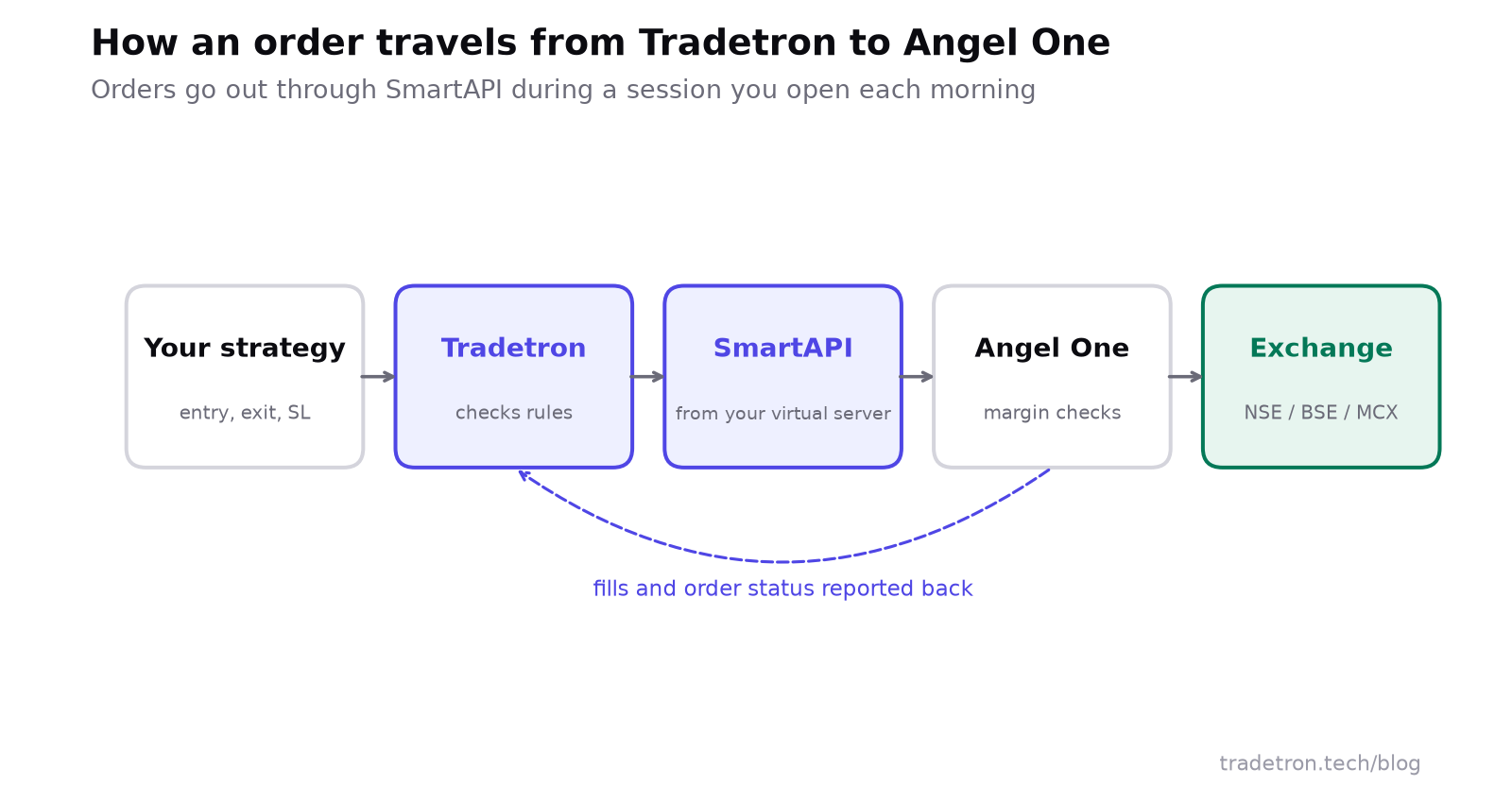 Strategy → Tradetron → SmartAPI → Angel One → exchange
You build entries, exits, position sizing and risk limits in Tradetron's no-code builder. When conditions are met during market hours, Tradetron sends the order through SmartAPI. Angel One checks it against your margin, segment permissions and exchange rules and routes it to the exchange. Fills come back along the same path to your Tradetron dashboard.
Tradetron only has the permissions SmartAPI grants: it can place, modify and cancel orders while your session is active. It can't withdraw funds or change your account settings.
The daily login: Regenerate Token
SmartAPI sessions don't carry over to the next trading day. Each trading morning, by 8:30 AM (the market opens at 9:15), generate a fresh TOTP code and use the Regenerate Token option in Tradetron. It takes about 30 seconds.
This reflects how Angel One secures API sessions, not a Tradetron limit. If you skip it, live orders on Angel One are blocked for the day. Backtests and Live Offline deployments carry on as normal.
- ~30 sec a TOTP code stays valid
- 8:30 AM latest sensible time to regenerate the session
- 9:15 AM NSE market open
Is Angel One's SmartAPI free?
Angel One doesn't charge a subscription for SmartAPI access; you pay the usual brokerage on executed orders. Other brokers price their APIs differently. Zerodha's Kite Connect, for example, has a free Personal plan for orders and a paid plan that adds live and historical market data.
| Broker API | Order placement | Market and historical data | Subscription |
|---|---|---|---|
| Angel One SmartAPI | Included | Included | None |
| Zerodha Kite Connect, Personal | Included | Not included | Free |
| Zerodha Kite Connect, paid | Included | Included | Monthly fee per API key |
Two caveats: your Tradetron plan is a separate cost from any broker API, and brokers change API pricing from time to time, so check the broker's own site before you budget around it.
Why isn't my Angel One connection working?
| Symptom | Likely cause | Fix |
|---|---|---|
| Login fails on the first try | TOTP generated too early | Generate a new code and submit at once |
| Connected, but orders never reach the exchange | Virtual server address missing or mismatched on the SmartAPI app | Re-check it against the address in Tradetron's email |
| Authentication fails every time | Wrong User ID or MPIN | Re-enter both carefully |
| Broker shows added, but no live orders today | Daily Regenerate Token not done | Regenerate with a fresh TOTP |
| SmartAPI key stops validating | App problem on Angel One's side | Recreate the app in the developer portal and update the key |
| An order type is rejected | The broker or exchange doesn't accept that order type for API orders | Check the rejection message and switch the leg's order type |
| Connected, but orders don't execute | Margin, or segment not enabled | Check funds and segment permissions |
Each rejection message is in the deployment's Notification Log on Tradetron's Deployed tab. If none of the above helps, Tradetron's helpdesk can check the connection, and Angel One support can confirm whether your SmartAPI key is active.
Test before you go live
- Connect the broker and complete the morning login.
- Deploy a simple strategy Live Offline: the strategy runs and records every trade, but nothing is sent to the exchange.
- Once it behaves as you expect across several sessions, deploy it Live Auto at 1x with Angel One selected.
- Watch the first live orders in the Notification Log, then scale up gradually.
Is algo trading legal on Angel One?
Yes. Algo trading through a broker's official API is legal for retail traders in India, and SmartAPI is Angel One's sanctioned connection method. Under SEBI's retail algo framework, API orders are traceable through the broker and placed from an address registered with the broker. Details are in SEBI's algo rules for retail traders and is algo trading legal in India.
Using other brokers too? See Zerodha, Dhan or the general broker setup guide.
Frequently asked questions
How do I do algo trading in Angel One with Tradetron?
Enable TOTP on Angel One, create a SmartAPI app to get an API key, add your Tradetron virtual server's address to that app, then enter your User ID, MPIN, SmartAPI key and a fresh TOTP code under Broker & Exchanges in Tradetron. Deploy a strategy with Angel One selected as the broker.
Is Angel One's SmartAPI free?
Angel One doesn't charge a subscription for SmartAPI access. You pay the usual brokerage on executed orders. Your Tradetron plan is a separate cost.
Do I need a static IP to use Angel One with Tradetron?
Your SmartAPI app needs a registered IP address. With Tradetron that is your Tradetron virtual server's address, not one you buy: enable the virtual server on Angel One's edit page under Broker & Exchanges and add the address Tradetron emails you to your SmartAPI app.
Do I need to log in to Angel One every day?
Yes. SmartAPI sessions last one trading day. Each morning, generate a fresh TOTP and use Regenerate Token in Tradetron, ideally by 8:30 AM.
Is coding required for algo trading on Angel One?
No. You enter the SmartAPI key, User ID, MPIN and TOTP in Tradetron's broker form, and strategies are built in the no-code builder.
Why is my Angel One connection not working?
The usual causes are a TOTP code that expired before you submitted, a wrong MPIN or User ID, a missed morning login, or a missing or mismatched address on your SmartAPI app.
Can I test on Angel One before trading with real money?
Yes. Deploy Live Offline first: the strategy runs on live prices and records every trade, but nothing is sent to the exchange.