TradingView to Zerodha Auto Trading Without Code (2026)
You can't connect a TradingView alert to Zerodha directly. Zerodha has no TradingView webhook, and the TradingView charts inside Kite are for trading by hand. To auto-trade TradingView signals on Zerodha, something has to receive the alert and place the order through Kite Connect, Zerodha's API, from your whitelisted address. The no-code way is to connect Zerodha to Tradetron once, then paste your Pine Script into Tradetron's Pine Script Strategy builder (PineBridge) and add one alert in TradingView.
Your three options for TradingView and Zerodha
| Option | What it does | Automated? | Effort |
|---|---|---|---|
| TradingView charts inside Kite | Analyse on TradingView charts within Kite and place orders by hand | No | None |
| Your own server and code | A server on your static IP receives the webhook, logs in to Kite Connect daily and places orders | Yes | High: you write, host and monitor it |
| A trading platform such as Tradetron | The platform receives the webhook and places the order through your Kite Connect connection | Yes | Low: one-time setup, no code |
The do-it-yourself route works, and plenty of developers run it. It also means handling the daily Kite login, a static IP registered with Zerodha, error handling when an order is rejected, and a server that's always on. TradingView drops a webhook if the receiver doesn't answer within about three seconds.
What you need before you start
| You need | Notes |
|---|---|
| A Zerodha account with F&O (or whichever segment you'll trade) enabled | Zerodha side |
| A Kite Connect app, connected to Tradetron | One-time setup. Follow how to connect Zerodha with Tradetron |
| A whitelisted fixed address for orders | Required by Zerodha for API orders since April 2026. In Tradetron, use the virtual server option on Zerodha's page under Broker & Exchanges |
| A paid TradingView plan, with two-factor sign-in on | TradingView only sends webhook alerts on paid plans |
| Your Pine Script | A strategy or an indicator |
Step by step: TradingView to Zerodha with Tradetron
- Connect Zerodha to Tradetron under Broker & Exchanges, following the Zerodha connection guide. Complete the Kite login once to confirm it works.
- Open Create → Pine Script Strategy and paste your script from TradingView's Pine Editor.
- Confirm what PineBridge found (strategy or indicator) and how it signals: always in trade, or separate entries and exits.
- For a strategy, copy the tagged script back into TradingView. PineBridge adds a short comment (L or S) to each order, so the alert knows which signal fired.
- Choose what each signal trades. For example, a long signal buys 1 lot of the NIFTY ATM call and a short signal buys the ATM put, current week, NRML.
- Add an optional square-off, such as intraday at 15:20, then create the strategy.
- In TradingView, create one alert on your strategy, set to fire on order fills, with the webhook URL and message PineBridge gives you.
- Deploy Live Offline, then Live Auto with Zerodha selected.
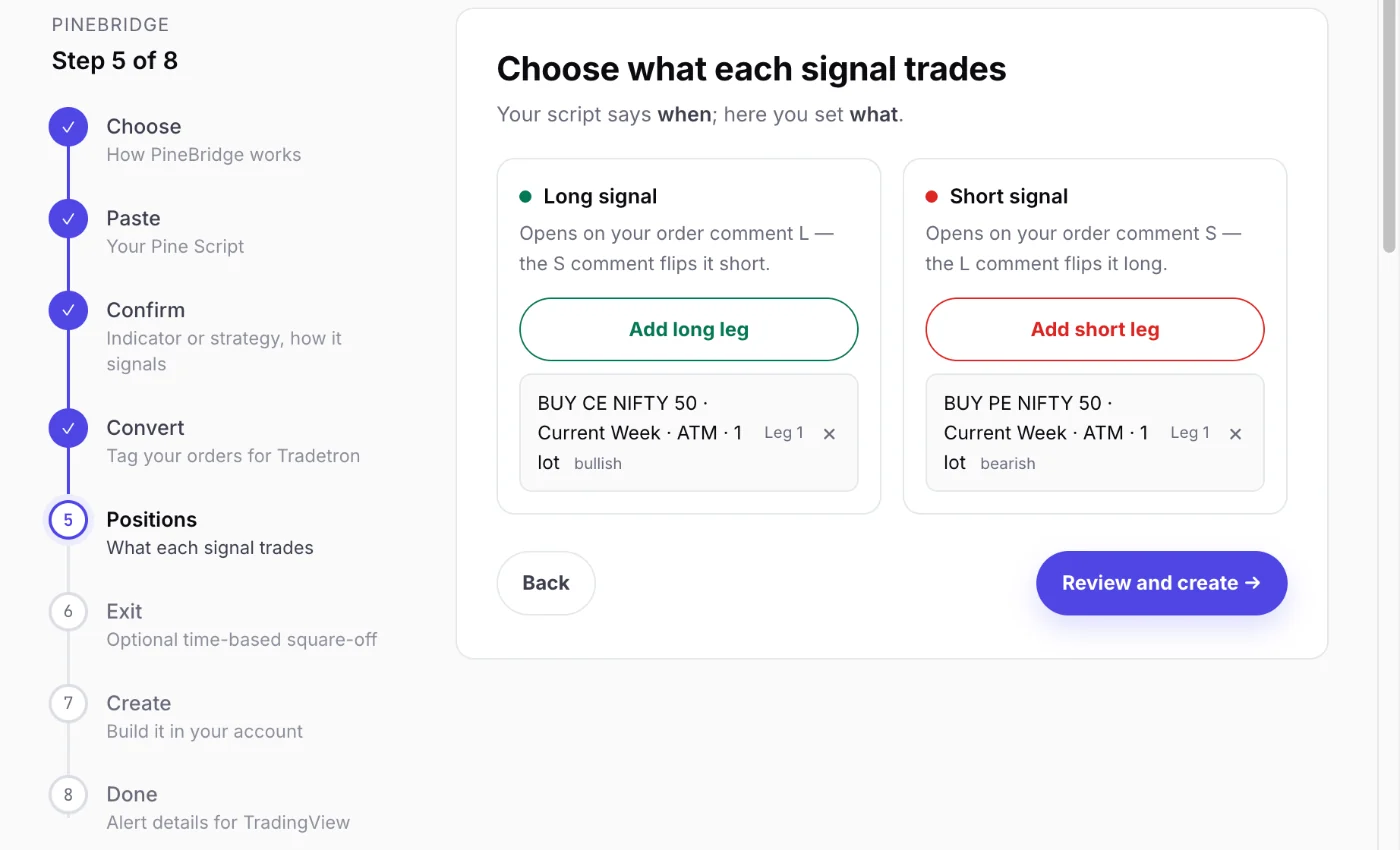 Your script says when; the baskets say what
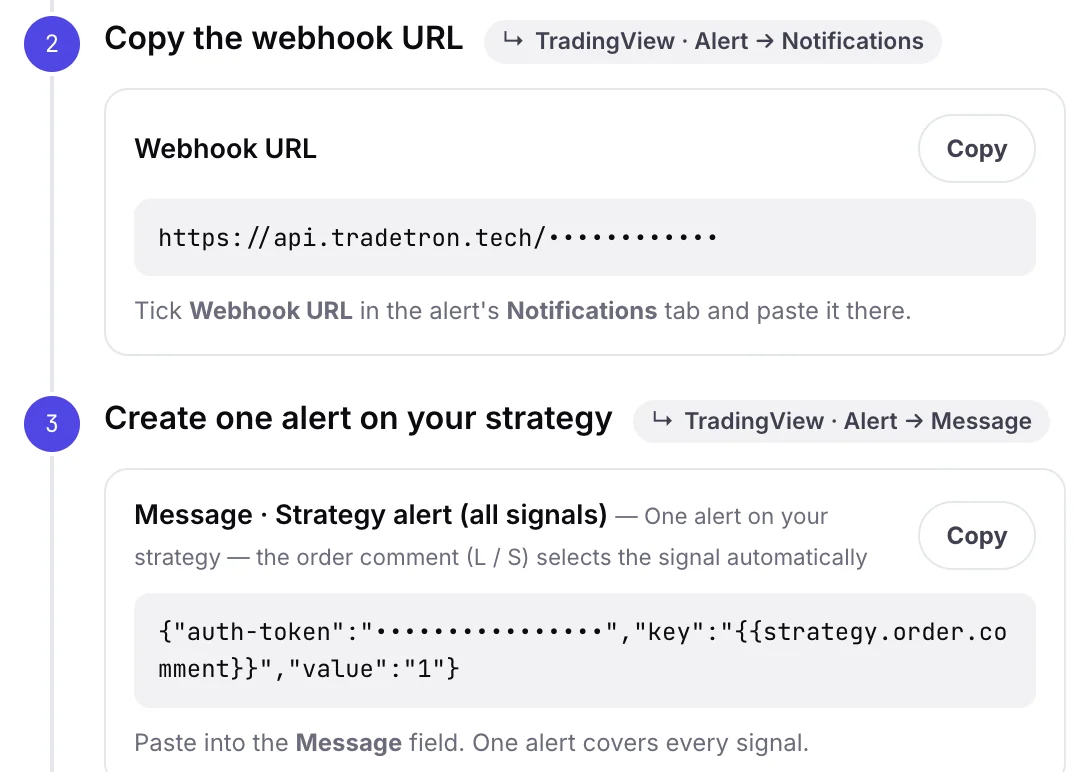 What goes into the TradingView alert
The full walkthrough, with a screenshot of every step, is in automate a TradingView Pine Script on Indian brokers.
Zerodha rules that affect TradingView automation
- Daily login. Kite Connect sessions last one trading day. Log in through Tradetron each morning, by 8:30 AM. TradingView alerts still fire on a day you forget, but no live order can be placed.
- Market protection. Zerodha rejects market and SL-M orders sent through the API without market protection. Algo orders in India can't be plain market orders, so expect protected or limit prices on fast candles.
- Order rate. Kite Connect allows up to 10 orders per second per account, far more than any TradingView strategy needs. It's also the threshold below which a self-built algo needs no separate exchange registration.
- MCX. IOC validity isn't accepted for MCX algo orders. Use Day validity.
- Segments and margin. The segment you trade must be enabled on your Zerodha account, with enough margin for the leg.
For why these rules exist, read is TradingView auto trading legal in India?
Why didn't my TradingView alert place an order on Zerodha?
| What you see | Most likely cause | Fix |
|---|---|---|
| The alert fired in TradingView, but nothing happened in Tradetron | Wrong webhook URL or message, or the alert is on an old version of the script | Copy the webhook URL and message again from the strategy's API section, and recreate the alert on the saved, tagged script |
| The signal reached Tradetron, but no trade | The strategy isn't deployed, or is deployed Live Offline | Deploy it, and check the mode |
| The trade shows Live Offline, but no Zerodha order | Expected: Live Offline places no order | Switch to Live Auto with Zerodha selected |
| Live Auto, but the order failed | No Kite login today, address not whitelisted, no market protection, or margin | Read the deployment's Notification Log for the rejection reason |
| The same signal traded twice | An alert firing intrabar, or two alerts on the same strategy | Fire on bar close, and keep one alert per strategy |
| The trades don't match the chart | The script repaints | Read why backtests fail live: repainting |
Will Zerodha add a TradingView webhook?
Traders have asked for years. As of October 2026, Zerodha offers TradingView charts inside Kite, but no webhook for placing orders from TradingView alerts. Under SEBI's April 2026 rules, any webhook order would still need to go through an approved route with an algo ID, so a broker-side webhook isn't a quick feature to add. Using Kite Connect through a platform is the practical route today.
Algo trading carries risk. This guide is for education and isn't investment advice. Zerodha's own rules and charges apply to your account.
Frequently asked questions
Can we connect TradingView to Zerodha?
Yes for charts, no for direct automation. Kite includes TradingView charts for placing orders by hand. To have TradingView alerts place Zerodha orders automatically, you need a webhook receiver that uses Kite Connect, such as Tradetron or your own server.
Can TradingView alerts place trades in Zerodha automatically?
Yes, through a platform connected to your Zerodha account with Kite Connect. On Tradetron, the alert reaches your strategy's private webhook, and the strategy places the order in your Zerodha account.
Is there a free TradingView webhook for Zerodha?
Zerodha doesn't offer one. TradingView's webhook alerts need a paid TradingView plan, and placing orders through the API needs a Kite Connect app, so check Zerodha's current Kite Connect pricing.
Do I need a static IP for TradingView automation with Zerodha?
Zerodha accepts API orders only from a whitelisted address. If you run your own code, that's your static IP. On Tradetron, use the virtual server option on Zerodha's page under Broker & Exchanges.
Can a TradingView signal on NIFTY trade NIFTY options on Zerodha?
Yes. The signal comes from your chart, and the trade is whatever you set for that signal on Tradetron, for example the NIFTY ATM call on a long signal. The strike is worked out from the spot price when the order is placed.
Do I have to log in to Zerodha every day?
Yes. Kite Connect sessions last one trading day, so log in through Tradetron each morning, by 8:30 AM. Without it, alerts still fire, but no live order can be placed that day.