Tradetron Advanced Settings સમજો, એક એક setting સાથે
આ લેખ અંગ્રેજીમાંથી અનુવાદિત છે. મૂળ લેખ અંગ્રેજીમાં વાંચો
Tradetron પર Advanced Settings નક્કી કરે છે કે તમારી strategyની conditions સાચી થયા પછી તે કેવી રીતે execute થશે: order કયા ભાવે મુકાશે, order fill ન થાય તો શું થશે, મોટા order ભાગમાં વહેંચાશે કે નહીં, strategy-level trailing stop કેવી રીતે ખસશે, conditions કેટલી વાર ચેક થશે, trading window, reactivation અને expiry rollover. તમારી conditions નક્કી કરે છે કે ક્યારે trade કરવો; આ settings નક્કી કરે છે કે કેવી રીતે.
તમારી strategy કેવી રીતે trade કરે છે તે બદલતી Tradetron Advanced Settings, 3 મિનિટમાં. हिन्दी में देखें: Tradetron Advanced Settings: वो settings जो तय करती हैं कि आपकी strategy कैसे trade करेगी, 3 मिनट में

Advanced Settings ક્યાં મળશે
Strategy builderમાં તમારી strategy ખોલો અને conditions તથા positionsની નીચે scroll કરો. Advanced Settings panelમાં બધા execution controls એક જ જગ્યાએ છે:
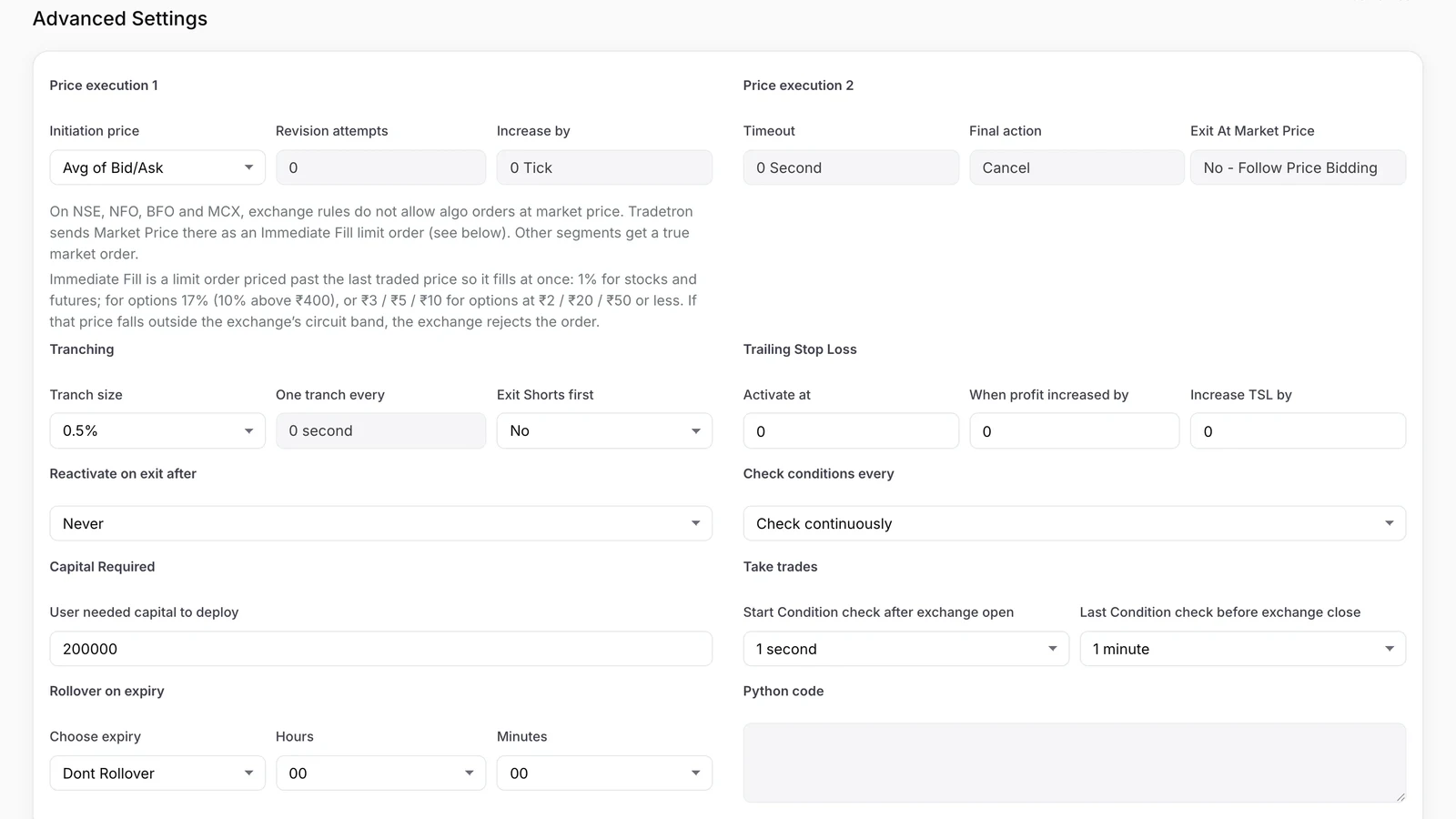 હાલના builderમાં Advanced Settings
દરેક block એક નજરમાં શું કરે છે તે અહીં છે:
| Setting | તે શું નિયંત્રિત કરે છે | સામાન્ય શરૂઆતની setting |
|---|---|---|
| Price Execution 1 | Orderનો ભાવ, revision attempts, tick step | Liquid instruments માટે Market Price |
| Price Execution 2 | Revisions વચ્ચે રાહ, fill ન થાય તો final action | Execute at Market Price અથવા Cancel |
| Tranching | Orderને ભાગોમાં વહેંચવો | 100% (કોઈ ભાગ નહીં), સિવાય કે size મોટી હોય |
| Trailing Stop Loss | Strategyનો નફો વધે તેમ તેને lock કરવો | Test ન કરો ત્યાં સુધી 0 / 0 / 0 (બંધ) |
| Reactivate on exit after | Universal Exit પછી ફરી શરૂ કરવું | Never, સિવાય કે તમારે ફરી run જોઈતા હોય |
| Check conditions every | Conditions કેટલી વાર ચેક થાય | Strategy મંજૂરી આપે તેટલું ટૂંકું |
| Capital Required | Creator સૂચવે તે capital | તમારો પ્રામાણિક અંદાજ |
| Take trades | Market ખૂલ્યા પછી અને બંધ થતાં પહેલાંની trading window | તમારો exit time તેની અંદર રાખો |
| Rollover on expiry | Expiryના દિવસે derivatives roll કરવા | જરૂર ન હોય તો Dont Rollover |
Price Execution 1: તમારો order કયા ભાવે જશે
આ blockમાં ત્રણ inputs છે: Initiation price, Revision attempts અને Increase by.
Initiation price ત્યારે જ લાગુ પડે છે જ્યારે તમે position builderમાં legનો ભાવ નક્કી ન કર્યો હોય. ત્યાં તમે સેટ કરેલા ભાવને તે ક્યારેય override કરતું નથી.
- Market Price: તમારી condition સાચી થતાં જ market order મુકાય છે.
- Avg of Bid/Ask: best bid અને best askની સરેરાશ પર limit order મુકાય છે.
- Best Price: ખરીદતી વખતે best bid પર, અથવા વેચતી વખતે best ask પર limit order.
- LTP: છેલ્લા traded ભાવ પર limit order.
ત્રણેય limit વિકલ્પોમાં, જો order fill ન થાય, તો Tradetron Increase byમાં આપેલા step (ticksમાં) જેટલો ભાવ revise કરે છે, અને Revision attemptsમાં આપેલી સંખ્યા સુધી revise કરતું રહે છે. તે પછી પણ fill ન થાય, તો નિયંત્રણ Price Execution 2ને જાય છે.
Price Execution 2: order તો પણ fill ન થાય તો શું થાય
અહીં બે inputs છે: Timeout અને Final action.
Timeout એટલે Price Execution 1માંથી Price Execution 2માં જતાં પહેલાં Tradetron કેટલી રાહ જુએ છે. દરેક price revision વચ્ચેનો સમય પણ આ જ છે.
Final action એટલે fill ન થયેલા order સાથે Tradetron શું કરે છે:
- Cancel: fill ન થયેલો order cancel થાય છે.
- Execute at Market Price: નવો market order મુકાતો નથી. હાલનો fill ન થયેલો limit order modify થાય છે: buy માટે તેનો ભાવ 5% વધારાય છે અને sell માટે 5% ઘટાડાય છે. થોડી સેકન્ડ પછી પણ fill ન થાય, તો order cancel થાય છે અને strategy error stateમાં જાય છે (Error Execution).
- Ignore: open orders જેમ છે તેમ રહે છે અને strategy conditions ચેક કરતી રહે છે. જો તે orders પછીથી fill થાય, તો તમારી positionsમાં quantity અપડેટ થતી નથી.
Tranching: મોટા orderને વહેંચવો
બે inputs: Tranch size (orderની ટકાવારી) અને One tranch every (ભાગો વચ્ચેની સેકન્ડ).
માની લો તમારી strategy entry પર SBINના 100 shares ખરીદે છે, Tranch size = 50% અને One tranch every = 10 seconds સાથે:
- Entry condition સાચી થાય છે અને Tradetron 50 sharesનો buy order મૂકે છે (100ના 50%).
- જો તે order fill થાય, તો તે 10 સેકન્ડ રાહ જુએ છે.
- પછી બાકીના 50 shares માટે order મૂકે છે.
જો પહેલી tranche fill ન થાય, તો બીજી મુકાતી નથી. જ્યારે instrumentની liquidityની સરખામણીમાં તમારી size મોટી હોય ત્યારે tranching કામનું છે, જેથી એક મોટો order ભાવને તમારી વિરુદ્ધ ન ધકેલે.
Trailing Stop Loss: strategyનો નફો lock કરવો
ત્રણ inputs: Activate at, When profit increased by અને Increase TSL by. ત્રણેય strategyના ₹માં નફાની રકમ છે, કોઈ એક instrumentના ભાવ નહીં. Trailing stop બંધ રાખવા માટે ત્રણેય 0 પર રાખો. આ રકમો multiplier 1 માટે છે: strategy 2× પર deploy કરો તો દરેક રકમ બમણી થાય (Activate at ₹3,000 ₹6,000 પર arm થાય).
- Activate at: strategyનો નફો આ રકમ સુધી પહોંચે, એટલે stop cost પર આવી જાય છે (હવે તે trade પર તમે નુકસાન નહીં કરો).
- When profit increased by: દર વખતે નફો આટલો વધુ વધે...
- Increase TSL by: ...ત્યારે stop આટલો ઊંચો થાય છે.
Tradetronના પોતાના walkthroughનું ઉદાહરણ લો: તમે ₹100 પર SBINના 1 shareમાં long છો, Activate at = 3, When profit increased by = 6, Increase TSL by = 5 સાથે. એક share હોવાથી, ₹1 ભાવ એટલે ₹1 નફો.
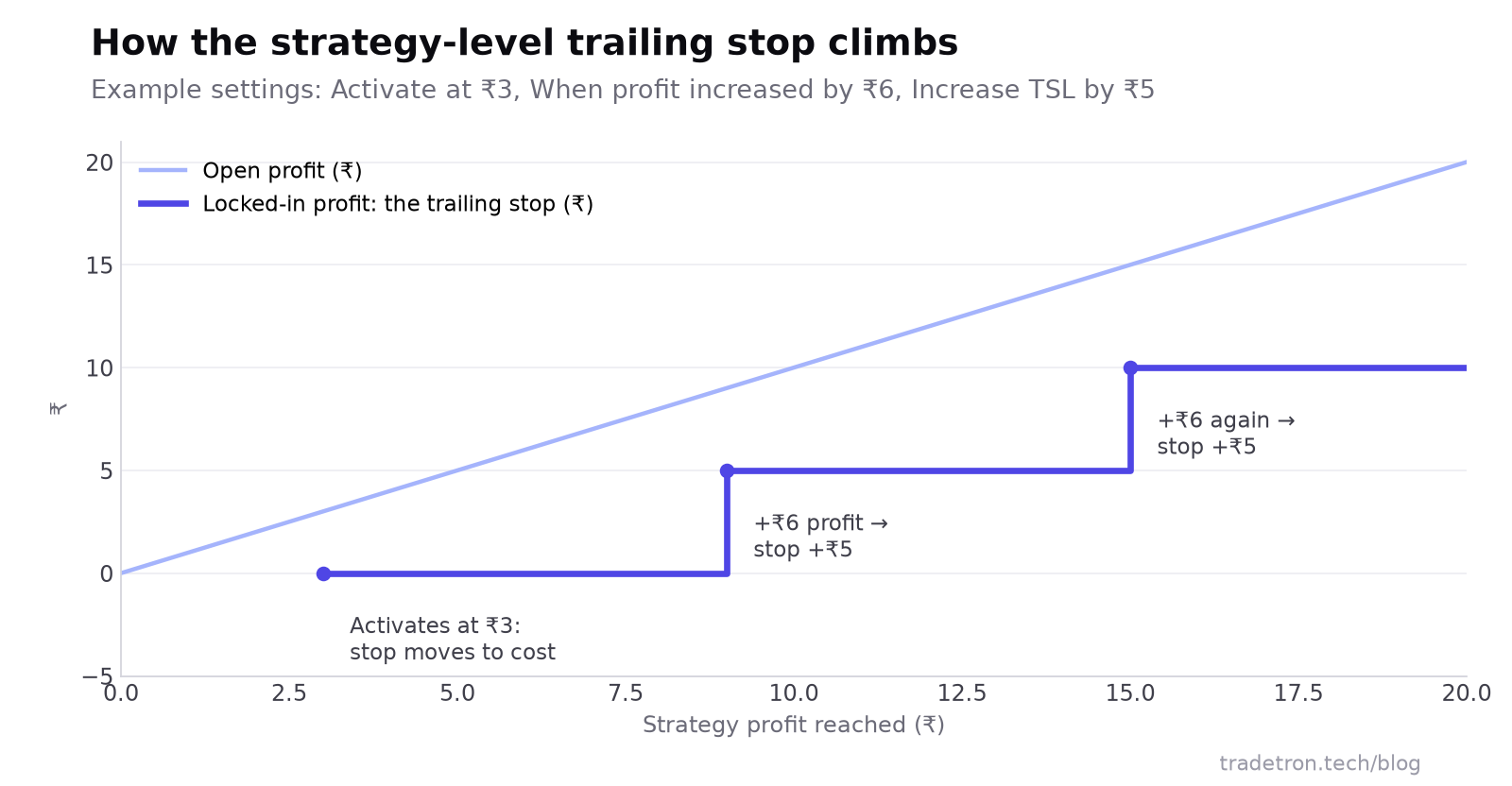 Activate at 3, profit step 6, TSL step 5: stop stepsમાં વધે છે અને ક્યારેય નીચે જતો નથી
| SBINનો ભાવ (₹100 પર long) | નફો | Locked-in નફો (stop) |
|---|---|---|
| ₹98 થી ₹102 | ₹3થી ઓછો | active નથી |
| ₹103 થી ₹108 | ₹3 થી ₹8 | ₹0 (stop cost પર) |
| ₹109 થી ₹114 | ₹9 થી ₹14 | ₹5 |
| ₹115 થી ₹118 | ₹15 થી ₹18 | ₹10 |
Short position પણ આ જ રીતે, ઊલટી દિશામાં કામ કરે છે: ₹100 પર short હો, તો ભાવ ₹97 પર આવે ત્યારે stop cost પર આવે છે, ₹91 પર ₹5 lock થાય છે અને ₹85 પર ₹10.
Reactivate on exit after
આ સમયની setting છે. જ્યારે Universal Exit લાગે છે, ત્યારે સામાન્ય રીતે strategy શરૂઆત પર પાછી જતી નથી. જો તમે અહીં સમય સેટ કરો, તો Universal Exit લાગ્યો હોવા છતાં, એટલા સમય પછી strategy શરૂઆત પર પાછી જાય છે. Activation દીઠ એક જ run જોઈતો હોય તો તેને Never પર રાખો.
ધ્યાન રાખો કે આ માત્ર Universal Exit પછી ફરી શરૂ થવાનું નિયંત્રણ કરે છે. જે set પોતાની Exit condition દ્વારા exit કરે છે, તેની Entry ફરી સાચી થાય તો તે એ જ runમાં ફરી enter કરી શકે છે; જો તમને તે ન જોઈતું હોય તો Entry conditionમાં re-entries પર મર્યાદા મૂકો. Repair Once અને Repair Continuous guide બતાવે છે કે conditions કેવી રીતે loop થાય છે.
Check conditions every
આ નક્કી કરે છે કે strategy કેટલી વાર તેની conditionsમાંથી પસાર થાય છે. તેને 5 મિનિટ પર સેટ કરો, તો તમારી conditions દર 5 મિનિટે ચેક થાય છે.
Capital Required
આ એ capital છે જે strategyના creatorના મતે તેને ચલાવવા માટે તમારે જોઈશે. તે માત્ર માહિતી છે અને execution પર કોઈ રીતે અસર કરતું નથી. જો તમે marketplace પર publish કરો, તો subscribers આ આંકડો વાંચે છે, તેથી તેને પ્રામાણિકતાથી સેટ કરો (marketplace settings જુઓ).
Take trades: તમારી trading window
બે inputs: First trade after exchange open અને Last trade before exchange close. બંને મળીને એ window નક્કી કરે છે જેમાં દરરોજ strategyની conditions પર કાર્યવાહી થાય છે.
Rollover on expiry
ત્રણ inputs: Choose expiry, Hour અને Minutes. Expiryના દિવસે, તમે સેટ કરેલા સમયે, Tradetron તમારી derivative positionsને તમે પસંદ કરેલી expiry પર roll કરે છે: Next Week અથવા Next Month. Default Dont Rollover છે.
તેના પર આધાર રાખતા પહેલાં આટલું જાણી લો:
- તે strategyની દરેક open derivative position roll કરે છે. જો તમારે એક પ્રકાર roll કરવો હોય અને બીજો square off કરવો હોય, તો square-off તમારી conditionsમાં સંભાળો.
- જે expiry અસ્તિત્વમાં હોય તે જ પસંદ કરો. November 2024થી, NSE પર NIFTY 50 એકમાત્ર weekly index expiry છે (BSE પર SENSEX). BANK NIFTY, FINNIFTY અને MIDCPNIFTYમાં માત્ર monthly expiries છે, તેથી તેમના માટે "Next Week" બંધબેસતું નથી.
- Backtestsમાં આ setting લાગુ થતી નથી. જો backtestમાં roll દેખાડવો હોય, તો near expiry પર exit leg અને next expiry પર entry leg સાથે તેને જાતે બનાવો.
Python code
આ fieldમાં Tradetron quant teamએ લખેલો Python code હોય છે, જે strategiesને તેની જરૂર હોય તેમના માટે. મોટા ભાગની strategiesમાં તે ખાલી રહે છે.
તમે તૈયાર હો ત્યારે, deployment guide live જવાની પ્રક્રિયા સમજાવે છે, અને strategy તમારી અપેક્ષા મુજબ ન ચાલે ત્યારે debugging guide મદદ કરે છે.
વારંવાર પૂછાતા પ્રશ્નો
Tradetronમાં Advanced Settings શું છે?
તે builderમાં દરેક strategyના તળિયે આવેલા execution controls છે: order pricing અને revisions (Price Execution 1 અને 2), tranching, strategy-level trailing stop, reactivation, conditions કેટલી વાર ચેક થાય, દૈનિક trading window અને expiry rollover.
Final Action "Execute at Market Price" શું કરે છે?
તે તમારા હાલના fill ન થયેલા limit orderને modify કરે છે, buy માટે ભાવ 5% વધારે છે અથવા sell માટે 5% ઘટાડે છે. નવો market order મુકાતો નથી. થોડી સેકન્ડ પછી પણ order fill ન થાય, તો તે cancel થાય છે અને strategy Error Execution બતાવે છે.
Advanced Settingsમાં trailing stop pointsમાં છે કે રૂપિયામાં?
તે strategyના ₹માં નફા પર કામ કરે છે. "Activate at 3,000" એટલે આખી strategy ₹3,000 નફામાં આવે એટલે stop cost પર આવી જાય છે (multiplier 1 પર; 2× પર તે ₹6,000 પર arm થાય છે). એક legના ભાવને trail કરવા, તેના બદલે તે legનો SL trigger વાપરો.
શું Capital Required મારા trades પર અસર કરે છે?
ના. તે strategy creator દાખલ કરે છે તે આંકડો છે, જે જણાવે છે કે તેમના મતે strategyને કેટલી capital જોઈએ. તે quantities કે executionમાં ફેરફાર કરતું નથી.
મારી strategyએ 15:25 પર exit કેમ ન કર્યો?
"Last trade before exchange close" ચેક કરો. જો તે 10 મિનિટ પર સેટ હોય, તો 15:20 પછી strategy conditions પર કાર્યવાહી બંધ કરે છે, તેથી 15:25 માટે નક્કી કરેલો exit ક્યારેય ચાલતો નથી. દરેક exit time તમારી trading windowની અંદર રાખો.
શું expiry પર rollover backtestsમાં કામ કરે છે?
ના. Rollover setting માત્ર live અને Live Offline deployments પર લાગુ પડે છે. Backtestમાં roll જોવા માટે, near expiry પર exit અને next expiry પર entry સાથે તેને model કરો.