Tradetron પર Marketplace Settings: Creator અને Subscriber ગાઇડ
આ લેખ અંગ્રેજીમાંથી અનુવાદિત છે. મૂળ લેખ અંગ્રેજીમાં વાંચો
Tradetron પર Marketplace settings એવા નિયંત્રણો છે જેનાથી strategy creator નક્કી કરે છે કે તેની strategy કોણ વાપરી શકે અને કઈ શરતે: તે જાહેરમાં list થાય કે નહીં, fixed અને variable fees, બીજા લોકો તેને duplicate કરી શકે કે નહીં, subscribers ન હોય તેવા લોકોને positions દેખાય કે નહીં, અને દરેક subscriber ને મંજૂરી જોઈએ કે નહીં. Subscribers આ પસંદગીઓનું પરિણામ દરેક strategy પેજ પર જુએ છે.

Tradetron Marketplace એટલે શું
એક ઓનલાઇન સ્ટોર વિચારો, પણ trading strategies માટે. Creators Tradetron પર strategies બનાવીને list કરે છે; subscribers તેને જુએ છે, સરખાવે છે અને પોતાના broker accounts માં deploy કરે છે. પૈસા તમારી પાસે, તમારા broker પાસે જ રહે છે.
તેને ખોલવા Strategies → Marketplace પર જાઓ. ડાબી બાજુ તમે search, sort (ઉદાહરણ તરીકે rating કે minimum capital પ્રમાણે) અને tags, exchange અને fee type થી filter કરી શકો છો. જમણી બાજુ strategies ની યાદી છે, દરેક સાથે તેનું minimum capital અને fee, અને Subscribe કે Duplicate ના બટન.
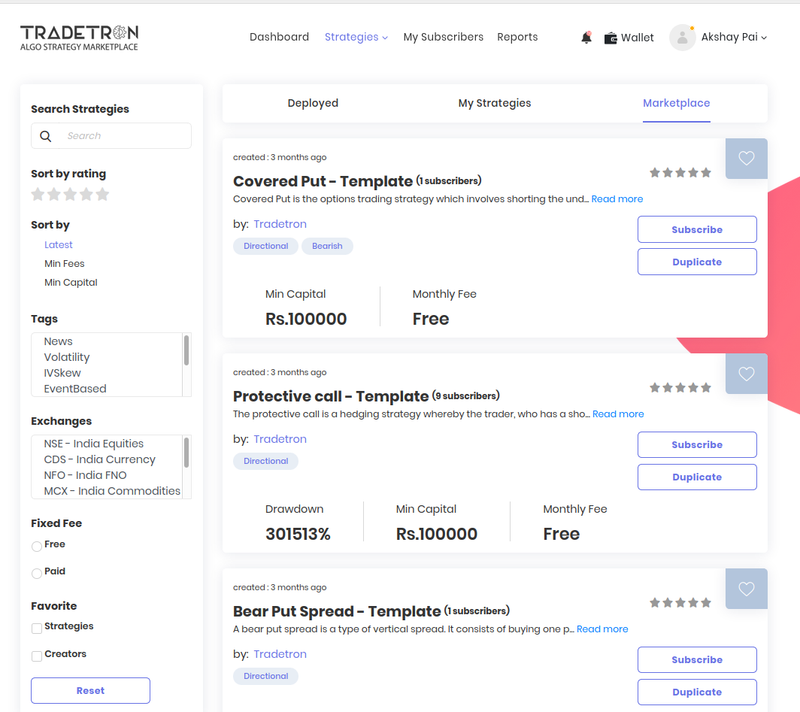 Strategies → Marketplace: ડાબી બાજુ filters, જમણી બાજુ strategies
નવી strategies વારંવાર ઉમેરાય છે, એટલે ફરી ફરી જોતા રહેવું યોગ્ય છે. એક પસંદ કરવાની પૂરી ગાઇડ માટે વાંચો Tradetron Marketplace પર strategies કેવી રીતે શોધવી અને વાપરવી.
Strategy પેજ વાંચવું (subscribers માટે)
કોઈ પણ strategy ના નામ પર ક્લિક કરીને તેનું પેજ ખોલો. તેમાં ચાર વિભાગ છે:
| વિભાગ | તે શું કહે છે |
|---|---|
| Description | Strategy શું કરે છે, કોણે બનાવી, જરૂરી capital અને fee નું માળખું. Subscribe અને Duplicate બટન અહીં છે |
| Subscribers | બીજા કોણ subscribe કરે છે, જો creator એ બતાવવાનું પસંદ કર્યું હોય |
| Statistics | Strategy નું પ્રદર્શન કેવું રહ્યું, equity curve અને P&L તથા drawdown જેવા આંકડા સાથે |
| Rating & Feedback | Subscribers ના ratings અને reviews |
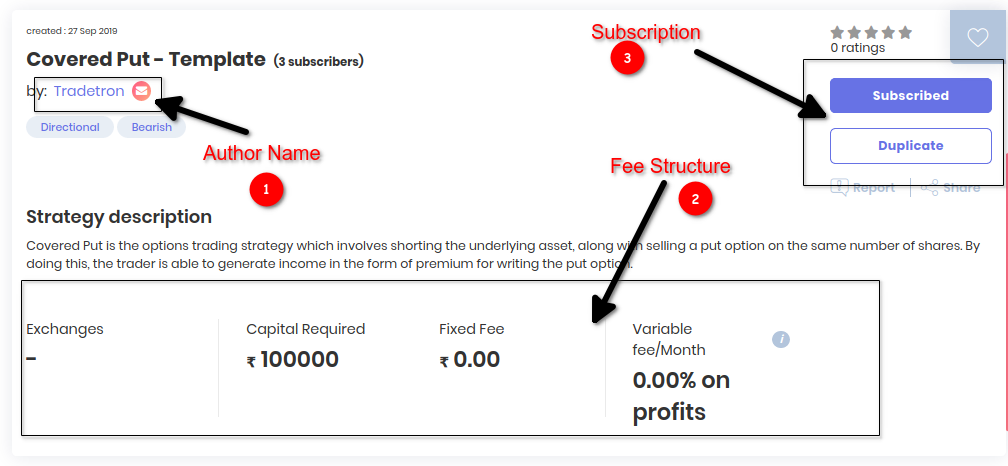 1: author નું નામ, 2: fee નું માળખું, 3: subscribe કે duplicate
Author ની profile અને તેમની બીજી strategies જોવા તેમના નામ પર ક્લિક કરો. તમે ફક્ત એ જ strategies ને rate અને review કરી શકો જે તમે subscribe કરી હોય. Subscribe કર્યા પછી strategy My Strategies માં દેખાય છે, deploy કરવા તૈયાર.
Subscribe કરવું કે duplicate?
આ બે અલગ ક્રિયાઓ છે, અને duplicate કરવાની મંજૂરી છે કે નહીં તે creator નક્કી કરે છે.
Subscribe
- Strategy તમારા પોતાના account માંથી ચલાવો
- Creator લોજિક સંભાળતા રહે છે
- તમે તેની કાર્યપદ્ધતિ જોઈ કે બદલી શકતા નથી
- Creator ના updates તમને લાગુ પડે છે
Duplicate
- તમારા account માં strategy ની તમારી પોતાની નકલ બને છે
- પૂરું નિયંત્રણ: લોજિક જુઓ અને બદલો
- તમારા ફેરફારો તમારી નકલમાં જ રહે છે; મૂળ strategy ને કંઈ થતું નથી
- ફક્ત ત્યારે જ શક્ય જ્યારે creator મંજૂરી આપે
Marketplace Settings પેનલ (creators માટે)
જ્યારે તમે strategy બનાવો છો, ત્યારે Marketplace Settings વિભાગ નક્કી કરે છે કે તે કેવી દેખાય અને કોણ તેને વાપરી શકે. દરેક setting શું કરે છે તે અહીં છે:
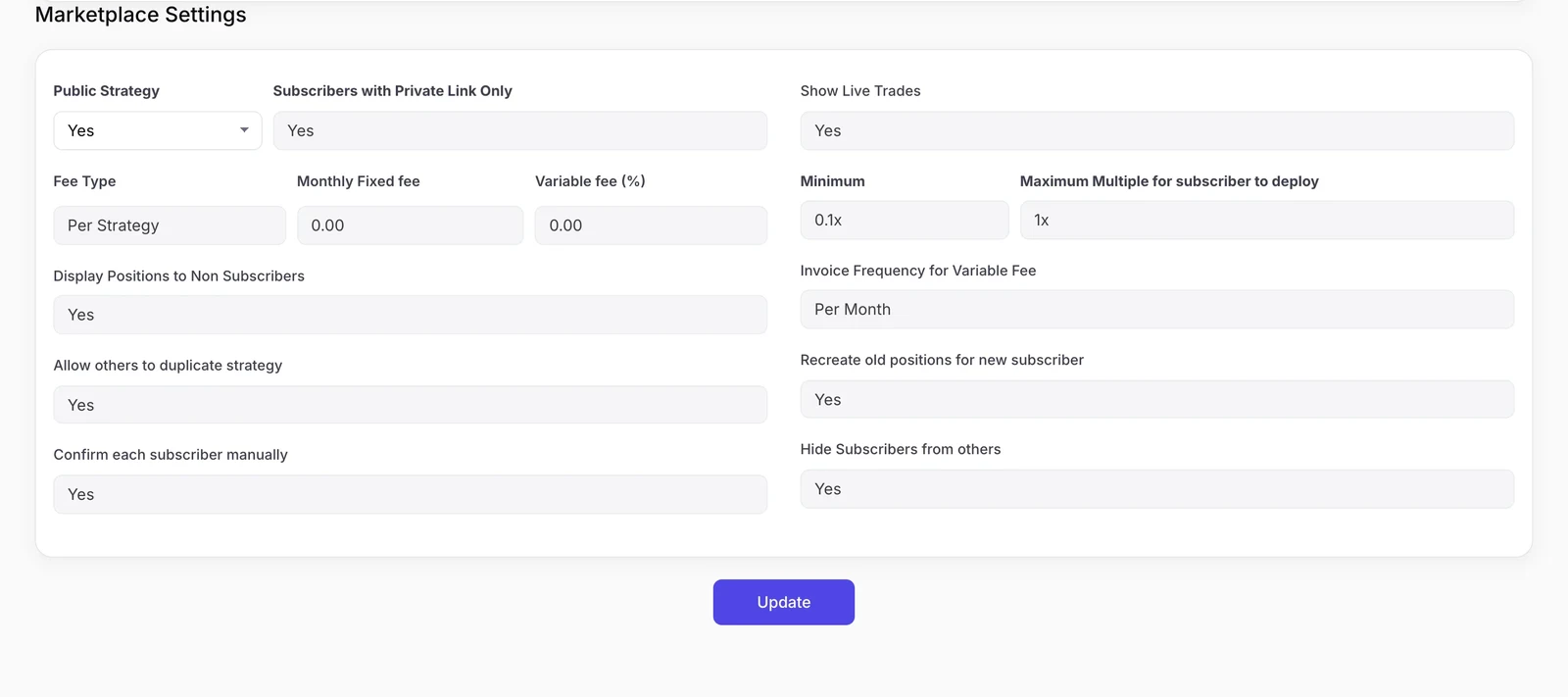 Strategy ના creator એ ભરેલા Marketplace Settings
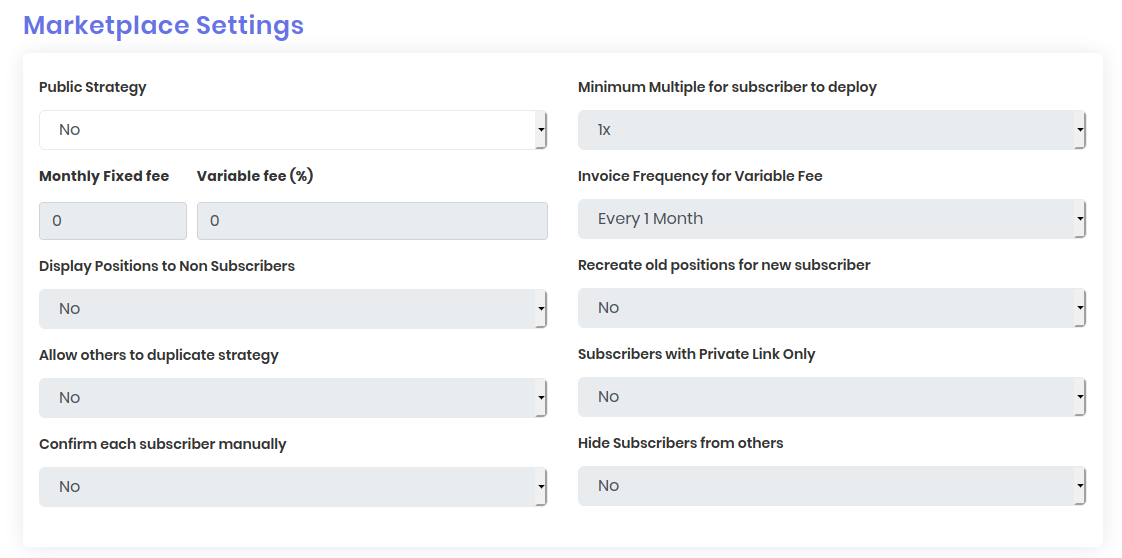 Strategy નો Marketplace Settings વિભાગ
| Setting | તે શું કરે છે |
|---|---|
| Public Strategy | Yes કરવાથી strategy Tradetron Marketplace પર list થાય છે. No કરવાથી તે ફક્ત તમારા માટે private રહે છે |
| Monthly Fixed fee | દરેક subscriber તમને દર મહિને ચૂકવે તે નક્કી રકમ |
| Variable fee (%) | Strategy માંથી subscriber ને થયેલા નફાનો અમુક ટકા |
| Invoice Frequency for Variable Fee | Variable fee નું invoice કેટલી વાર બને, ઉદાહરણ તરીકે દર મહિને |
| Display Positions to Non Subscribers | Yes કરવાથી subscribe ન કર્યું હોય તેવા લોકો પણ strategy ની positions જોઈ શકે |
| Allow others to duplicate strategy | Yes કરવાથી users પોતાની edit થઈ શકે તેવી નકલ બનાવી શકે |
| Confirm each subscriber manually | Yes એટલે દરેક subscription request ને તમે મંજૂરી આપો છો |
| Minimum Multiple for subscriber to deploy | Subscriber જે સૌથી નાના multiplier પર deploy કરી શકે તે. તે તમારી strategy ની position sizes નો ગુણાકાર કરે છે |
| Recreate old positions for new subscriber | Yes કરવાથી ટ્રેડની વચ્ચે subscribe કરનાર માટે strategy ની ખુલ્લી positions ફરી બને છે |
| Subscribers with Private Link Only | Yes કરવાથી strategy જાહેર યાદીમાંથી બહાર રહે છે; તમે આપેલી link ધરાવતા લોકો છતાં subscribe કરી શકે છે |
| Hide Subscribers from others | Yes કરવાથી તમારી subscribers ની યાદી બીજા users થી છુપાય છે |
Fees કેવી રીતે કામ કરે છે, એક ઉદાહરણમાં
Fixed fee બંને પક્ષ માટે અનુમાન લગાવી શકાય તેવો છે. Variable fee creator ની કમાણીને subscriber માટે strategy કેવું કરે છે તેની સાથે જોડે છે. ઘણા creators નાનો fixed fee અને variable fee બંને ભેગા કરે છે.
ભરોસો બનાવે તેવા settings પસંદ કરવા
- શક્ય હોય તો subscribers ન હોય તેવા લોકોને positions બતાવો: તેનાથી લોકો પૈસા ચૂકવતાં પહેલાં strategy ને ટ્રેડ કરતી જોઈ શકે છે.
- પ્રામાણિક minimum multiple અને Capital Required (Advanced Settings માં) સેટ કરો, જેથી subscribers પાસે ઓછા પૈસા ન હોય.
- Manual confirmation વાપરો જ્યારે strategy ની capacity મર્યાદિત હોય અથવા તેને સમજતા subscribers જોઈતા હોય.
- Private link વાપરો જેથી જાહેરમાં list કરતાં પહેલાં નાના જૂથ સાથે strategy ટેસ્ટ થઈ શકે.
- Old positions ફરી બનાવો ફક્ત ત્યારે જ્યારે ટ્રેડની વચ્ચેની entry પણ strategy ના જોખમ સાથે મેળ ખાતી હોય. ઘણી intraday option strategies માટે, મોડી entry એક અલગ જ ટ્રેડ છે.
વારંવાર પૂછાતા પ્રશ્નો
Tradetron Marketplace શું છે?
તે Tradetron પર creators એ બનાવેલી algo trading strategies નું marketplace છે. તમે તેને જોઈ શકો, તેનું description અને statistics તપાસી શકો, અને તમારા પોતાના broker account માં deploy કરવા subscribe કરી શકો.
Strategy ને subscribe કરવા અને duplicate કરવા વચ્ચે શું ફરક છે?
Subscribe કરવાથી તમે strategy નું લોજિક જોયા કે બદલ્યા વગર તેને ચલાવી શકો છો. Duplicate કરવાથી તમારી પોતાની નકલ બને છે, જે તમે જોઈ અને edit કરી શકો. Duplicate કરવાની મંજૂરી છે કે નહીં તે creator નક્કી કરે છે.
Tradetron પર creators strategies માટે ચાર્જ કેવી રીતે લે છે?
Monthly Fixed fee, subscriber ના નફાના ટકા તરીકે Variable fee, અથવા બંને દ્વારા, જે strategy ના Marketplace Settings માં સેટ થાય છે.
મારી strategy private રાખીને પણ શેર કેવી રીતે કરું?
"Subscribers with Private Link Only" ને Yes કરો. Strategy જાહેર યાદીમાંથી બહાર રહે છે, અને તમે જેને link આપો તે કોઈ પણ subscribe કરી શકે છે.
જે strategy મેં subscribe નથી કરી, તેનો review આપી શકું?
ના. Ratings અને feedback ફક્ત એ જ strategies માટે આપી શકાય જે તમે subscribe કરી હોય.
જો હું strategy duplicate કરીને બદલું, તો શું મૂળ strategy બદલાય છે?
ના. Duplicate માં કરેલા ફેરફારો ફક્ત તમારી નકલને લાગુ પડે છે. મૂળ strategy પોતાના settings અને લોજિક જાળવી રાખે છે.