What a Strategy Builder Does, and How Tradetron's Works
A strategy builder lets you turn a trading idea into rules a platform can run automatically, without writing code. You pick conditions such as "RSI crosses above 30" or "time is 9:20" from menus, say what to buy or sell, and set your exits. The platform then checks the market against those rules and places the orders.
How any strategy builder works
Every strategy builder works in the same three layers:
| Layer | Question it answers | Examples |
|---|---|---|
| Conditions | When should something happen? | Price above the 20-day average; time is 09:20; RSI below 30 |
| Actions | What should be traded, and how much? | Buy 1 lot of NIFTY futures; sell the ATM call and put |
| Exits and risk | When do we get out? | Stop loss, target, trailing stop, time-based square-off, a daily loss limit |
The builder checks live market data against your conditions while the strategy is running, and acts when they are met. You supply the logic; the platform handles data, timing and order routing.
How Tradetron's strategy builder is organised
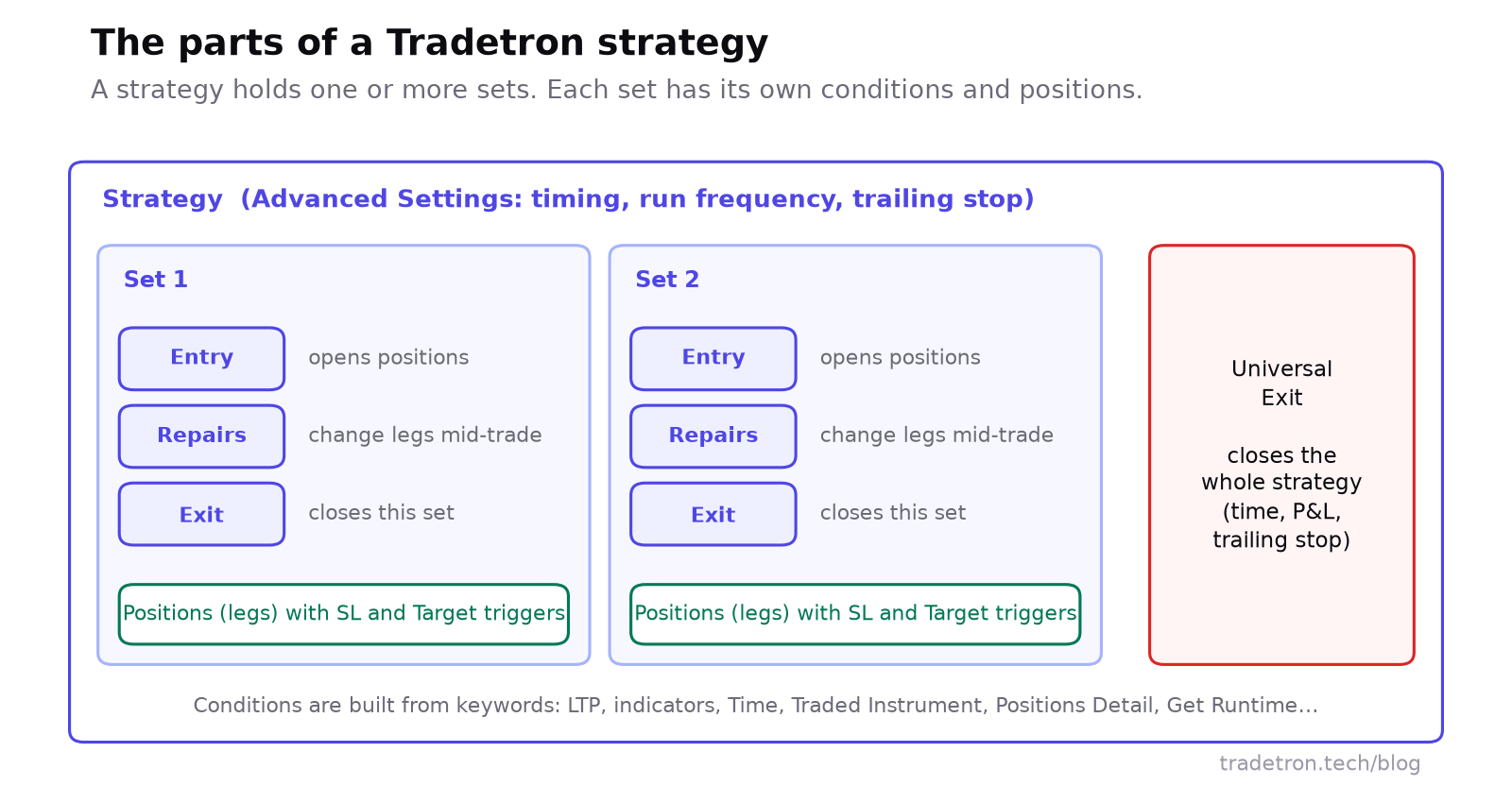 Sets, conditions, legs and exits
The pieces you'll work with:
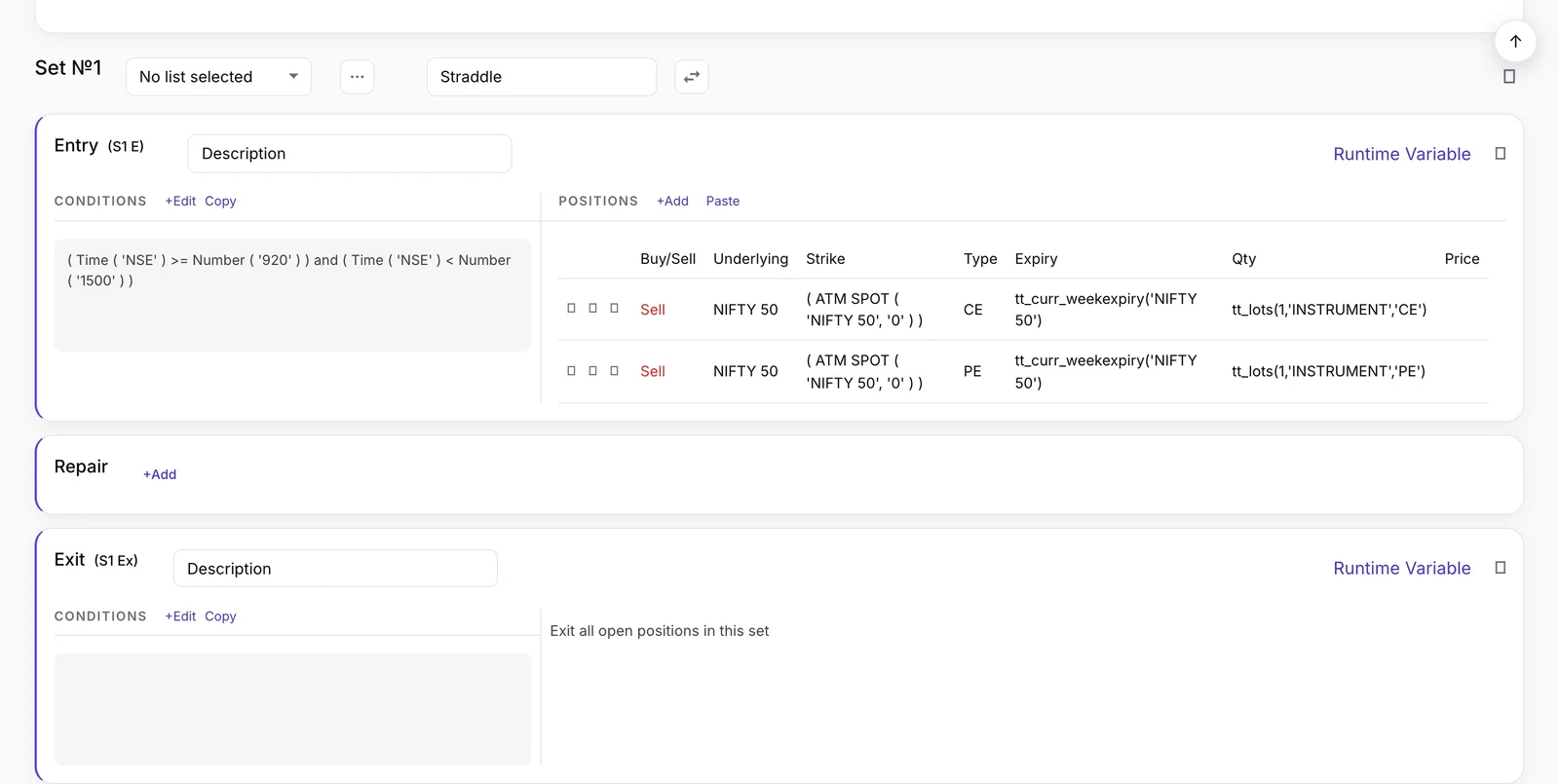 A set in the strategy builder: entry conditions on the left, positions on the right, then Repair and Exit
- Sets. A strategy holds one or more sets. Each set is a self-contained idea, such as "the long side" and "the short side", with its own conditions and positions.
- Condition types. Entry opens the set's positions. Repair Once and Repair Continuous change individual legs mid-trade: exit one leg, add a hedge, roll a strike. Exit closes the set. Universal Exit closes the whole strategy. See Repair Once and Repair Continuous.
- Positions (legs). What to trade when a condition fires. Strike, expiry and quantity can be fixed or come from formulas, such as two strikes above ATM. Each leg can carry its own SL trigger and Target trigger.
- Keywords. The building blocks of conditions: LTP, indicators, Time, Days Difference, option Greeks, Traded Instrument (details of a leg you already took), Positions Detail, runtime variables and more. See keywords in Tradetron.
- Advanced Settings. Strategy-wide settings, such as how soon after the open and how late before the close it may trade, how often it runs, and a strategy-level trailing stop. See Advanced Settings explained.
- Lists. Run one set's rule on many instruments at once. See Lists in Tradetron.
Build a strategy step by step
Here's the full path, using a simple example so each step is concrete.
This is a teaching example, not a recommendation.
- Write the idea in plain words first. Entry, exit, size, stop. If you can't write it in three lines, it isn't ready to build.
- Create a strategy and add a set.
- Add the Entry condition. Choose the SMA keyword for NIFTY with period 20, compare it with the SMA with period 50, and use the crossover comparison.
- Add the position. Buy NIFTY current-month futures, 1 lot.
- Set the stop on the leg. In the leg's SL trigger: LTP of the traded instrument is at or below its entry price × 0.985, with the entry price from Traded Instrument (Field: price).
- Add the Exit condition: the 20-day SMA crosses below the 50-day SMA.
- Add a Universal Exit as a backstop, such as a total loss limit on the strategy's P&L.
- Check Advanced Settings, such as the time window it's allowed to trade in.
- Backtest it and read the trade list.
- Deploy it Live Offline, then Live Auto at 1 lot once it behaves.
Test before you trust it
| Stage | What it tells you | Its limit |
|---|---|---|
| Backtest | How the rules would have behaved on historical data, trade by trade | Fills are simulated, so slippage and fast markets are understated |
| Live Offline | How the strategy behaves on live prices: the strategy runs and records every trade, but nothing is sent to the exchange | Real fills can still differ |
| Live Auto | Real orders through your broker | Full market and execution risk |
Most of the gap between a backtest and live trading is slippage: the difference between the price the backtest assumed and the price you actually get. Read nine reasons your backtest doesn't match live trading and all about backtests in Tradetron.
Strategy builder vs writing code
| No-code strategy builder | Writing your own code | |
|---|---|---|
| Learning curve | Low: menus and keywords | High: programming plus a broker API |
| Time to a first strategy | Fast for rule-based ideas | Slower: write, test, debug |
| Flexibility | Bounded by the available keywords and settings | Anything you can program |
| Infrastructure | The platform runs data, servers and order routing | You run and monitor it all |
| Best for | Rule-based strategies, including multi-leg options | Unusual logic beyond any builder |
Neither is better for everyone. A builder wins on speed and upkeep for most retail strategies; code wins when the logic goes beyond what the builder can express.
Limits and risks
What a builder does well
- Removes the coding barrier
- Executes the same rule the same way every time
- Makes multi-leg options and leg-level exits manageable
- Lets you change a rule in minutes and re-test it
What it can't do
- Make a poor strategy profitable
- Remove slippage, gaps or market risk
- Guard against outages at your broker or internet provider by itself
- Adapt on its own when market conditions change
Who a strategy builder suits
- Rule-based traders who can state their edge as clear conditions.
- Traders who don't code but have a precise idea.
- Options traders running multi-leg positions with leg-level exits and adjustments.
- Busy traders who want rules to run during market hours without watching charts.
It suits purely discretionary traders less: if your decisions rely on judgment you can't write down, a builder can't capture them.
Frequently asked questions
What is a strategy builder in trading?
It is a tool for creating an automated trading strategy by choosing conditions, actions and exits from menus instead of writing code. The platform then runs the strategy and places orders when the conditions are met.
Do I need to code to use Tradetron's strategy builder?
No. You build conditions from keywords and set up positions in forms. Formulas are available for things like strikes and quantities, but no programming is needed.
What is a set in a Tradetron strategy?
A set is a self-contained part of a strategy with its own Entry, optional Repair conditions, Exit and positions. A strategy can have several sets, for example one for the long side and one for the short side, plus a Universal Exit for the whole strategy.
How do I test a strategy before trading real money?
Backtest it on historical data first, then deploy it Live Offline, where it runs on live prices and records every trade but sends nothing to the exchange. Move to Live Auto, at small size, only when it behaves as expected.
Can a strategy builder build options strategies?
Yes. Tradetron's builder handles multi-leg options strategies, with strikes set by formulas such as distance from ATM, per-leg stops and targets, and repairs to adjust individual legs. The Option Wizard offers ready-made templates for common structures.
Is algo trading with a strategy builder legal in India?
Yes. Retail algo trading is legal and runs through your broker under SEBI's framework. Read SEBI's algo-ID mandate for what it means for you.