Strategy Builder क्या करता है, और Tradetron का builder कैसे काम करता है
यह लेख अंग्रेज़ी से अनुवाद किया गया है। मूल लेख अंग्रेज़ी में पढ़ें
Strategy builder की मदद से आप बिना code लिखे अपने trading idea को ऐसे नियमों में बदल सकते हैं जिन्हें platform अपने आप चला सके। आप menus से "RSI 30 के ऊपर cross करे" या "time 9:20 हो" जैसी conditions चुनते हैं, बताते हैं कि क्या खरीदना या बेचना है, और अपने exits सेट करते हैं। फिर platform market को इन नियमों से मिलाता है और orders लगाता है।
कोई भी strategy builder कैसे काम करता है
हर strategy builder इन्हीं तीन परतों में काम करता है:
| परत | किस सवाल का जवाब देती है | उदाहरण |
|---|---|---|
| Conditions | कुछ कब होना चाहिए? | Price 20-day average से ऊपर; time 09:20 है; RSI 30 से नीचे |
| Actions | क्या trade करना है, और कितना? | NIFTY futures का 1 lot खरीदें; ATM call और put बेचें |
| Exits और risk | हम बाहर कब निकलें? | Stop loss, target, trailing stop, time के हिसाब से square-off, daily loss limit |
Strategy चलते समय builder live market data को आपकी conditions से मिलाता रहता है, और conditions पूरी होने पर काम करता है। Logic आप देते हैं; data, timing और order routing platform संभालता है।
Tradetron का strategy builder कैसे बना है
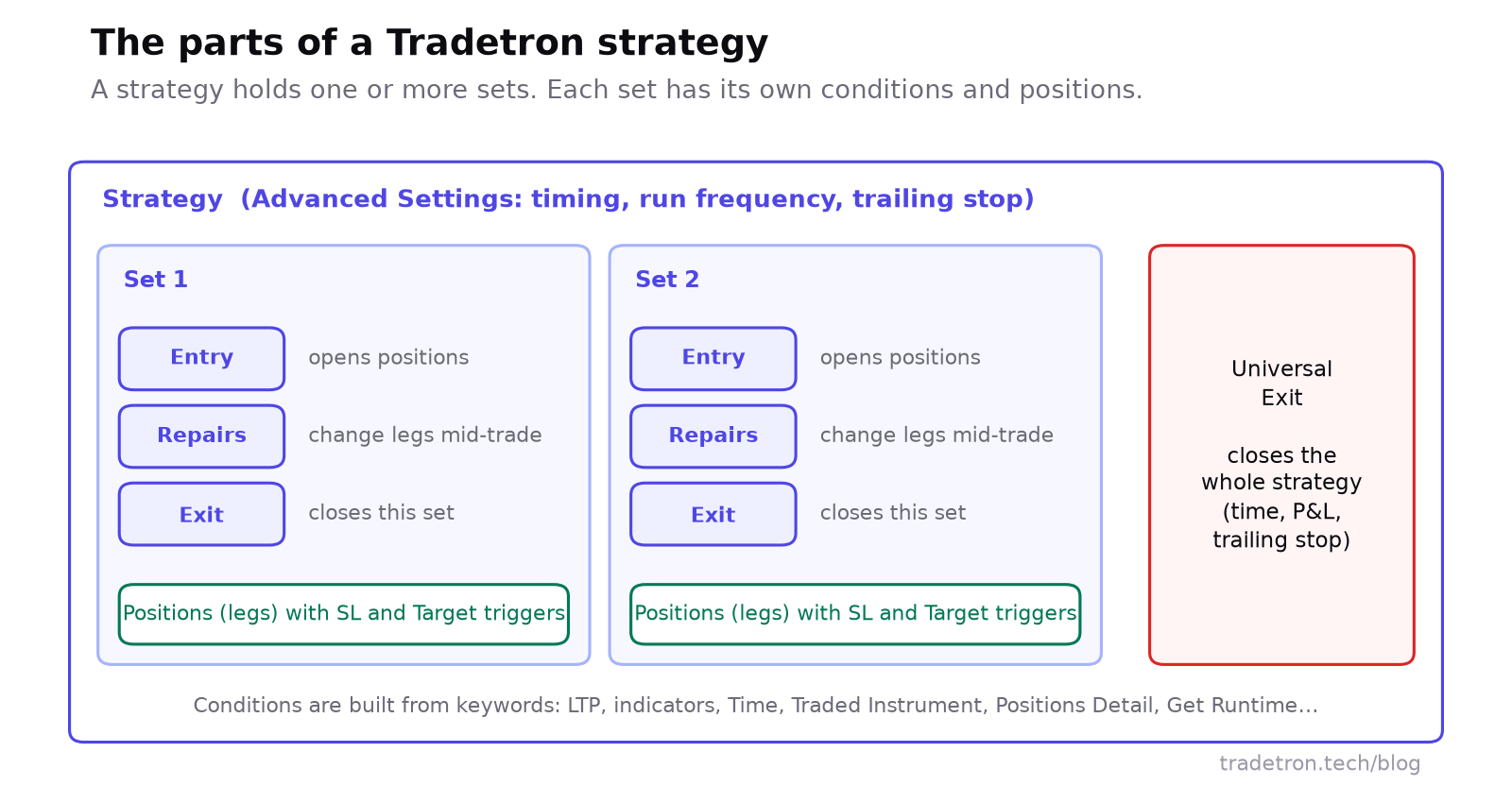 Sets, conditions, legs और exits
जिन हिस्सों के साथ आप काम करेंगे:
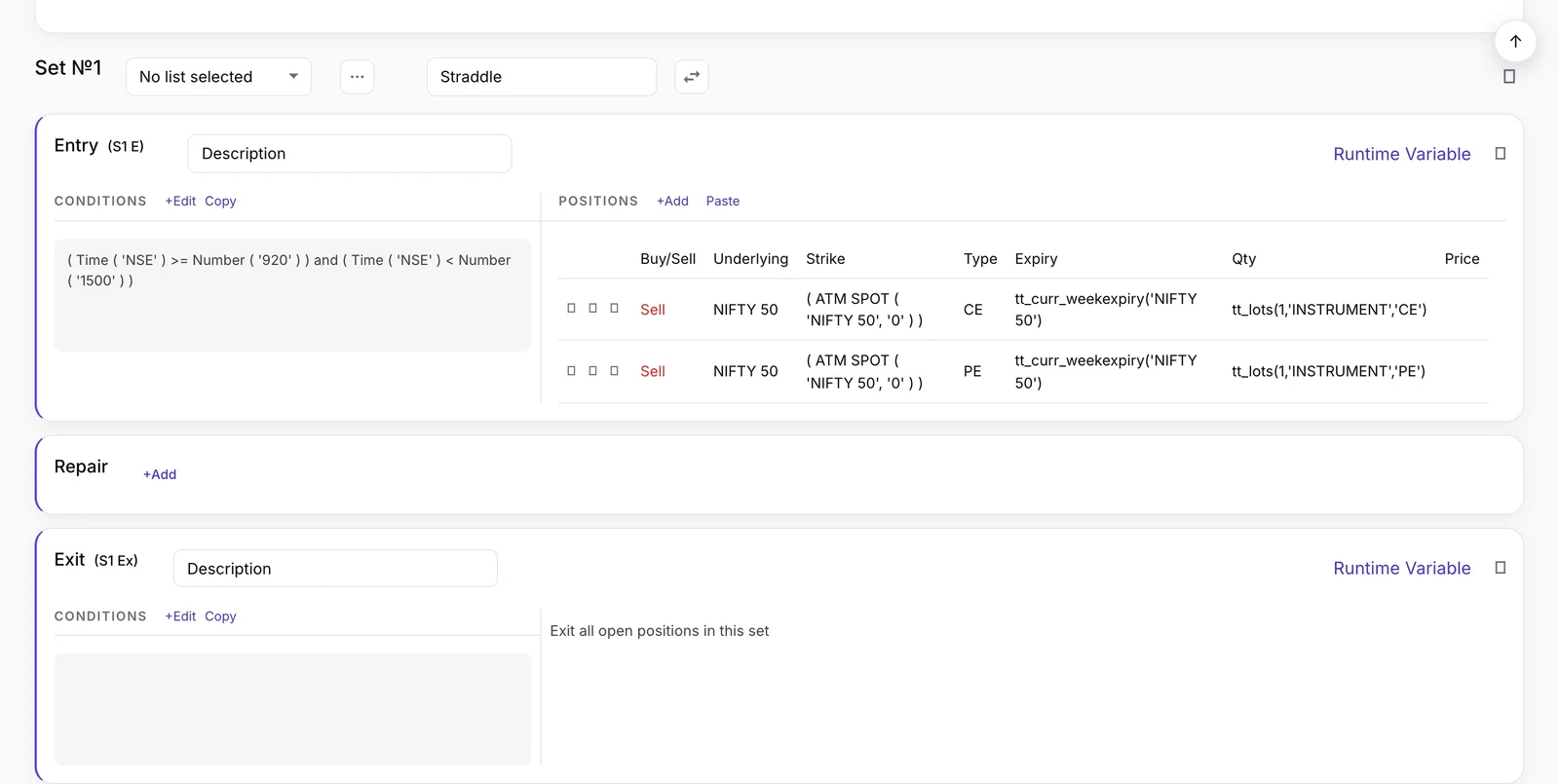 Strategy builder में एक set: बाईं तरफ़ entry conditions, दाईं तरफ़ positions, फिर Repair और Exit
- Sets. एक strategy में एक या ज़्यादा sets होते हैं। हर set अपने आप में पूरा एक idea होता है, जैसे "long side" और "short side", जिसकी अपनी conditions और positions होती हैं।
- Condition के प्रकार। Entry set की positions खोलती है। Repair Once और Repair Continuous trade के बीच में अलग-अलग legs बदलते हैं: एक leg से exit, hedge जोड़ना, strike roll करना। Exit set को बंद करता है। Universal Exit पूरी strategy बंद करता है। देखें Repair Once और Repair Continuous।
- Positions (legs). Condition trigger होने पर क्या trade करना है। Strike, expiry और quantity तय हो सकती हैं या formulas से आ सकती हैं, जैसे ATM से दो strikes ऊपर। हर leg का अपना SL trigger और Target trigger हो सकता है।
- Keywords. Conditions बनाने की ईंटें: LTP, indicators, Time, Days Difference, option Greeks, Traded Instrument (जो leg आप पहले ले चुके हैं उसकी details), Positions Detail, runtime variables और बहुत कुछ। देखें Tradetron में keywords।
- Advanced Settings. पूरी strategy पर लागू settings, जैसे market खुलने के कितनी देर बाद और बंद होने के कितनी देर पहले तक यह trade कर सकती है, कितनी बार चलती है, और strategy-level trailing stop। देखें Advanced Settings आसान भाषा में।
- Lists. एक set का नियम एक साथ कई instruments पर चलाएं। देखें Tradetron में Lists।
Step by step strategy बनाएं
यह पूरा रास्ता है, एक आसान उदाहरण के साथ ताकि हर step साफ़ समझ आए।
यह सिखाने के लिए उदाहरण है, कोई recommendation नहीं।
- पहले idea को सीधे शब्दों में लिखें। Entry, exit, size, stop। अगर आप इसे तीन लाइनों में नहीं लिख सकते, तो यह बनाने के लिए तैयार नहीं है।
- एक strategy बनाएं और एक set जोड़ें।
- Entry condition जोड़ें। NIFTY के लिए period 20 वाला SMA keyword चुनें, इसे period 50 वाले SMA से मिलाएं, और crossover comparison इस्तेमाल करें।
- Position जोड़ें। NIFTY current-month futures, 1 lot खरीदें।
- Leg पर stop सेट करें। Leg के SL trigger में: traded instrument का LTP उसके entry price × 0.985 के बराबर या उससे नीचे हो, और entry price Traded Instrument (Field: price) से लें।
- Exit condition जोड़ें: 20-day SMA, 50-day SMA के नीचे cross करे।
- बचाव के तौर पर Universal Exit जोड़ें, जैसे strategy के P&L पर कुल loss limit।
- Advanced Settings जांचें, जैसे वह time window जिसमें इसे trade करने की इजाज़त है।
- इसका backtest करें और trade list पढ़ें।
- इसे Live Offline deploy करें, फिर जब यह ठीक चले तो 1 lot पर Live Auto।
भरोसा करने से पहले test करें
| Stage | यह क्या बताता है | इसकी सीमा |
|---|---|---|
| Backtest | Historical data पर नियम कैसे चलते, trade दर trade | Fills simulated होते हैं, इसलिए slippage और तेज़ markets का असर कम दिखता है |
| Live Offline | Live prices पर strategy कैसे चलती है: strategy चलती है और हर trade रिकॉर्ड करती है, लेकिन exchange को कुछ नहीं भेजा जाता | असली fills फिर भी अलग हो सकते हैं |
| Live Auto | आपके broker के ज़रिए असली orders | पूरा market और execution risk |
Backtest और live trading के बीच का ज़्यादातर फ़र्क slippage होता है: backtest ने जो price माना और जो price आपको असल में मिला, उनके बीच का अंतर। पढ़ें आपका backtest live trading से मेल क्यों नहीं खाता, इसके नौ कारण और Tradetron में backtests के बारे में सब कुछ।
Strategy builder vs खुद code लिखना
| No-code strategy builder | अपना code लिखना | |
|---|---|---|
| सीखने में कितना समय | कम: menus और keywords | ज़्यादा: programming और broker API |
| पहली strategy तक का समय | नियम वाले ideas के लिए तेज़ | धीमा: लिखो, test करो, debug करो |
| लचीलापन | मौजूद keywords और settings तक सीमित | जो भी आप program कर सकें |
| Infrastructure | Data, servers और order routing platform चलाता है | सब कुछ आप चलाते और देखते हैं |
| किसके लिए बेहतर | नियम वाली strategies, multi-leg options समेत | ऐसा अलग logic जो किसी builder से बाहर हो |
कोई भी तरीका सबके लिए बेहतर नहीं है। ज़्यादातर retail strategies के लिए builder रफ़्तार और रखरखाव में आगे है; जब logic builder की पहुंच से बाहर जाता है, तब code आगे है।
सीमाएं और risks
Builder क्या अच्छा करता है
- Coding की रुकावट हटाता है
- एक ही नियम को हर बार एक ही तरह चलाता है
- Multi-leg options और leg-level exits को संभालने लायक बनाता है
- किसी नियम को मिनटों में बदलकर दोबारा test करने देता है
यह क्या नहीं कर सकता
- कमज़ोर strategy को profitable बनाना
- Slippage, gaps या market risk हटाना
- अपने आप आपके broker या internet provider के outages से बचाना
- Market की हालत बदलने पर खुद को अपने आप ढालना
Strategy builder किसके लिए सही है
- नियमों पर चलने वाले traders जो अपनी edge को साफ़ conditions में बता सकते हैं।
- ऐसे traders जो code नहीं करते लेकिन जिनके पास सटीक idea है।
- Options traders जो leg-level exits और adjustments के साथ multi-leg positions चलाते हैं।
- व्यस्त traders जो चाहते हैं कि market hours में charts देखे बिना नियम चलते रहें।
पूरी तरह discretionary traders के लिए यह कम सही है: अगर आपके फ़ैसले ऐसी समझ पर टिके हैं जिसे आप लिख नहीं सकते, तो builder उन्हें पकड़ नहीं सकता।
अक्सर पूछे जाने वाले सवाल
Trading में strategy builder क्या होता है?
यह एक tool है जिससे आप code लिखने के बजाय menus से conditions, actions और exits चुनकर automated trading strategy बनाते हैं। फिर platform strategy चलाता है और conditions पूरी होने पर orders लगाता है।
क्या Tradetron का strategy builder इस्तेमाल करने के लिए code आना ज़रूरी है?
नहीं। आप keywords से conditions बनाते हैं और forms में positions सेट करते हैं। Strikes और quantities जैसी चीज़ों के लिए formulas मौजूद हैं, लेकिन programming की ज़रूरत नहीं है।
Tradetron strategy में set क्या होता है?
Set strategy का अपने आप में पूरा एक हिस्सा है, जिसकी अपनी Entry, चाहें तो Repair conditions, Exit और positions होती हैं। एक strategy में कई sets हो सकते हैं, जैसे एक long side के लिए और एक short side के लिए, साथ में पूरी strategy के लिए एक Universal Exit।
असली पैसे से trade करने से पहले strategy को test कैसे करें?
पहले historical data पर इसका backtest करें, फिर इसे Live Offline deploy करें, जहां यह live prices पर चलती है और हर trade रिकॉर्ड करती है लेकिन exchange को कुछ नहीं भेजती। Live Auto पर, छोटे size के साथ, तभी जाएं जब यह उम्मीद के मुताबिक चले।
क्या strategy builder से options strategies बन सकती हैं?
हां। Tradetron का builder multi-leg options strategies संभालता है, जिनमें strikes ATM से दूरी जैसे formulas से तय होते हैं, हर leg के अपने stops और targets होते हैं, और अलग-अलग legs को adjust करने के लिए repairs होते हैं। आम structures के लिए Option Wizard तैयार templates देता है।
क्या भारत में strategy builder से algo trading legal है?
हां। Retail algo trading legal है और SEBI के framework के तहत आपके broker के ज़रिए चलती है। आपके लिए इसका क्या मतलब है, यह जानने के लिए SEBI का algo-ID mandate पढ़ें।