Tradetron vs Streak: A Similar No-Code Platform, Many Brokers
Tradetron is similar to Streak in that both let you build trading strategies without code, backtest them and run them automatically. The main differences are scope: Tradetron is built around multi-leg options and complex exits, runs the same strategy on many brokers, and accepts signals from TradingView and Amibroker. Which fits depends on what you trade and with whom.

What Streak and Tradetron have in common
Both platforms were built for traders who know their rules but don't want to write code. In both, you:
- Build entry and exit conditions from price, indicators and time.
- Backtest the rules on historical data before trading them.
- Run strategies in the cloud and send orders through a broker.
If your strategy is a technical-indicator rule on stocks, such as "buy when the 20 EMA crosses above the 50 EMA, exit on a 2% stop", either platform can express it. The differences show up as strategies get more complex, or when your broker setup changes.
Where Tradetron is different
| What you need | How Tradetron handles it |
|---|---|
| Multi-leg options | Straddles, strangles, iron condors, spreads and custom legs in one strategy, with strikes set from ATM or other keywords |
| Managing legs separately | Repair Once and Repair Continuous conditions to exit, add, hedge or roll individual legs |
| Stops and targets | Per-leg SL and target triggers, plus a strategy-level trailing stop and Universal Exit |
| Your broker | Zerodha, Angel One, Dhan and many more brokers |
| Several accounts | Deploy one strategy many times, on different brokers, with a multiplier for size |
| Signals from elsewhere | TradingView webhooks and Amibroker |
| Testing without money | Backtests, plus Live Offline: the strategy runs and records every trade, but nothing is sent to the exchange |
| Ready-made strategies | A marketplace of strategies built by creators |
| Building by description | An AI connector that lets assistants such as Claude build the strategy for you |
One strategy, many brokers
The point the original version of this post was built around still stands: you shouldn't have to rebuild your strategy because you changed brokers, or run different tools for different accounts.
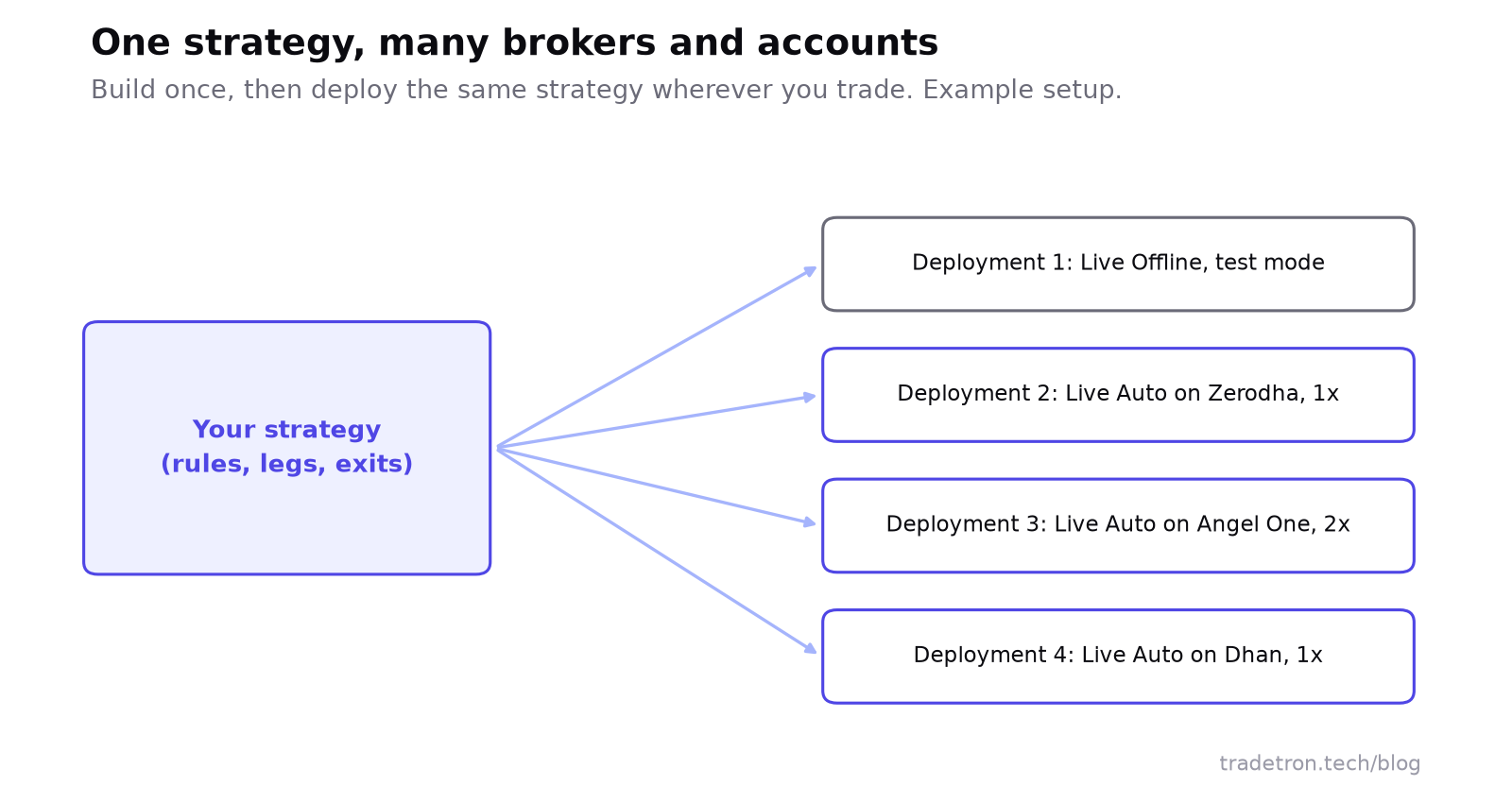 Build once, deploy wherever you trade
On Tradetron, a strategy is a template. Each time you deploy it, you choose the broker, the mode (Live Offline or Live Auto) and a multiplier for size. That lets you:
- Run a test deployment and a live one side by side.
- Trade the same rules in your own account and a family member's account at another broker.
- Move to a new broker by connecting it and deploying again, without touching the strategy.
Read how to connect your broker to Tradetron for the setup.
Options strategies: where the gap is widest
A short straddle on NIFTY sounds simple: sell the ATM call and put at 9:20. In practice, you want more:
Each line above maps to a Tradetron building block: positions for the entry, SL triggers for the leg stops, a repair for "after one stop, adjust the other", and a Universal Exit for the time and loss limit. This kind of leg-by-leg logic is what Tradetron's builder is designed around. See Repair Once and Repair Continuous for how the adjustment works.
How to choose between Streak and Tradetron
- Write down one strategy you actually trade, with every rule: entry, exit, size, stops and what happens after a stop.
- Build it on both platforms. Note anything you couldn't express, or had to approximate.
- Backtest it on the same period and read the trade lists, not just the totals.
- Check your broker is supported for live orders on each, and how orders are confirmed.
- Run it without real money for two weeks and compare the results with what the backtest would have shown.
- Pick the one that ran your rules exactly. Price and design come after that.
Tradetron suits you if
- You trade options strategies with several legs
- You need per-leg exits, adjustments or re-entries
- You use more than one broker or account
- You want TradingView or Amibroker signals executed
- You'd like to start from marketplace strategies
Another tool may suit you if
- You only need simple indicator rules on a few stocks
- You want everything inside one broker's ecosystem
- You prefer a scanner-first workflow
- You don't need options leg management
Frequently asked questions
Is Tradetron similar to Streak?
Yes, in the basics: both are no-code platforms where you build trading rules, backtest them and run them through a broker. Tradetron goes further on multi-leg options, leg-level adjustments, multi-broker deployment, external signals and a strategy marketplace.
Which brokers does Tradetron support?
Tradetron connects to Zerodha, Angel One, Dhan and many more Indian brokers. You can connect more than one and deploy the same strategy on each.
Can I move my Streak strategy to Tradetron?
Rebuild it in Tradetron's builder: most indicator-based rules map directly onto Tradetron conditions. Then backtest both on the same period and compare the trade lists.
Is Tradetron free to use?
Tradetron has a free plan as well as paid plans. Check the pricing page for what each plan includes, since limits change over time.
Can I backtest options strategies on Tradetron?
Yes. You can backtest multi-leg options strategies on historical data, including stops, targets and repairs, and see every trade in the report.
Is algo trading with these platforms legal in India?
Yes. Retail algo trading is legal and runs through your broker under SEBI's framework. Read SEBI's algo-ID mandate for what it means for you.