Tradetron vs Streak: એક જેવું No-Code Platform, ઘણા Brokers
આ લેખ અંગ્રેજીમાંથી અનુવાદિત છે. મૂળ લેખ અંગ્રેજીમાં વાંચો
Tradetron એ રીતે Streak જેવું છે કે બંને તમને code વગર trading strategies બનાવવા, તેમનો backtest કરવા અને તેમને આપોઆપ ચલાવવા દે છે. મુખ્ય તફાવત વ્યાપનો છે: Tradetron multi-leg options અને જટિલ exits માટે બનેલું છે, એક જ strategy ઘણા brokers પર ચલાવે છે, અને TradingView તથા Amibrokerમાંથી signals સ્વીકારે છે. કયું બંધબેસે છે તે તમે શું trade કરો છો અને કોની સાથે, તેના પર આધાર રાખે છે.

Streak અને Tradetronમાં શું સરખું છે
બંને platforms એવા traders માટે બન્યાં છે જેઓ પોતાના rules જાણે છે પણ code લખવા નથી માગતા. બંનેમાં, તમે:
- Price, indicators અને સમય પરથી entry અને exit conditions બનાવો છો.
- Trade કરતાં પહેલાં historical data પર rulesનો backtest કરો છો.
- Cloudમાં strategies ચલાવો છો અને broker દ્વારા orders મોકલો છો.
જો તમારી strategy stocks પરનો technical-indicator rule હોય, જેમ કે "જ્યારે 20 EMA 50 EMAને ઉપરની તરફ cross કરે ત્યારે ખરીદો, 2% stop પર exit", તો બંનેમાંથી કોઈ પણ platform તેને બનાવી શકે છે. Strategies વધુ જટિલ બને, અથવા તમારું broker setup બદલાય, ત્યારે તફાવત દેખાય છે.
Tradetron ક્યાં અલગ છે
| તમને શું જોઈએ | Tradetron તેને કેવી રીતે સંભાળે છે |
|---|---|
| Multi-leg options | એક જ strategyમાં straddles, strangles, iron condors, spreads અને custom legs, ATM કે બીજા keywordsથી નક્કી થતા strikes સાથે |
| Legs અલગથી manage કરવા | દરેક leg માટે exit, add, hedge કે roll કરવા Repair Once અને Repair Continuous conditions |
| Stops અને targets | Per-leg SL અને target triggers, ઉપરાંત strategy-level trailing stop અને Universal Exit |
| તમારો broker | Zerodha, Angel One, Dhan અને બીજા ઘણા brokers |
| ઘણાં accounts | એક strategy અલગ અલગ brokers પર ઘણી વાર deploy કરો, size માટે multiplier સાથે |
| બીજેથી આવતા signals | TradingView webhooks અને Amibroker |
| પૈસા વગર testing | Backtests, ઉપરાંત Live Offline: strategy ચાલે છે અને દરેક trade નોંધે છે, પણ exchangeને કંઈ મોકલાતું નથી |
| તૈયાર strategies | Creatorsએ બનાવેલી strategiesનું marketplace |
| વર્ણનથી બનાવવું | એક AI connector, જે Claude જેવા assistantsને તમારા માટે strategy બનાવવા દે છે |
એક strategy, ઘણા brokers
આ postનું મૂળ version જે મુદ્દા પર બન્યું હતું તે હજુ પણ સાચો છે: broker બદલ્યો એટલે તમારે strategy ફરી બનાવવી ન પડવી જોઈએ, કે અલગ accounts માટે અલગ tools ચલાવવાં ન પડવાં જોઈએ.
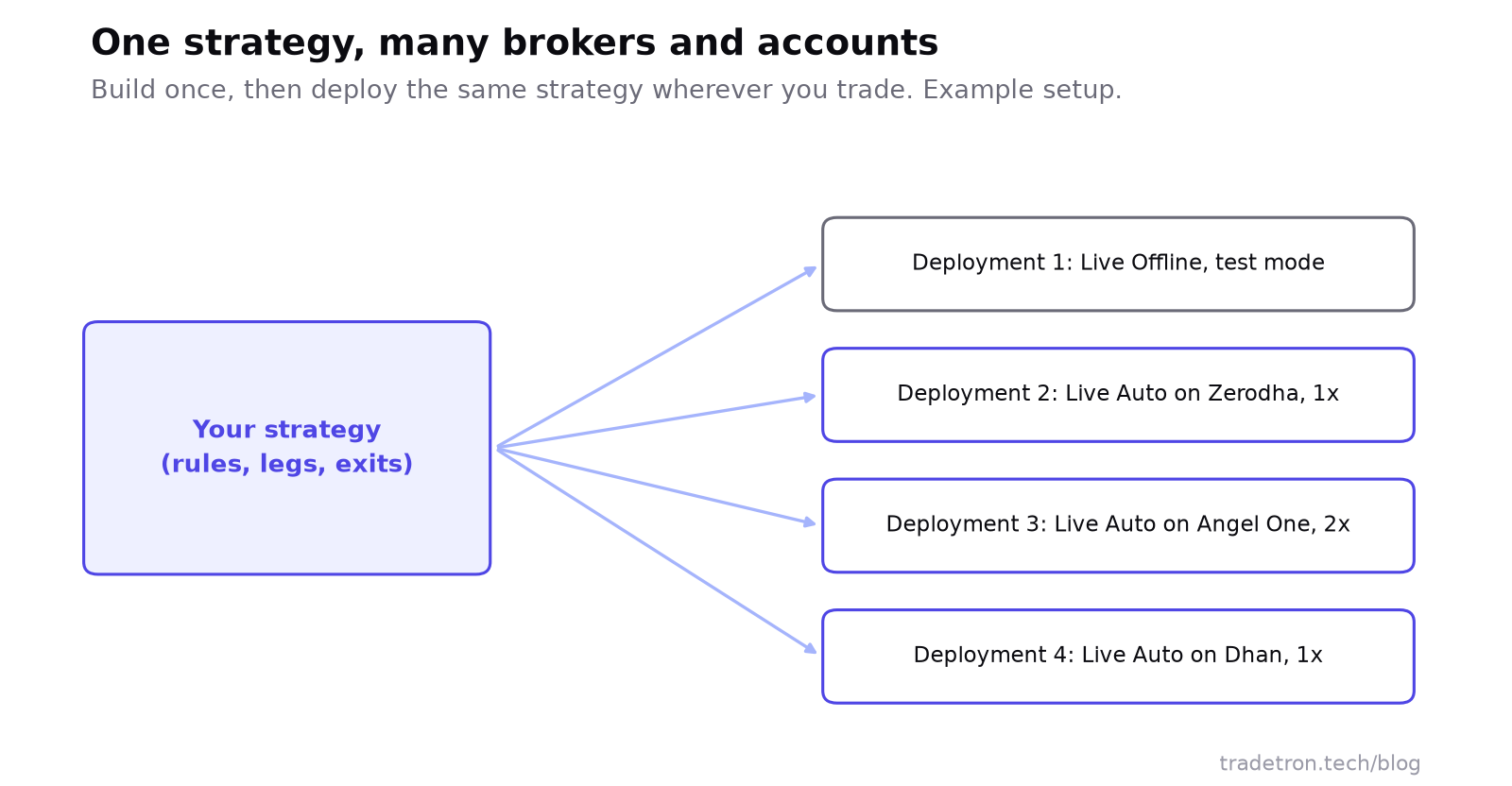 એક વાર બનાવો, જ્યાં trade કરો ત્યાં deploy કરો
Tradetron પર strategy એક template છે. દરેક વખતે તેને deploy કરો ત્યારે, તમે broker, mode (Live Offline કે Live Auto) અને size માટે multiplier પસંદ કરો છો. તેનાથી તમે:
- Test deployment અને live deployment બાજુ-બાજુમાં ચલાવી શકો.
- એ જ rules તમારા પોતાના account અને બીજા broker પરના પરિવારના સભ્યના accountમાં trade કરી શકો.
- Strategyને અડ્યા વગર, નવો broker જોડીને અને ફરી deploy કરીને નવા broker પર જઈ શકો.
Setup માટે તમારા brokerને Tradetron સાથે કેવી રીતે જોડવો વાંચો.
Options strategies: જ્યાં ફરક સૌથી મોટો છે
NIFTY પર short straddle સાદું લાગે છે: 9:20 પર ATM call અને put વેચો. વ્યવહારમાં, તમારે વધુ જોઈએ:
ઉપરની દરેક line Tradetronના એક building block સાથે મેળ ખાય છે: entry માટે positions, leg stops માટે SL triggers, "એક stop પછી બીજાને adjust કરો" માટે repair, અને સમય તથા loss limit માટે Universal Exit. Tradetronનું builder આવા leg-by-leg logicને ધ્યાનમાં રાખીને જ બનાવાયું છે. Adjustment કેવી રીતે કામ કરે છે તે માટે Repair Once અને Repair Continuous જુઓ.
Streak અને Tradetron વચ્ચે કેવી રીતે પસંદ કરવું
- તમે ખરેખર trade કરો છો તે એક strategy લખી લો, દરેક rule સાથે: entry, exit, size, stops અને stop પછી શું થાય છે.
- તેને બંને platforms પર બનાવો. જે તમે બનાવી ન શક્યા, કે અંદાજે બનાવવું પડ્યું, તે નોંધો.
- એક જ સમયગાળા પર તેનો backtest કરો અને માત્ર totals નહીં, trade lists વાંચો.
- ચેક કરો કે તમારો broker દરેક પર live orders માટે supported છે, અને orders કેવી રીતે confirm થાય છે.
- બે અઠવાડિયાં સાચા પૈસા વગર તેને ચલાવો અને પરિણામોની સરખામણી backtest શું બતાવત તેની સાથે કરો.
- જેણે તમારા rules બરાબર ચલાવ્યા તે પસંદ કરો. કિંમત અને design તે પછી આવે.
Tradetron તમને ફાવશે જો
- તમે ઘણા legs વાળી options strategies trade કરો છો
- તમારે per-leg exits, adjustments કે re-entries જોઈએ છે
- તમે એકથી વધુ broker કે account વાપરો છો
- તમારે TradingView કે Amibroker signals execute કરાવવા છે
- તમે marketplace strategiesથી શરૂઆત કરવા માગો છો
બીજું tool તમને ફાવી શકે જો
- તમારે થોડા stocks પર માત્ર સાદા indicator rules જોઈએ છે
- તમારે બધું એક જ brokerની ecosystemમાં જોઈએ છે
- તમને scanner-first workflow ગમે છે
- તમારે options leg managementની જરૂર નથી
વારંવાર પૂછાતા પ્રશ્નો
શું Tradetron Streak જેવું છે?
હા, મૂળભૂત બાબતોમાં: બંને no-code platforms છે જ્યાં તમે trading rules બનાવો, તેમનો backtest કરો અને broker દ્વારા ચલાવો. Tradetron multi-leg options, leg-level adjustments, multi-broker deployment, external signals અને strategy marketplaceમાં આગળ જાય છે.
Tradetron કયા brokersને support કરે છે?
Tradetron Zerodha, Angel One, Dhan અને બીજા ઘણા ભારતીય brokers સાથે જોડાય છે. તમે એકથી વધુ broker જોડી શકો અને દરેક પર એ જ strategy deploy કરી શકો.
શું હું મારી Streak strategy Tradetron પર લઈ જઈ શકું?
તેને Tradetronના builderમાં ફરી બનાવો: indicator આધારિત મોટા ભાગના rules સીધા Tradetron conditions સાથે મેળ ખાય છે. પછી બંનેનો એક જ સમયગાળા પર backtest કરો અને trade listsની સરખામણી કરો.
શું Tradetron મફત છે?
Tradetronમાં free plan પણ છે અને paid plans પણ. દરેક planમાં શું આવે છે તે pricing page પર ચેક કરો, કારણ કે limits સમય સાથે બદલાય છે.
શું હું Tradetron પર options strategiesનો backtest કરી શકું?
હા. તમે historical data પર multi-leg options strategiesનો backtest કરી શકો, જેમાં stops, targets અને repairs પણ આવે, અને reportમાં દરેક trade જોઈ શકો.
શું ભારતમાં આ platforms સાથે algo trading કાયદેસર છે?
હા. Retail algo trading કાયદેસર છે અને SEBIના framework હેઠળ તમારા broker દ્વારા ચાલે છે. તમારા માટે તેનો અર્થ શું છે તે જાણવા SEBIનો algo-ID mandate વાંચો.