How to Automate an Options Strategy Without Coding
You automate an options strategy without coding by writing it as exact rules (when to enter, which legs, which strikes, where to stop, when to exit) and building those rules in a no-code strategy builder that checks them on every price update. On Tradetron you can build the rules yourself in the Strategy Builder or describe them to an AI that builds them for you, then check the payoff, backtest the rules and watch the signals before any real money is involved.
What "automating an options strategy" means
An automated options strategy is a set of rules that a computer follows the same way every time. Once it is running, the rules decide when to enter, which contracts to trade and when to get out. You decide the rules in advance, while you are calm, instead of making those calls in the middle of a fast market.
That matters more for options than for most instruments. Premiums move quickly, time decay works every day, and a multi-leg position has to be opened and closed together. The common manual mistakes are execution mistakes: a late entry, a hedge leg forgotten, a stop moved "just this once", a position left open past the planned exit.
"Without coding" means you don't write a program. You pick conditions, legs and limits from menus, and the platform turns them into the logic that runs.
Step 1: write the strategy as rules
Before you open any builder, write one sentence per rule. Here is the example used through this guide. It is an example to learn the process, not a recommendation.
The test of a good rule is that two people reading it would place exactly the same trade. Most vague ideas need one more step to become buildable:
| Vague idea | Buildable rule |
|---|---|
| Sell options when the market is calm | Enter at 09:20 if India VIX is below a level you choose |
| Sell far out-of-the-money strikes | Sell the strike 300 points from ATM |
| Cut losses if it goes wrong | Exit everything if the strategy loss reaches ₹4,000 |
| Close before expiry gets risky | Exit at 15:15 on expiry day |
| Protect against a big move | Buy the strike 500 points from ATM on each side |
If you are new to the structure itself, read our iron condor guide with a NIFTY example first.
Step 2: check the payoff before you build
A payoff diagram shows what the position gains or loses at expiry for every closing level of NIFTY. It is the fastest way to see the worst case before you spend time building anything.
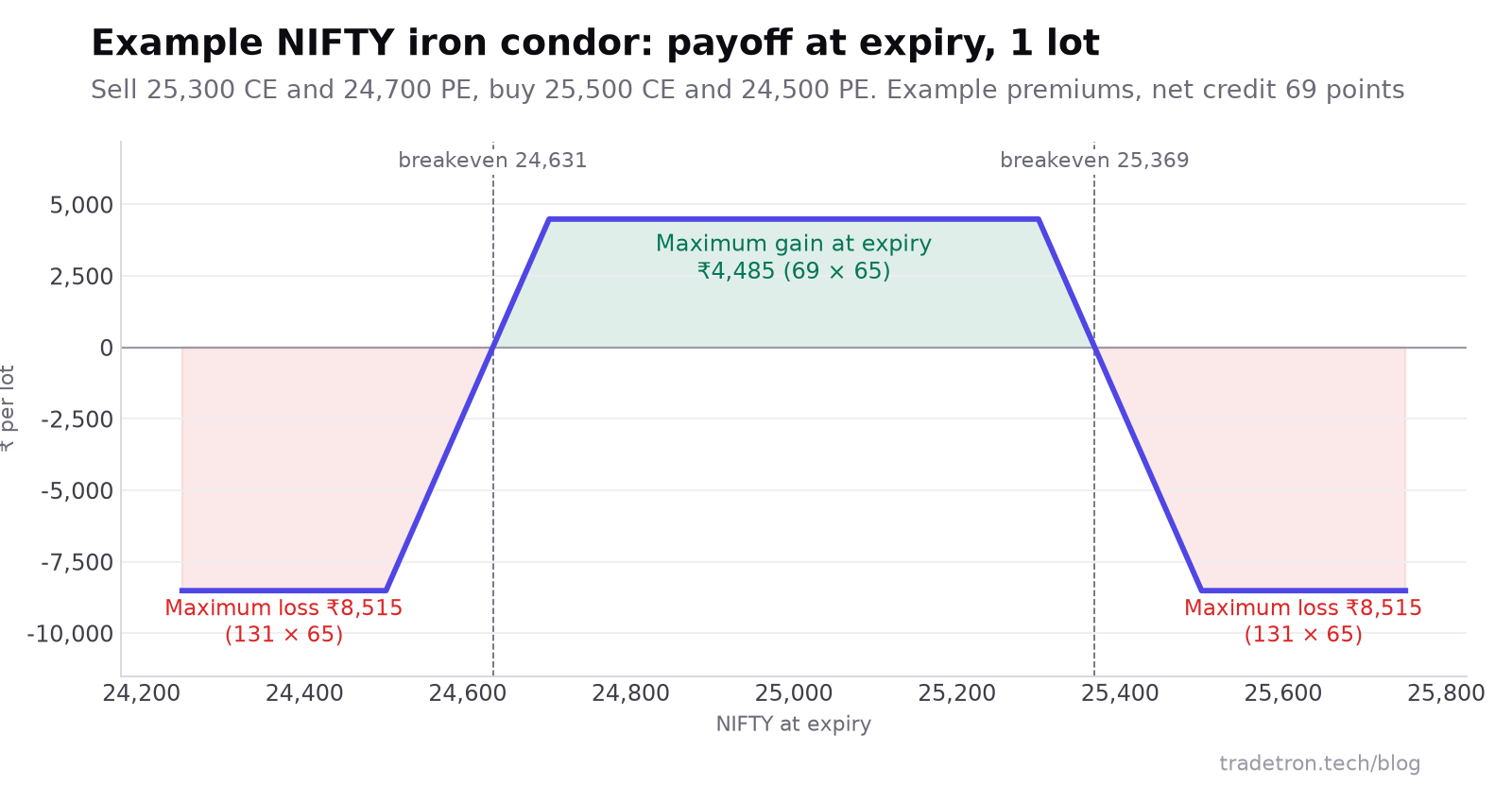 Example premiums only: your strikes and premiums will differ
Two things to read from this. First, the worst case is almost twice the best case, which is normal for a strategy that sells premium; that is why the ₹4,000 stop exists. Second, the bought legs put a ceiling on the loss, even on a gap opening. Without them this would be a short strangle with no limit on either side.
Try your own strikes and premiums in the free option payoff calculator, and size the trade with the position size calculator before you build.
Step 3: build the rules in the Strategy Builder
In Tradetron's Strategy Builder, conditions sit in sets, and each set holds the stages of a trade: Entry, Exit, Repair Once, Repair Continuous and Universal Exit. The positions you open are legs. Conditions use keywords such as Time, Week Day, PNL and Traded Instrument, which you pick from menus.
- Start a new strategy and give it a name you will recognise, such as "NIFTY IC weekly (test)".
- Add the entry condition. Time is 09:20 or later AND Week Day is Wednesday. Join the two with AND so both must be true.
- Add the four legs. For each one, choose NIFTY options, the side (sell or buy), CE or PE, the expiry (the current week, which on a Wednesday is the following Tuesday) and the strike relative to ATM: +300 and +500 for the calls, −300 and −500 for the puts. Set the quantity to 1 lot.
- Add the stop. Use a Universal Exit with the PNL keyword: exit all positions if the strategy's P&L is −4,000 or lower. A strategy-level stop closes all four legs together, so you are never left holding only the hedge or only the sold leg.
- Add the time exit. An Exit condition for 15:15 on expiry day, so nothing is carried into settlement by accident.
- Decide what happens after an exit. Here, nothing: the strategy waits for the next Wednesday. Leaving this undecided is a common source of surprise trades.
- Read the whole strategy back and compare it with the sentences you wrote in step 1. Every rule should appear once, and nothing else should be there.
For a general walk-through of the builder with a futures example, see building automated trading strategies without coding.
Or describe it to an AI and let it build the rules
If you would rather not click through the builder, you can describe the strategy in plain English and have it built for you. Tradetron offers two ways, both on its Build with AI page:
- Connect your own AI. Add Tradetron's connector to Claude, ChatGPT, Gemini or a similar assistant you already use. You describe the strategy in that chat, and the assistant builds it in your Tradetron account, where you can backtest and change it. Tradetron does not charge for the connector.
- Have it built for you. Cookie, Tradetron's AI, or a quant from the build team restates your strategy as rules for you to confirm, builds it in the Strategy Builder and delivers it to your account as a Strategy Template. This is a paid service.
Whichever you choose, the result is the same kind of strategy you would have built by hand. Paste in the rules from step 1 rather than a loose idea, then open the strategy and check each condition against your sentences. An AI can misread "300 points above ATM" as "the 300 strike"; you are the one who has to catch it.
Our guide to AI tools for algo trading explains what a connector can and can't do.
Step 4: test before any real money is involved
Testing happens in two stages, and each one catches different problems.
Backtest. Run the rules on past data covering calm weeks, trending weeks and sharp moves. Tradetron's backtests use data that ends 35 days before today. Read the worst week and the largest drawdown, not only the total. If the worst week is more than you could sit through, change the strikes, the stop or the size now. Our guide to backtesting on Tradetron covers the settings.
Live Offline. Deploy the strategy in Live Offline. Tradetron runs it on live prices and shows you each signal, and it places no order. Watch a few weeks of signals and compare them with what you expected: does it enter at 09:20 on Wednesdays, pick the strikes you meant, and exit on time? Mismatches here are almost always a rule that was built differently from how it was written.
Only after both stages look the way you expect should you consider trading real money, at the smallest size. Orders then go through your own broker account, and SEBI's rules for retail algo trading apply; see what SEBI's algo-ID rules mean for you.
Common mistakes when automating options
- Stops on single legs only. A stop on the sold call that leaves its bought call open turns a hedged position into a stray long option. Use a strategy-level stop, or stop the pair together.
- Strikes fixed as numbers. "Sell 25,300 CE" works for one week. "Sell ATM + 300" works every week.
- No time exit. Without one, a position can drift into the last hours of expiry day, when option prices can swing sharply, without you having planned for it.
- Ignoring lot size changes. NIFTY's lot is 65 now; risk per lot changes whenever the lot does. Check the size in your legs after any revision.
- Changing rules after every week. Tuning the strategy to last week's market is overfitting. Change a rule only when a test shows it was built wrong or the risk is too high.
Learn the platform first
If you are new to Tradetron, the free New Tradetron course walks through the builder, keywords and deployment in short lessons. You can also join the free Level Up algo webinar to see strategies built live and ask questions, and compare plans on the pricing page.
Options trading involves a risk of loss, and an options seller can lose more than the premium collected. The strikes, premiums and amounts in this article are examples to explain the method, not recommendations.
Frequently asked questions
Can I automate an options strategy without knowing how to code?
Yes. A no-code builder lets you set entries, legs, strikes, stops and exits from menus. You need to understand the strategy and write it as exact rules; you don't need to write a program.
Which options strategies can be automated?
Any strategy that can be written as rules: straddles, strangles, iron condors, spreads, ratio spreads, option buying on a signal, and hedged positions. If a decision depends on "feel", turn it into a rule first or it can't be automated.
Can an AI build an options strategy for me?
Yes. On Tradetron you can connect an AI assistant such as Claude or ChatGPT and describe the strategy in the chat, or have Cookie or the build team build it for you. Always open the result and check each condition against the rules you meant before you test it.
How do I test an automated options strategy before using real money?
Backtest it on past data first, then deploy it in Live Offline, where Tradetron runs it on live prices, shows each signal and places no order. Compare the signals with what you expected before considering a small live trial.
How much capital do I need to automate an iron condor on NIFTY?
It depends on the margin your broker charges for the hedged position and on how much you are willing to lose. Start from the maximum loss per lot, which in the example above is ₹8,515, and size the trade so that a stop or a worst case is a small share of your capital.
Is automated options trading allowed in India?
Yes. Retail algo trading is permitted under SEBI's framework, with orders placed through your broker. Read our guide to SEBI's algo trading rules for what that means for retail traders.