Building Automated Trading Strategies Without Coding, Step by Step
You can build an automated trading strategy without coding by writing your idea as plain if-then rules (when to enter, when to exit, where the stop loss sits, how much to trade) and entering those rules in a no-code strategy builder. The platform checks the rules on live prices and places orders through your broker. Test on past data first, then in simulation.

What "no-code" actually means
Writing a strategy in Python means handling the market data feed, the clock, the broker's API, order errors, reconnections and logs, and only then your trading logic. A no-code builder does all the plumbing and leaves you the logic.
Instead of code, you pick building blocks from menus. Each block maps to a piece of your trading rule:
| Your trading rule says | The builder piece |
|---|---|
| "When the 20 EMA crosses above the 50 EMA" | An entry condition using indicator keywords |
| "Only between 9:30 and 2:30" | A condition on the Time keyword |
| "Buy one lot of NIFTY futures" | A position (leg) with instrument, side and quantity |
| "Get out if it falls 0.5% from my price" | A stop-loss trigger on that position |
| "Close everything at 3:15" | An exit condition |
Here is what a condition looks like in Tradetron's builder. This one checks that the time is 9:20 or later and the weekday matches a chosen day. The green line underneath shows the same rule as a formula, so you can read back exactly what you built.
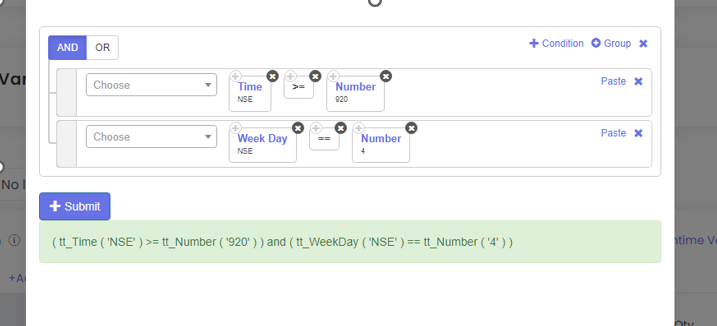 An entry condition built from keywords, with no code
Code vs no-code: what changes
| Coding it yourself (e.g. Python) | No-code builder | |
|---|---|---|
| Skills needed | Programming, broker API, data handling | Your trading rules, clearly written |
| Time to first test | Days to weeks | Minutes to hours |
| Infrastructure | Your own computer or server, running all day | Runs on the platform's cloud servers |
| Backtesting | Write or buy a backtester | Built in |
| Flexibility | Anything you can code | Whatever the builder's keywords cover (often a lot) |
| Maintenance | Yours: API changes, crashes, restarts | The platform's |
If you already code well, a builder still saves you the infrastructure work. If you don't, it is the difference between trading your idea and never getting it running.
A worked example we'll build
To keep the steps concrete, here is one simple trend-following idea, written as rules. It is an example to learn the process, not a recommendation.
Step-by-step: building the strategy without code
- Write the idea as one sentence per rule. If a rule needs the word "probably" or "looks like", it isn't a rule yet. "Buy when momentum is strong" is not buildable; "buy when RSI(14) on 5-minute candles goes above 60" is.
- Set the entry conditions. Add the indicator condition (EMA 20 crosses above EMA 50 on 5-minute candles) and a Time condition so trades only start between 09:30 and 14:30. Join them with AND.
- Add the position. Choose the instrument (NIFTY futures, current month), the side (buy) and the quantity in lots. Check what one lot is: NIFTY's lot size is 65.
- Attach the stop loss to the position. Set the stop-loss trigger as "price ≤ entry price × 0.995". Using the actual entry price means the stop follows the price you really got.
- Write the exits. One exit for the opposite crossover, one for 15:15 so nothing is carried overnight by accident.
- Decide what happens after an exit. Should the strategy look for a new entry the same day, or stop? Leaving this undecided is a common source of surprise trades.
- Backtest it. Run the rules over a few years of data that include trending, sideways and volatile periods. Read the drawdown, not just the total.
- Run it in simulation. Let it trade live prices without sending orders for a few weeks. Compare what it did with what you expected.
- Go live small. Start with the smallest size, watch the first trades closely, then scale only if live results look like the tests.
Step zero: how much does one trade risk?
Before building anything, work out what one losing trade costs. For futures it is simple arithmetic: entry price × stop distance × lot size.
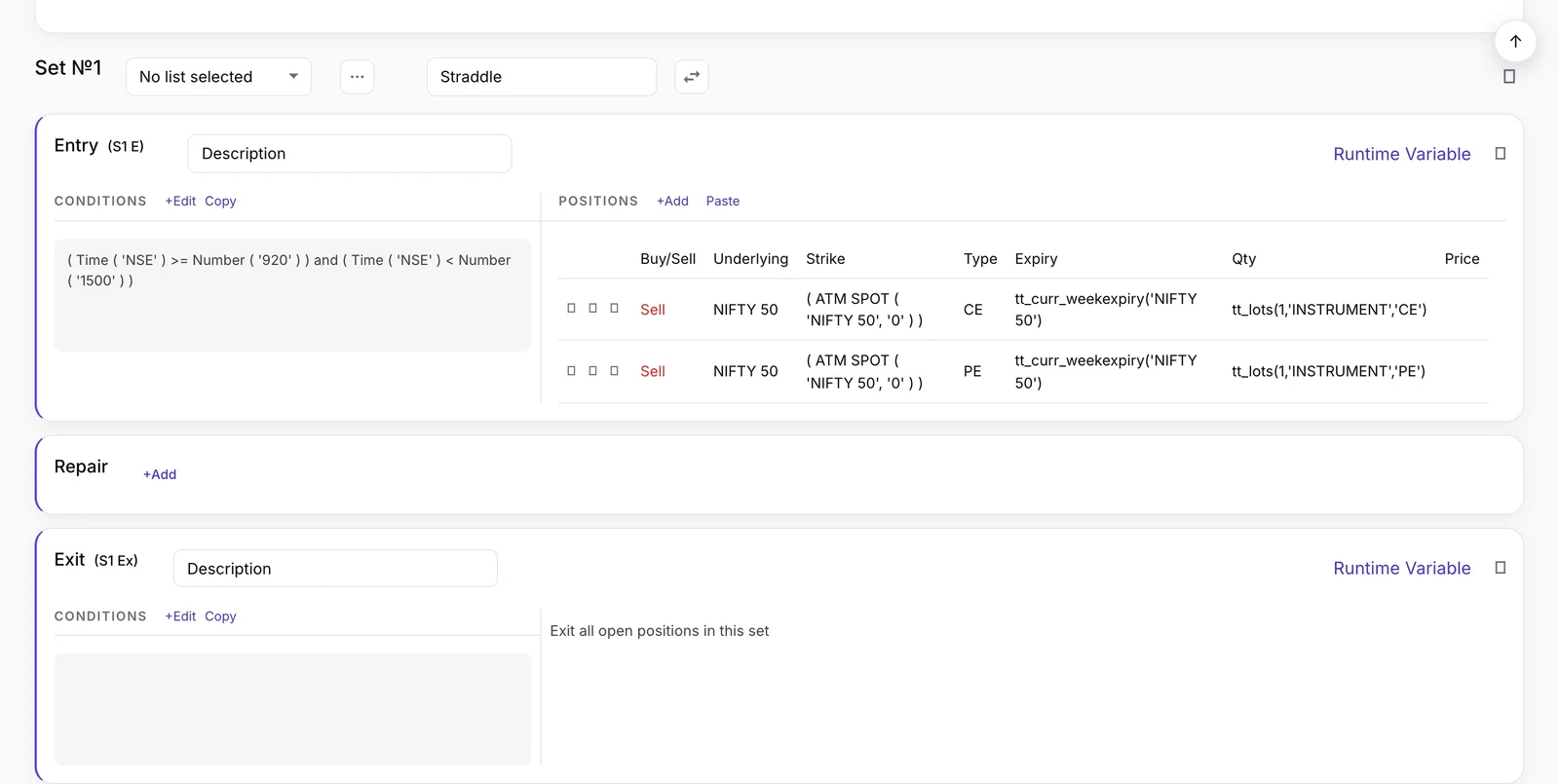 A set in the strategy builder: entry conditions on the left, positions on the right, then Repair and Exit
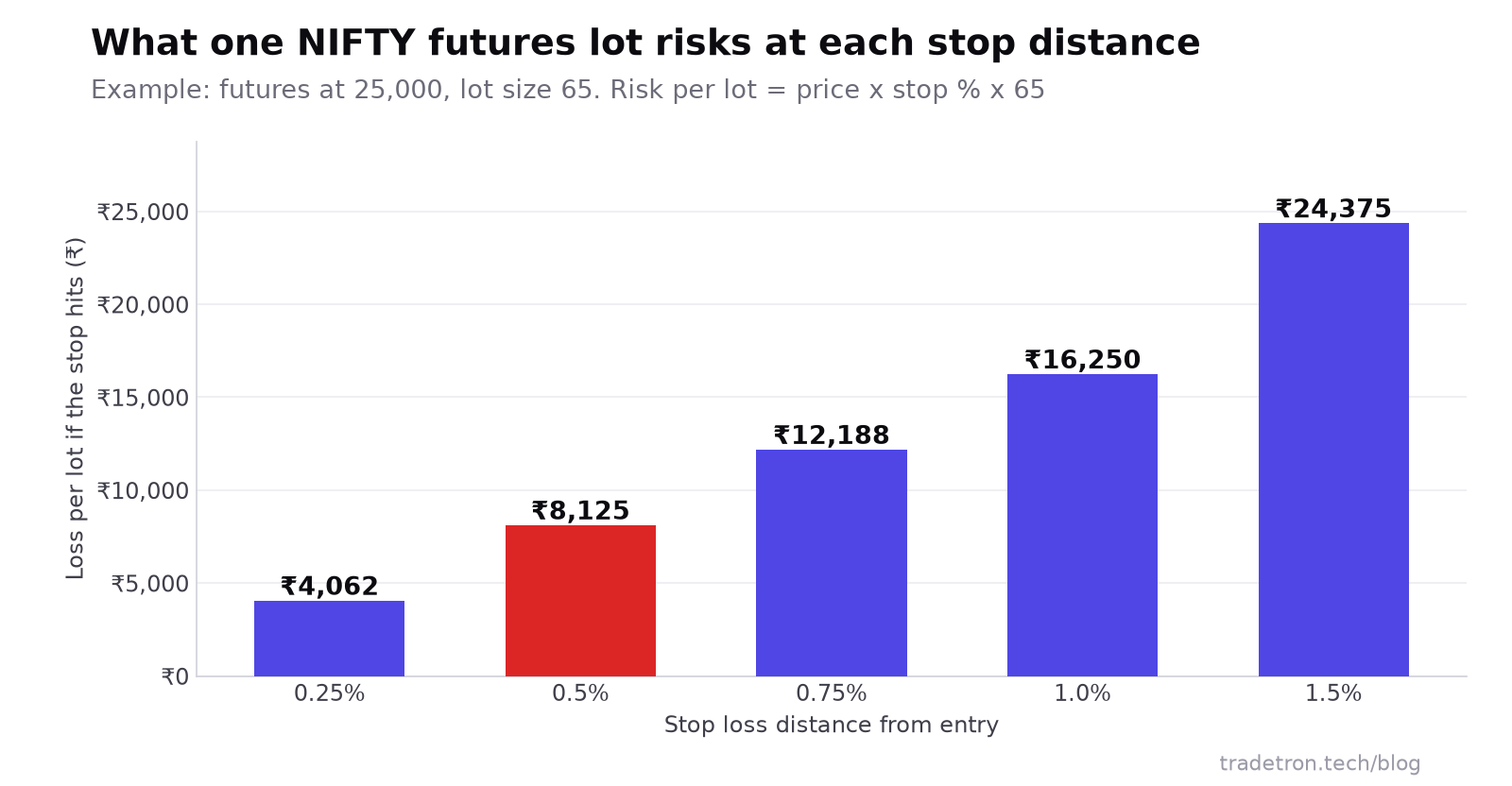 Example: the rupee risk per lot grows in step with the stop distance
Mistakes that break no-code strategies
- No exit for every situation. A strategy with an entry and a target but no time exit can carry a position overnight you never meant to hold.
- Testing on one kind of market. A crossover strategy tested only on a strong trend year will look far better than it is.
- Tuning until the backtest looks perfect. Trying fifty parameter combinations and keeping the best one mostly fits past noise. Keep parameters round and few.
- Ignoring costs and slippage. Brokerage, taxes and the gap between the signal price and the fill price add up, especially for strategies that trade often.
- Going live at full size. The first weeks live often reveal things the backtest didn't: order rejections, margin shortfalls, timing differences.
For more on the last two, see why your backtest doesn't match live trading.
Is no-code right for you?
Pros
- Build and test an idea the same day you have it
- No servers, scripts or broker-API code to maintain
- Rules are visible and easy to review or change
- Backtesting and simulated runs are part of the same tool
Cons
- Limited to what the builder's building blocks support
- Very custom logic may still need code (many builders allow some)
- Easy to build quickly, so easy to skip proper testing
- You still own the strategy's risk; the tool doesn't judge it
Next, learn the building blocks in more depth: keywords in Tradetron, repair once and repair continuous and how to deploy a strategy. Prefer to describe the strategy in words? See how to build an algo strategy using ChatGPT.
Frequently asked questions
Can I really do algo trading without knowing how to code?
Yes. A no-code builder lets you set entry, exit and stop-loss rules from menus of indicators, prices and times, and runs them on cloud servers connected to your broker. You need clear rules, not programming.
How long does it take to build a strategy without coding?
A simple rule set like an indicator crossover with a stop loss and a time exit can be built in under an hour. Testing it properly on past data and in simulation takes longer, usually a few weeks before going live.
What kinds of strategies can I build without code?
Indicator-based entries and exits, breakout rules, time-based entries, multi-leg options strategies such as straddles and spreads, and strategies that adjust positions when conditions change. What's possible depends on the keywords the builder offers.
Do I need to keep my computer on for an automated strategy?
Not on a cloud platform. The strategy runs on the platform's servers and sends orders through your broker connection, so your computer can be off.
Is a no-code strategy less reliable than a coded one?
Not inherently. Reliability comes from clear rules, complete exits and proper testing. A coded strategy has more ways to fail through bugs and server issues you manage yourself.
How do I test a strategy before risking money?
Backtest it on several years of historical data, then run it in a simulated mode on live prices. On Tradetron that mode is Live Offline: the strategy runs and records every trade, but nothing is sent to the exchange.