Tradetron में Repair Once और Repair Continuous, आसान भाषा में
यह लेख अंग्रेज़ी से अनुवाद किया गया है। मूल लेख अंग्रेज़ी में पढ़ें
Tradetron में repair condition उस position को बदलती है जो आपके पास पहले से है, और इसके लिए set के exit का इंतज़ार नहीं करती। Repair Once हर entry पर एक बार चलती है: इससे एक leg से exit करें, hedge जोड़ें या strike roll करें। Repair Continuous हर check पर चलती है जब तक उसकी condition सही है: इसे बार-बार होने वाले बदलावों के लिए इस्तेमाल करें, और इसे हमेशा एक सीमा दें।
Tradetron पर Repair Once और Repair Continuous, और हर बार-बार चलने वाली repair को ब्रेक क्यों चाहिए, 3 मिनट में।

Strategy में repair कहाँ आती है
Tradetron की strategy sets से बनती है। हर set में अलग-अलग तरह की conditions होती हैं:
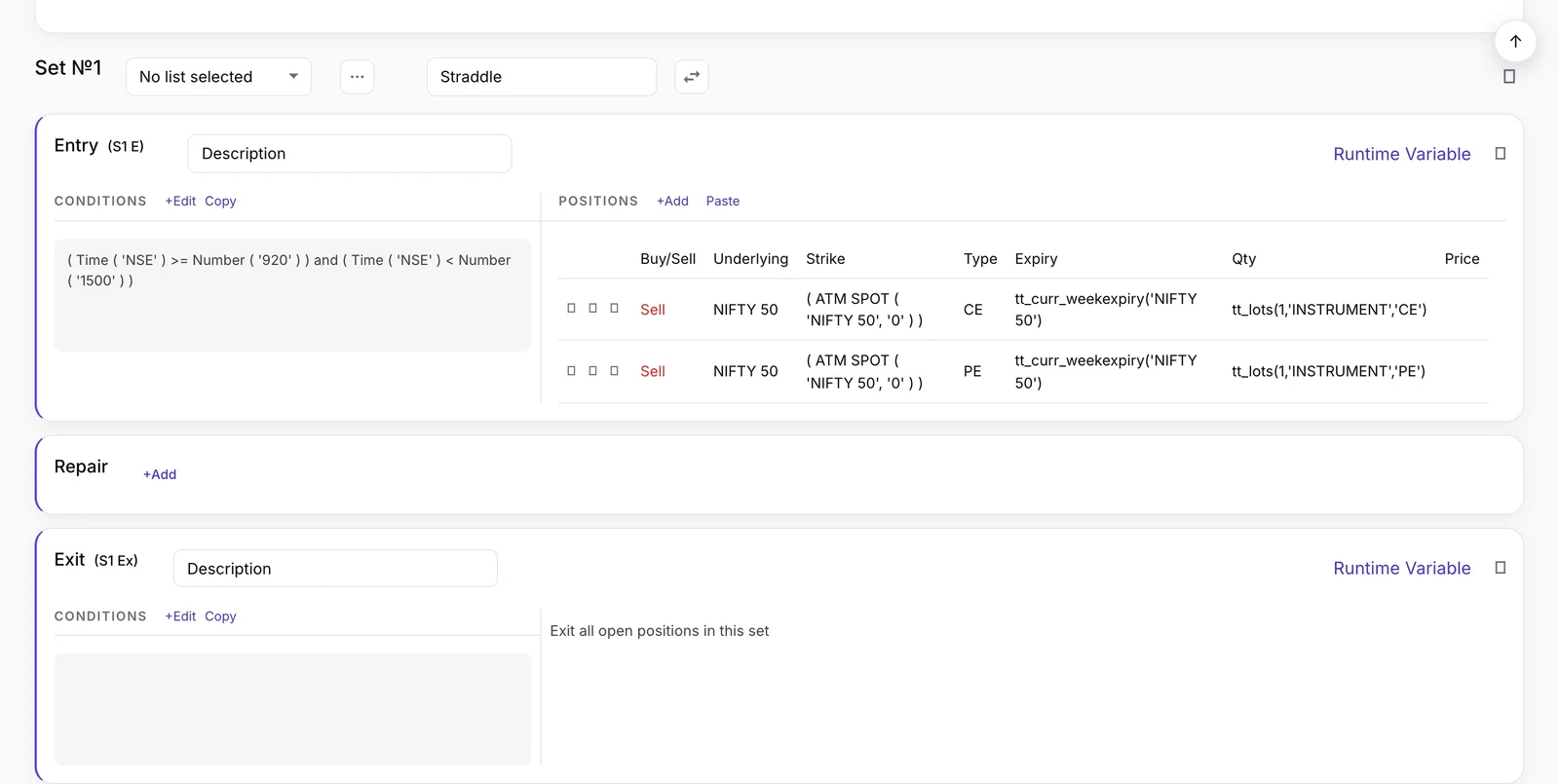 एक set का ढांचा: entry conditions, positions, फिर Repair और Exit. यह set ATM straddle बेचता है; नीचे वाला उदाहरण इसकी जगह strangle खरीदता है
| Condition का प्रकार | यह क्या करती है | कब चलती है |
|---|---|---|
| Entry | Set की positions खोलती है | एक बार, फिर exit का इंतज़ार करती है |
| Repair Once | कोई leg जोड़ती, हटाती या बदलती है | हर entry पर एक बार |
| Repair Continuous | कोई leg जोड़ती, हटाती या बदलती है | जब तक सही है, हर check पर |
| Exit | Set ने जो खोला, सब बंद करती है | सही होने पर, जब positions खुली हों |
| Universal Exit | पूरी strategy बंद करती है | सही होने पर |
Set के अंदर क्रम है: पहले Entry, फिर repairs, फिर Exit। Repair तभी चलती है जब set की entry active हो।
Multi-leg strategy एक entry पर कई positions लेती है: जैसे strangle अलग-अलग strikes पर एक call और एक put खरीदता है। Repairs की वजह से ही आप इन legs को अलग-अलग संभाल पाते हैं, ताकि एक leg बंद हो और दूसरी चलती रहे।
Repair Once बनाम Repair Continuous
फ़र्क इस बात का है कि repair कितनी बार चल सकती है।
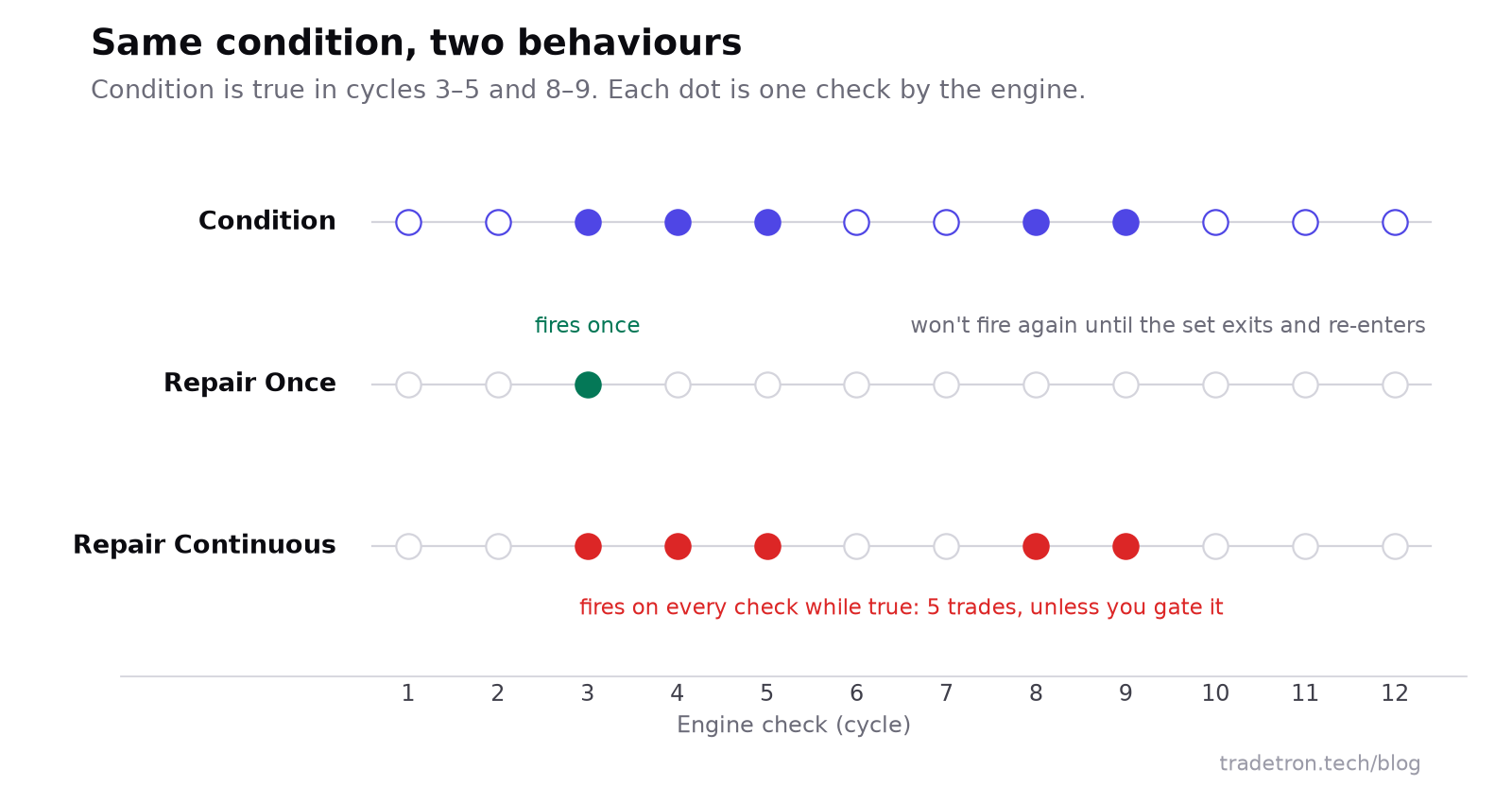 एक ही condition, जिसे Repair Once और Repair Continuous पढ़ते हैं
Repair Once पहली बार चलती है जब उसकी condition सही होती है। फिर set के exit होकर दोबारा entry लेने तक चुप रहती है। एक बार वाले कामों के लिए यही सही है:
- Leg अपने stop loss पर पहुँचे तो उससे exit करना।
- बाज़ार पहली बार आपके ख़िलाफ़ जाए तो एक hedge leg जोड़ना।
- कोई level टूटते ही short strike को एक बार roll करना।
Repair Continuous हर cycle पर फिर से check होती है, और हर बार condition सही मिलने पर चलती है। यह उन कामों के लिए है जो बार-बार होने चाहिए:
- कीमत आपके पक्ष में हर 50 points और बढ़े तो एक lot जोड़ना (pyramiding)।
- Strategy का Net Delta एक दायरे से बाहर जाए तो हर बार futures से फिर hedge करना।
- Stop हुई leg की premium हर बार entry कीमत पर लौटे तो उसमें दोबारा entry लेना।
Repairs किन keywords पर टिकी हैं
Traded Instrument
उस position से एक value लौटाता है जो आप पहले ले चुके हैं। इसके inputs:
- Condition Type: leg कहाँ खुली थी: Entry, Repair Once या Repair Continuous
- Field: कीमत, strike, quantity, P&L या समय
- Underlying: जैसे NIFTY 50
- Set Number, Condition Number, Leg Number: ठीक कौन सी leg
यानी Traded Instrument (Entry, price, NIFTY 50, 1, 1, 1) का मतलब है set 1 की पहली entry condition की leg 1 की entry कीमत।
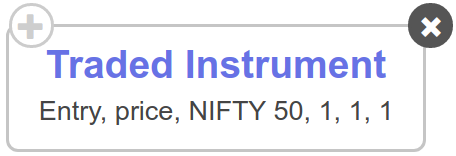 Traded Instrument keyword
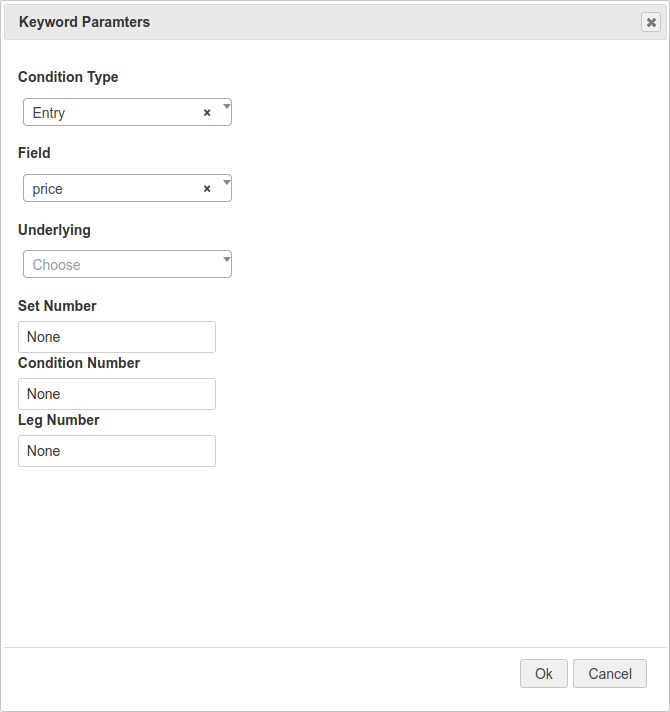 इसके inputs
Traded Instrument Name इसी तरह काम करता है, पर instrument ख़ुद (या उसकी expiry) लौटाता है। इसे LTP के अंदर रखें, तो आपको ठीक उसी option की live कीमत मिलती है जो आपने ख़रीदा था।
ATM
At-the-money strike लौटाता है, या उससे तय steps दूर की strike। ATM futures की कीमत इस्तेमाल करता है; ATM SPOT spot index की कीमत इस्तेमाल करता है और weekly NIFTY expiry के लिए आमतौर पर यही चुना जाता है।
 ATM keyword
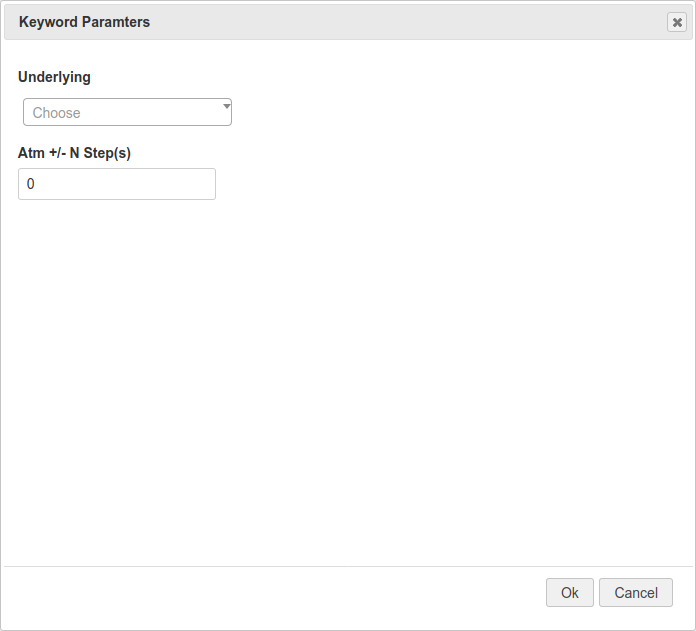 Underlying और steps की गिनती
| Steps | Call (CE) के लिए | Put (PE) के लिए |
|---|---|---|
| +1, +2, +3 | Out of the money | In the money |
| 0 | At the money | At the money |
| −1, −2, −3 | In the money | Out of the money |
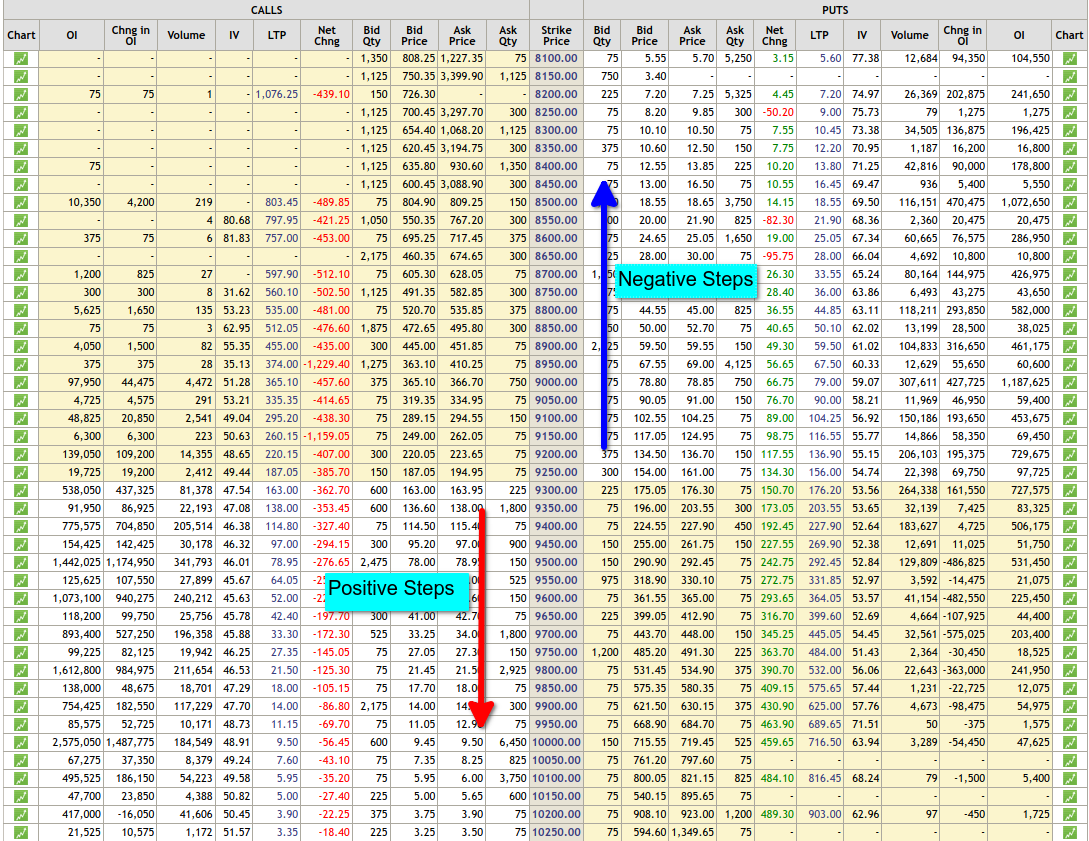 Steps option chain पर ATM से दूर की strikes गिनते हैं
Open Positions Detail
अभी जो खुला है उसे पढ़ता है। Field को count पर रखें, तो यह बताता है कि कितने instruments अभी खुले हैं; बंद हुई legs पूरी तरह हट जाती हैं। इसलिए "क्या दोनों legs अभी चालू हैं?" पूछने का यह सबसे साफ़ तरीका है। पुराना Positions Detail keyword quantity और value भी पढ़ता है, बंद हो चुकी positions की भी।
पूरा उदाहरण: एक leg वाले stops के साथ NIFTY long strangle
यह strategy हम बनाएंगे:
Long strangle किसी भी दिशा में बड़ी चाल से फ़ायदा कमाता है। अगर बाज़ार शांत रहे तो नुकसान होता है, क्योंकि समय के साथ दोनों options की value घटती है।
Step 1: entry
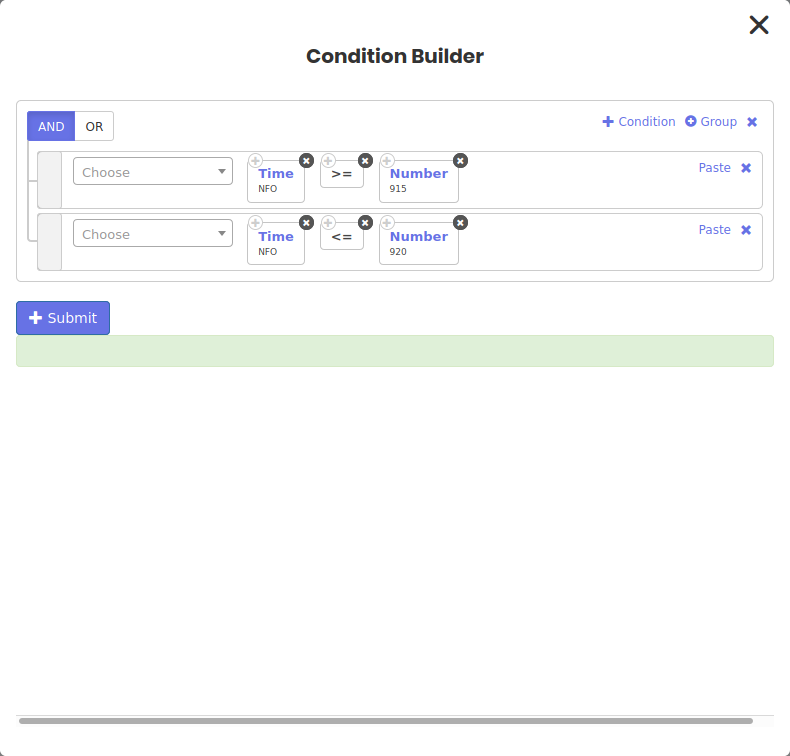 Entry: बाज़ार खुलते ही एक समय की खिड़की
Position builder में option की details चुनें और strike field में Fx चुनकर Formula Builder खोलें। वहाँ ATM keyword को call के लिए +2 और put के लिए −2 के साथ इस्तेमाल करें।
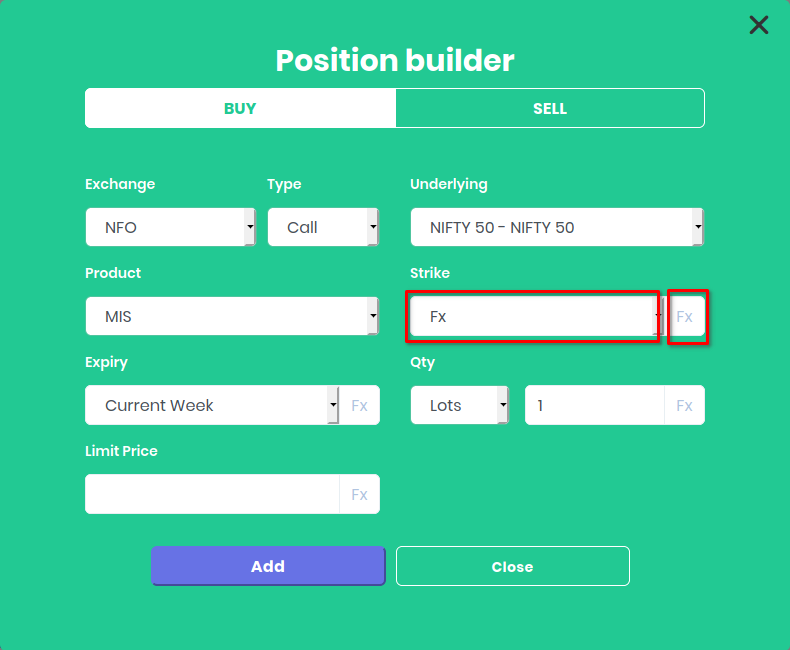 Fx से strike के लिए Formula Builder खुलता है
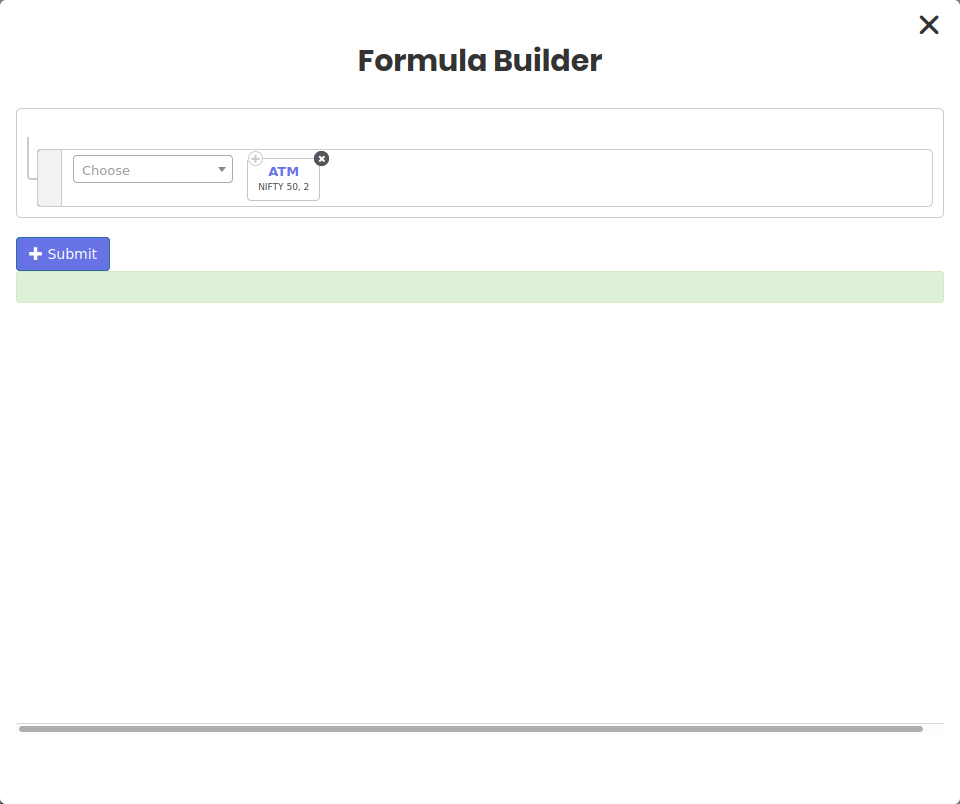 Out of the money में दो strikes
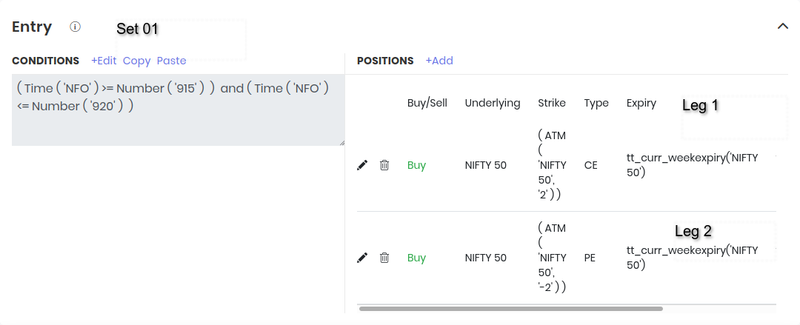 दोनों entry legs
Step 2: call के stop loss के लिए एक Repair Once
Call, set 1 की पहली entry condition की leg 1 है। इसकी stop condition है:
LTP of Traded Instrument Name (Entry, instrument, NIFTY 50, 1, 1, 1) ≤ Traded Instrument (Entry, price, NIFTY 50, 1, 1, 1) × 0.95
आसान शब्दों में: call की live कीमत आपकी चुकाई कीमत के 95% या उससे नीचे है।
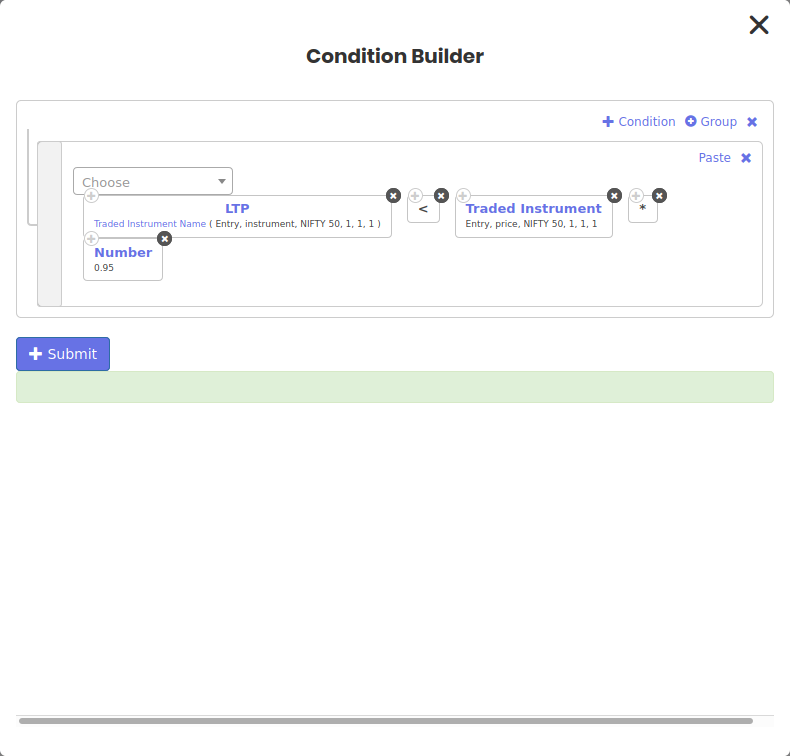 Repair 1: call का 5% stop
इस repair के position builder में उल्टा trade जोड़ें: उसी call का sell। Strike के लिए Fx में Traded Instrument और Field = strike इस्तेमाल करें, ताकि यह ठीक वही strike square off करे जो आपने ख़रीदी थी, न कि आज की ATM + 2।
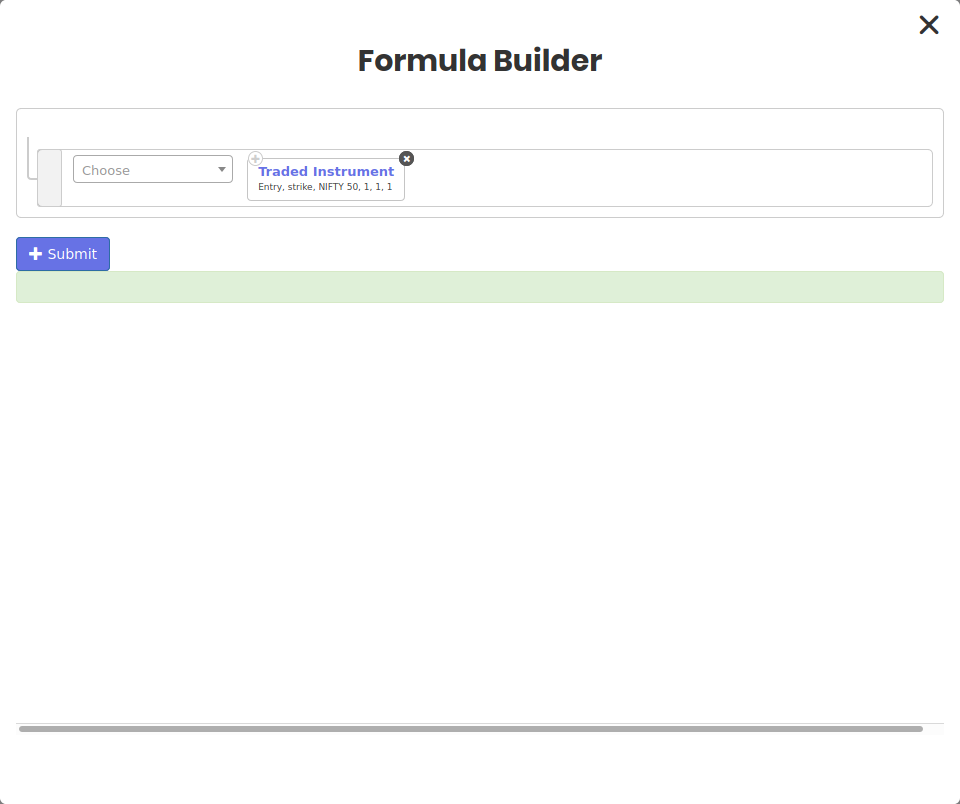 वही strike जिसमें आपने entry ली थी
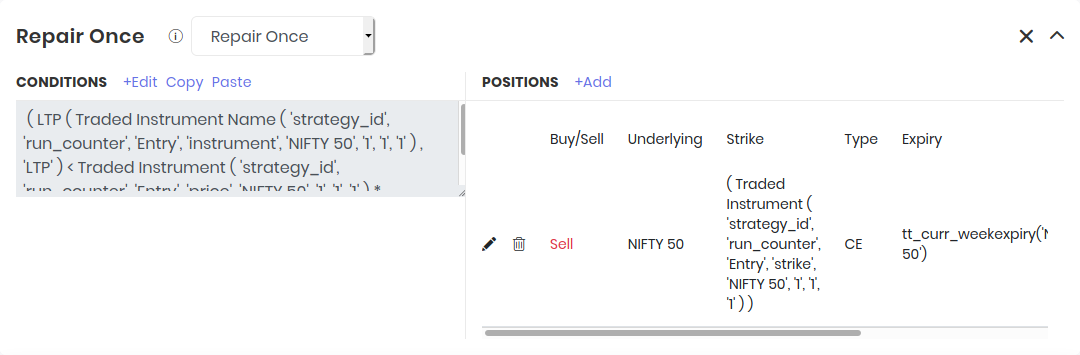 Repair 1 call बंद करती है
Step 3: put के लिए दूसरी Repair Once
Put उसी condition की leg 2 है, इसलिए stop condition और strike formula, दोनों में नंबर हो जाते हैं set 1, condition 1, leg 2।
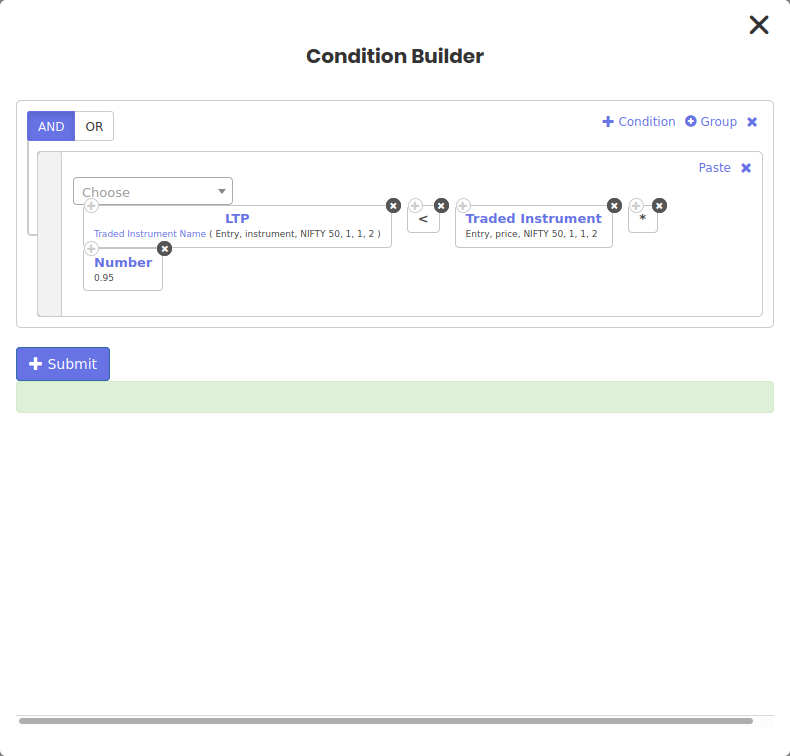 Repair 2: put का 5% stop
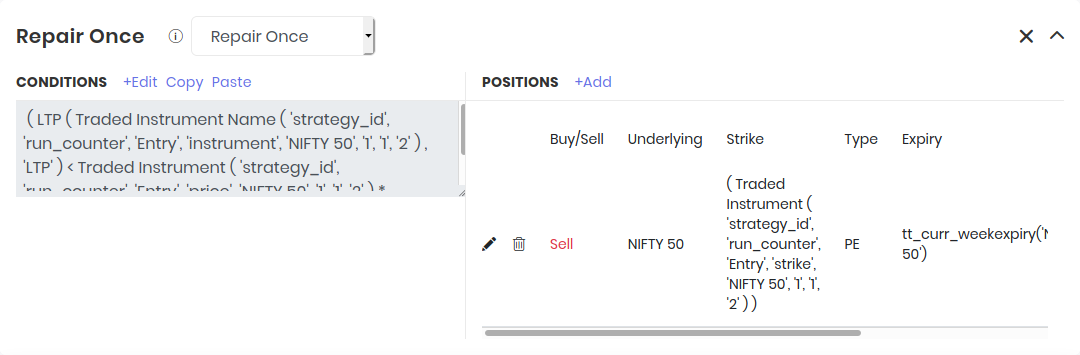 Repair 2 put बंद करती है
Step 4: पहली repair चलते ही दूसरी को रोकें
अब तक जैसा बना है, दोनों legs stop out हो सकती हैं। नियम कहता है कि सिर्फ़ पहला stop चले; बची हुई leg Universal Exit तक चले।
दोनों repairs में AND से जोड़कर एक और clause डालें:
Open Positions Detail (All, All, NIFTY 50, count) = 2
जब तक दोनों legs खुली हैं, count 2 है और कोई भी stop चल सकता है। एक leg बंद होते ही count 1 हो जाता है, इसलिए दूसरी repair अब trigger नहीं हो सकती।
Step 5: Universal Exit
आख़िर में एक Universal Exit लगाएं, जैसे बाज़ार बंद होने से पहले का कोई तय समय, ताकि जो भी अभी खुला है वह square off हो जाए।
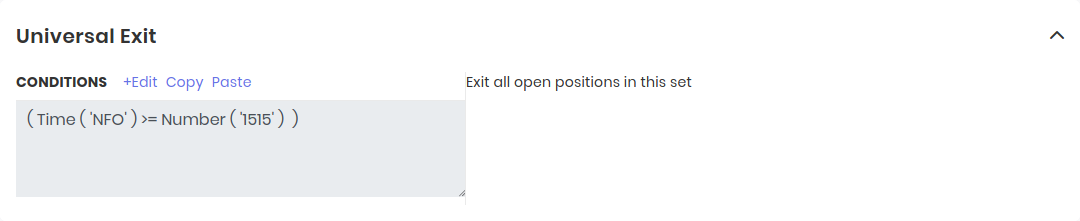 Universal Exit जो बचा है उसे बंद करता है
Repairs के साथ आम गलतियाँ
| गलती | क्या होता है | सुधार |
|---|---|---|
| बिना सीमा की Repair Continuous | Deployment Blocked होने तक हर check पर trade करती है | Runtime variable से या चलने के बाद ग़लत हो जाने वाली condition से रोक लगाएं |
| ग़लत leg number | Stop दूसरी leg पर नज़र रखता है | Legs उसी क्रम में गिनें जिसमें वे entry में दिखती हैं |
| Traded Instrument की जगह ATM से strike | Square-off दूसरी strike बेचता है और नई position खोल देता है | Traded Instrument, Field = strike इस्तेमाल करें |
| Hard-coded quantities | Lot size बदलने पर टूट जाती हैं | Counts इस्तेमाल करें, या Traded Instrument के साथ Field = quantity |
| Entry और exit एक साथ सही | Set loop में खुलता और बंद होता रहता है | Exit को entry का उल्टा बनाएं, या एक guard जोड़ें |
आगे पढ़ें: Tradetron में keywords, logical operators, Advanced Settings और strategy को debug कैसे करें।
अक्सर पूछे जाने वाले सवाल
Tradetron में Repair Once और Repair Continuous में क्या फ़र्क है?
Repair Once पहली बार चलती है जब उसकी condition सही होती है, और फिर set के exit होकर दोबारा entry लेने तक रुकी रहती है। Repair Continuous हर cycle पर check होती है और हर बार condition सही होने पर चलती है, इसलिए एक ही entry के दौरान यह कई बार काम कर सकती है।
Repair Continuous कब इस्तेमाल करूँ?
उन कामों के लिए जो trade के दौरान बार-बार होने चाहिए, जैसे हर नए price step पर एक lot जोड़ना, delta खिसकने पर फिर hedge करना, या stop हुई leg में दोबारा entry लेना। हमेशा एक सीमा जोड़ें, जैसे एक runtime variable जिसे यह update करे या एक counter जिसकी हद तय हो।
Repair जोड़ने के बाद मेरी strategy Blocked क्यों हो गई?
सबसे आम वजह है ऐसी Repair Continuous जिसकी condition सही ही बनी रहती है, इसलिए वह हर check पर trade करती है। दूसरी वजह है entry और exit का एक साथ सही होना। Repair में एक रोक जोड़ें, या entry और exit को ऐसा बनाएं कि दोनों एक साथ सही न हों।
Multi-leg strategy की सिर्फ़ एक leg से exit कैसे करूँ?
उस leg की exit condition के साथ एक Repair Once जोड़ें, और उसके position builder में उसी instrument पर उल्टा trade रखें। Traded Instrument के साथ Field = strike (और expiry के लिए Traded Instrument Name) इस्तेमाल करें, ताकि ठीक वही leg बंद हो जिसमें आपने entry ली थी।
Traded Instrument क्या लौटाता है?
यह उस position से एक value लौटाता है जो आप पहले ले चुके हैं: उसकी कीमत, strike, quantity, P&L या समय। कौन सी leg, यह आप condition type, set number, condition number और leg number से चुनते हैं।
क्या repairs वाली strategies का backtest कर सकते हैं?
हाँ। Repairs strategy के logic का हिस्सा हैं, इसलिए Tradetron backtest में वे वैसे ही चलती हैं जैसे live में। Backtest की trade list देखकर पक्का करें कि हर repair उसी समय चली जब आप उम्मीद कर रहे थे।