Automated Trading Workflow: From Strategy Idea to Monitored Trades
An automated trading workflow is the full path a strategy takes from idea to live trading: writing exact rules, building them in a platform, backtesting, a live test run, setting risk limits, connecting a broker, going live small, automatic order execution, monitoring and periodic review. Only the execution step runs on its own. Every other stage needs your decisions.
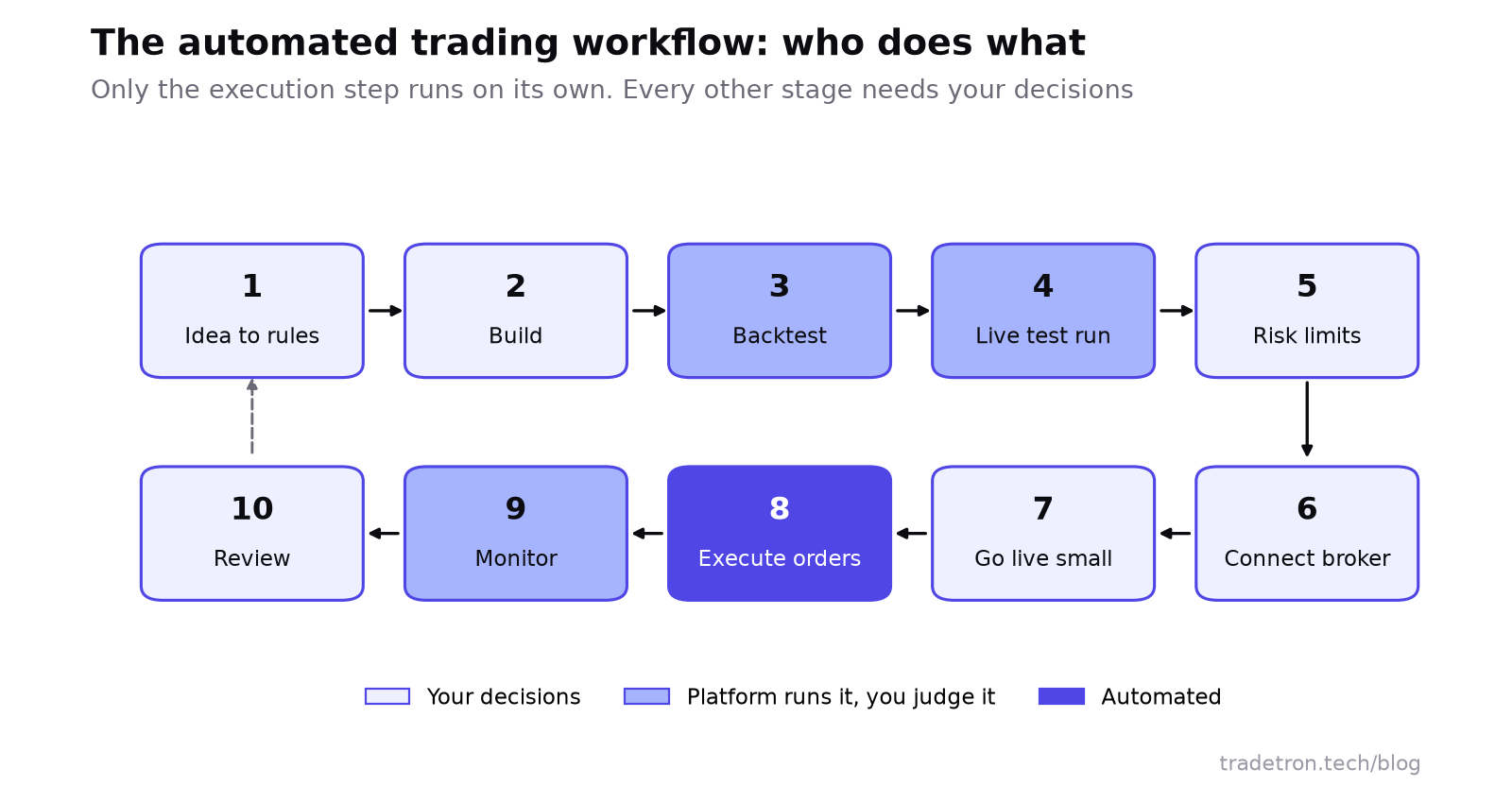 The automated trading workflow, and who does what at each stage
What "automated" actually means
A platform continuously checks your predefined conditions and places, modifies or exits orders when those conditions are met, so you don't enter each trade by hand. It does not decide whether your strategy still makes sense. Brokers can disconnect, markets can move outside anything your backtest covered, and a sizing rule can do something you didn't intend. Execution runs on rules; judgment, risk oversight and review still need you.
Stage 1: Turn the idea into exact rules
Every strategy starts as an idea: sell a strangle when implied volatility is high, buy a breakout above the previous day's high, hedge a short option once it moves too far against you. Before it touches a platform, write it as explicit rules:
| Question | Vague | Exact |
|---|---|---|
| When to enter? | "When the market looks strong" | "When NIFTY's 5-minute close is above the day's first 15-minute high" |
| What to trade? | "Nifty options" | "Sell 1 lot of the ATM call and put, current weekly expiry" |
| When to exit? | "When it's enough profit" | "At 30% of premium collected, or 15:15, whichever comes first" |
| Stop loss? | "If it goes badly" | "Exit a leg if its premium rises 40% above entry" |
| How much? | "A few lots" | "1 lot per ₹X of capital, decided in advance" |
Stage 2: Build the strategy
The rules are then configured in a platform. On a no-code builder this means conditions made of keywords (prices, indicators, time) rather than code. For common options structures, a template wizard can fill in the legs, and you add the target, stop loss and trailing stop. You can also start from a strategy someone else built and adapt it.
A detailed walkthrough is in building automated trading strategies without coding.
Stage 3: Backtest on historical data
A backtest runs your rules over past prices to show how they would have behaved. It won't predict tomorrow, but it surfaces obvious flaws: a stop so tight it triggers on noise, an entry that almost never fires, a strategy that only worked in one volatile year.
- Use enough history. Twenty trades over three months is not evidence. Aim for hundreds of trades or several years, covering calm, trending and volatile periods.
- Read the drawdown first, then the returns. The worst losing stretch is what you must live through.
- Watch for overfitting. Rules tuned until the backtest looks perfect usually fail on new data.
Backtests use candle prices rather than the live order book, so expect live fills to differ. More in nine reasons your backtest doesn't match live trading.
Stage 4: Run it live without sending orders
A live test run trades your strategy on real-time prices while sending nothing to the exchange. It catches what backtests can't: how quickly signals turn into orders, how the strategy behaves when prices move fast, whether exits fire the way you expect.
Run it for at least a few weeks, and compare each trade with what you expected. Skipping this stage is one of the most common ways a well-tested idea becomes an expensive lesson.
Stage 5: Set the risk limits
Risk management is a layer under the whole workflow, not a box ticked at the end:
- Per position: stop loss and target on every leg.
- Per strategy: a maximum daily loss, and a trailing stop on total profit.
- Per account: how much capital and margin all your strategies together may use.
See seven ways to reduce drawdown for practical limits.
Stage 6: Connect your broker
A strategy can't trade until it is linked to a broker account through the broker's API. This connection fetches live data and places, modifies and cancels orders in your account. Under SEBI's algo framework it also carries the identifiers that make each order traceable; see is algo trading legal in India.
Stage 7: Go live small
Deploy with the smallest size first, often one lot or a low multiplier. Watch the first few sessions closely: fills, slippage, margin, and whether every order matches the rules. Scale only when live behaviour matches your tests.
Stage 8: Automated order execution
This is where automation earns its place. Entries aren't missed because you were away for ten minutes, exits don't hesitate because a trade feels uncomfortable, re-entries don't get typed wrong.
But automatic is not the same as unsupervised. An API connection can drop mid-session, an order can be rejected for insufficient margin, or a partial fill can quietly leave a position under-hedged. The strategy can follow its rules perfectly while the rules no longer suit the market.
Stage 9: Monitor
Build a routine you will actually keep: a quick check after the open, another before the close, and a longer weekly review. Look at:
- Live P&L against expectations from the backtest and the live test run.
- Broker connection status, especially after re-logins or token expiry.
- Fill quality: are orders filling near the expected prices, or is slippage larger than planned?
- Risk limits: did stops, daily loss caps and sizing trigger as configured?
- Unexpected behaviour: any trade that doesn't match the strategy's logic.
- Market conditions: a strategy built for range-bound markets can struggle when volatility shifts.
Stage 10: Review, then keep, fix or stop
After a meaningful stretch of live trading, compare actual results with the tests: win rate, drawdown, slippage, behaviour in different market conditions. Then make one of three decisions: keep it running, pause it for rework, or retire it. Decide the stop criteria in advance (for example, a drawdown larger than the worst seen in testing) so you aren't deciding under pressure.
Related guides: how to deploy a strategy in Tradetron, how to debug a strategy and what to do when live trades don't perform as expected.
Frequently asked questions
What is an automated trading workflow?
It is the full sequence a strategy goes through: writing rules, building the strategy, backtesting, a live test run, setting risk limits, connecting a broker, deploying small, automated order execution, monitoring and periodic review.
Can I leave an automated strategy running without checking it?
No. Automation handles order placement, but broker connectivity, fills, risk limits and whether the strategy still suits the market need regular checks. A short routine at the open and close, plus a weekly review, is a practical minimum.
Do I need to code to build an automated trading workflow?
No. No-code platforms let you set entry, exit, sizing and risk rules from menus of keywords. Code helps only for unusually custom logic.
What is the difference between a backtest and a live test run?
A backtest applies your rules to historical candle data to see how they would have behaved. A live test run applies them to real-time prices without sending orders, which shows execution timing and behaviour that historical data can't.
How long should I test before going live?
Backtest over several years and hundreds of trades if the strategy trades often enough, then run it live without orders for at least a few weeks. Go live at the smallest size and scale up gradually.
Does automated trading reduce risk?
It removes execution errors and emotional decisions, but not market risk, technical risk or the risk of a bad strategy. Those are managed by testing, risk limits and monitoring.