By Tradetron · Updated September 2026 · 8 min read
What is Live Offline? A Complete Guide for Indian Traders
Live Offline is how you test a strategy on Tradetron. Your strategy runs on the live engine against live market data, exactly as it would when trading, and every entry, exit, position and P&L is recorded. The one difference: no order is sent to your broker or the exchange, so no real money changes hands.
Think of it like a flight simulator for traders. A pilot doesn't take their first solo flight without hundreds of hours in a simulator first — and serious traders don't risk real capital without first testing their strategies in a simulated environment.
Why do Indian traders test a strategy before going live?
The Indian stock market — particularly the F&O (Futures and Options) segment — is one of the most traded derivatives markets in the world. While the opportunities are enormous, so is the risk. Statistics consistently show that the majority of first-year traders lose money, primarily because they deploy strategies that have never been properly tested.
Running the strategy in Live Offline first solves this problem. It allows you to:
Test your strategy in live Nifty, BankNifty, and F&O market conditions without any financial risk
Understand how your algo behaves across different market scenarios — trending, sideways, volatile
Fine-tune parameters, lot sizes, and exit conditions without paying the price of a mistake
Develop the discipline and emotional composure that real trading demands
Whether you are a complete beginner or an experienced algo trader testing a new strategy, a Live Offline run is the smartest first step before going live.
Backtesting vs Live Offline vs Live Trading — What's the Difference?
Many traders confuse these three terms. Here is how they differ:
Method
Data Used
Money at Risk
Best For
Backtesting
Historical (past) data
None
First validation — how did it perform in the past?
Live Offline
Live, real-time data
None (no order is sent)
Second validation — how does it perform right now?
Live Trading
Live, real-time data
Real capital
After confidence from both above steps
Backtesting tests your strategy against historical NSE/BSE data. Tradetron's backtesting engine supports years of historical tick data for Nifty, BankNifty, Finnifty, Sensex, and more.
Live Offline (forward testing) is the next step — the strategy runs in live market conditions and records every trade, without sending an order. This captures real-world factors like news events, volatility spikes, and liquidity gaps that historical data cannot replicate.
Live Trading is deploying with real capital after sufficient confidence from both steps above.
The recommended sequence: Backtest → Live Offline → Live Trade. Skipping the Live Offline step is one of the most costly mistakes Indian algo traders make.
Live Offline on Tradetron — How It Works
Tradetron is India's most powerful algorithmic trading platform — trusted by over 1 lakh traders, 11,000+ algo strategies deployed, and more than 1.5 million trades executed every month. It connects with 35+ Indian and US brokers, supports equity, options, futures, commodities, and crypto, and hosts India's largest algo strategy marketplace.
Live Offline lets you run any algo strategy on Tradetron's live engine in real-time market conditions with no money at risk. Whether you are testing your own custom strategy built on TT Condition Builder, or a marketplace strategy you have subscribed to, Live Offline runs it exactly as it would in Live Auto — tracking entries, exits, positions, and P&L in real time — and simply sends no order to the exchange.
This means that when you switch from Live Offline to live trading, the strategy runs the same logic it ran in Live Offline. No surprises from the rules themselves — the only new thing is real fills from the market.
How to Run a Strategy in Live Offline — Step-by-Step Guide
Here is a step-by-step guide to running your strategies in Live Offline on Tradetron:
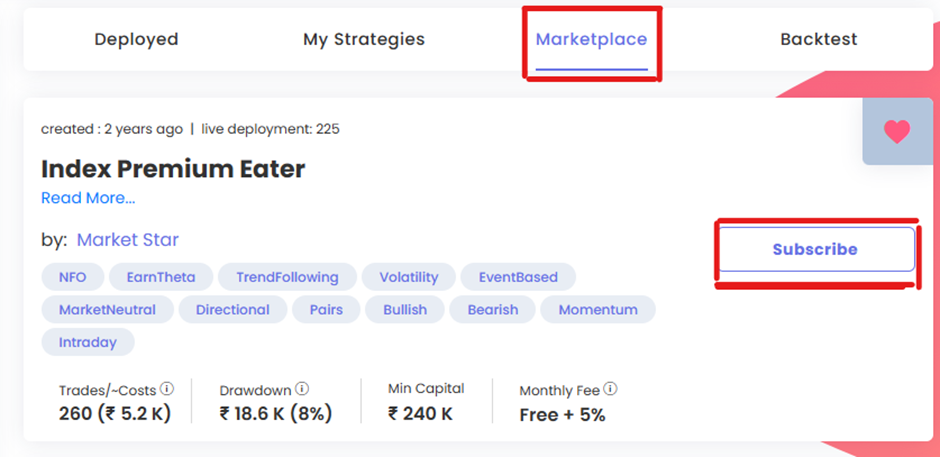
Choose or create your algo strategy. You can create your own strategy using TT – Condition Builder, or subscribe directly to any marketplace algo. If you are new to Tradetron, watch this YouTube playlist to understand how to build strategies. To subscribe to a marketplace strategy, go to Marketplace, select the strategy, and click Subscribe.
Go to My Strategies and click Deploy. Once you subscribe to a marketplace strategy or create your own strategy, all your algos are visible under the "My Strategies" section. Simply go to "My Strategies" and then click on Deploy.
Select Live Offline as the execution type. Once you click the "Deploy" button you get options to select "Multiplier", "Execution type" and "Broker". "Multiplier" in Tradetron means that if you select 2x while deploying, it will double the lots. Choose Live Offline under execution type, pick your broker for each exchange, and click "Deploy". In Live Offline no order is sent to that broker.
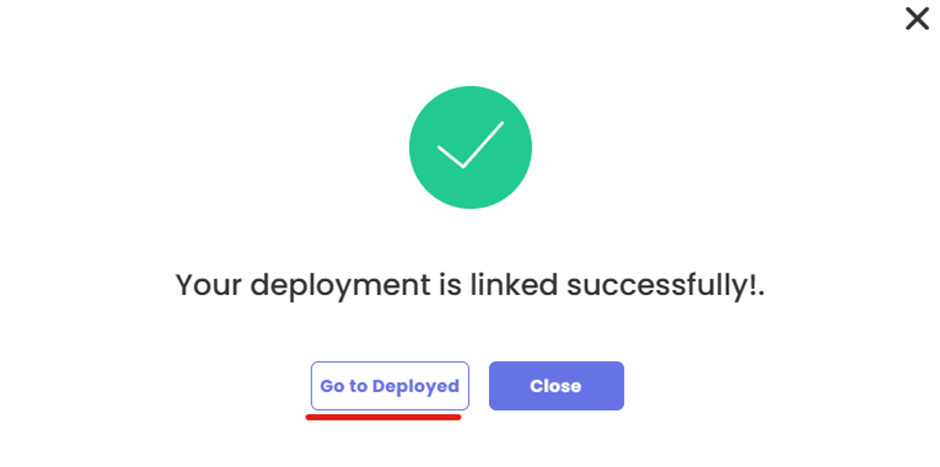
Confirm deployment and go to Deployed page. Once you click on Deploy, Tradetron replies with a confirmation message. You can simply click on "Go to Deployed" which will direct you to the Deployed page where all of your Live Offline deployments will be visible to you.
Monitor and fine-tune on the Deployed page. This is the final step where you can check the open positions of your deployed algo strategy on Tradetron's Deployed page. If the strategy is created by you on Tradetron then you can check the "Notification logs" in which you can understand the Entry – exit criteria of your algo and on the basis of that you can even fine tune your algo trading strategy. Deployed page is filled with lots of options — you can pause or exit the algo strategy from the Deployed page itself.
Instruments Available in Live Offline on Tradetron
Live Offline supports virtually all instruments available on Indian exchanges — making it one of the most comprehensive ways to test an algo strategy in India.
Equity & Derivatives (NSE/BSE). Nifty 50, BankNifty, Finnifty, Midcap Nifty, Sensex, Bankex, and individual stocks. Run intraday, positional, and overnight options strategies in Live Offline across weekly and monthly expiries.
Options Strategies. Test multi-leg options strategies — straddles, strangles, iron condors, credit spreads, ratio spreads, and more — running in real market conditions with real IV and Greeks. This is particularly useful for options sellers who want to validate strategies across different volatility regimes before going live.
Futures & Commodities. Run futures on Nifty, BankNifty, stocks, and commodity contracts — metals, energy, and agricultural — in Live Offline to test risk-reward assumptions before committing capital.
Crypto (via Delta Exchange & CoinDCX). Run Bitcoin, Ethereum, and altcoin strategies in Live Offline through Tradetron's integrations with Delta Exchange and CoinDCX.
5 Key Benefits of Live Offline
Testing with No Money at Risk. The most obvious benefit of Live Offline is the ability to test your algo trading strategies without any financial risk. You can experiment with various algorithms, fine-tune them, and ensure they meet your trading objectives.
Real Market Conditions. Live Offline runs on the live engine with live market data, including price movements, entries and exits, and P&L-based exits. This creates a lifelike testing environment to make more accurate assessments.
In-Depth Analysis. The platform provides detailed performance metrics and historical data for your own created algorithm. You can assess the success of your strategies and understand their strengths and weaknesses. You can view statistics of your strategy on the Deployed page by simply clicking on the 3 small dots beside the name of your strategy.
Window into Personal Trading Style. Live Offline goes beyond practice; it acts as a powerful tool for self-discovery. It serves as a magnifying glass, helping you identify your trading strengths and weaknesses. By running strategies in Live Offline, you gain insights into your risk tolerance, patience levels, and how you react to market fluctuations. This process paves the way for crafting your unique trading style tailored to your personality and preferences.
Educational Value. For beginner traders, Live Offline is an excellent educational tool. It helps traders understand trading principles, risk management, and the psychology of trading.
When Should You Move from Live Offline to Live Trading?
This is one of the most searched questions by Indian traders considering algo trading for the first time — and there's no universal answer, but there are clear signals to look for:
Consistent results across 30+ trading days. A strategy that has run for a single week may have been lucky. One that has run consistently across 30+ trading sessions — across different market conditions, budget days, event weeks — has statistically meaningful results.
Acceptable maximum drawdown. Review the drawdown chart in Tradetron's statistics panel. If the maximum drawdown seen in Live Offline is something you could emotionally and financially absorb in live trading, you are ready to proceed.
You understand every trade. If a Live Offline run takes an unexpected entry or exit, you should be able to explain why by reviewing the notification logs. If trades are happening that you don't understand, spend more time in Live Offline.
Start with 0.5x or 1x multiplier live. When you do go live, start small. Tradetron's multiplier lets you go live at a fraction of the capital while keeping the strategy identical.
Live Offline runs any algorithmic trading strategy on Tradetron's live engine in real-time market conditions. The strategy runs exactly as it would when trading live — same entries, exits, and P&L tracking — and every trade is recorded, but no order is sent to the exchange, so no real money is used.
No. You choose a broker for each exchange when you deploy, but in Live Offline no order is sent to the broker or the exchange. The strategy's trades and P&L are recorded on Tradetron only.
Backtesting tests a strategy against historical (past) market data. Live Offline (forward testing) runs the strategy in live, real-time market conditions and records every trade without sending an order. Both are complementary — backtest first, then run it in Live Offline.
Nifty, BankNifty, Finnifty, Midcap Nifty, Sensex, Bankex, individual NSE/BSE stocks, stock futures, commodity futures, and crypto via Delta Exchange and CoinDCX.
All performance is visible on Tradetron's Deployed page. Click the three-dot menu beside your strategy name to access full statistics: trade-by-trade P&L, win rate, maximum drawdown, and average profit/loss per trade.
Yes. Any strategy from Tradetron's marketplace that you subscribe to can be deployed in Live Offline. Simply subscribe to the strategy, go to My Strategies, click Deploy, and select Live Offline as the execution type. This is a great way to evaluate a marketplace strategy before you trade it live.
The Multiplier setting controls the lot size of your strategy. A 1x multiplier deploys at the default lot size defined in the strategy. A 2x multiplier doubles the lots. For a Live Offline run, we recommend starting at 1x to see realistic capital requirements before scaling up.
We strongly recommend against skipping it. Real algo trading involves real capital, and even well-designed strategies can behave unexpectedly in live market conditions. Running a strategy in Live Offline for at least 30 days gives you meaningful performance data, identifies edge cases in your strategy logic, and builds the confidence needed for live trading. It is the cheapest insurance against a costly live trading mistake.
Tradetron's key differentiators are: a live strategy marketplace with 11,000+ community-built algos, support for 35+ brokers for live deployment, crypto strategies in Live Offline via Delta Exchange, positional and overnight strategy support, and US market strategies — features that AlgoTest and Streak do not offer together in one platform.
Yes. Tradetron allows you to deploy multiple strategies in Live Offline at the same time. Each deployment runs independently and tracks its own P&L, positions, and notification logs. This is useful for comparing strategy performance side-by-side before deciding which to take live.
Go to the My Strategies page and click Deploy on the strategy you want to put live. Select Live Auto from the "Select Execution Type" dropdown. Then choose the multiplier — we suggest starting with a small multiplier initially. Next, select your broker and click Deploy.