

When a condition uses Get Runtime and Traded Instrument together, order the lines so each value exists before you use it. This prevents errors where a runtime value or an untraded instrument is read too early.
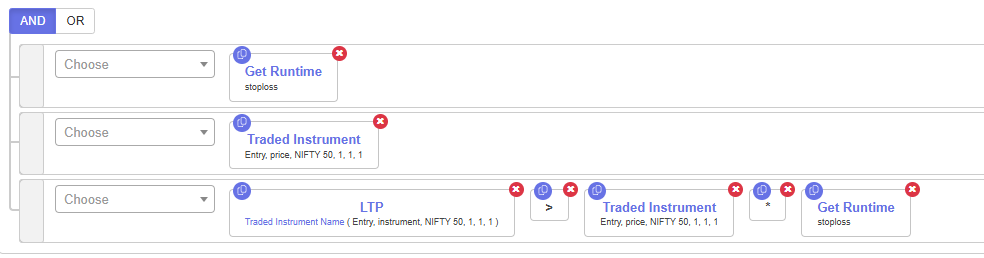
The structure (top to bottom)
- Line 1: Get Runtime. Confirms the runtime variable (for example,
stoploss) has a value. If it has none, the rest is not evaluated. - Line 2: Traded Instrument. Confirms the instrument has actually been traded.
- Line 3: the math. Only now compare values, for example the LTP of the traded instrument against the runtime stop-loss.
Best practices
- Keep Get Runtime and Traded Instrument as standalone checks at the top of the group.
- Do not start the group with a math expression.
- Reference the same traded instrument that was actually executed.
- Use keywords exactly as they appear in the builder.
- Use Traded Instrument for price or strike data. Traded Instrument Name only returns a text label.
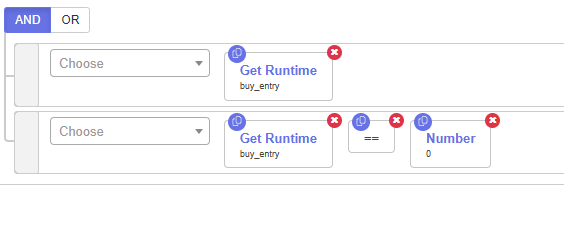
Avoid checking Get Runtime == 0
Do not gate a condition directly on Get Runtime == 0. Check Get Runtime as a standalone line first, then apply your logic.
 Edited with AI from the original Tradetron article, checked against current docs (Oct 2026). Spot something wrong? Tell us in the Community.