Logical Operators in Tradetron: AND, OR and Groups
Logical operators in Tradetron decide how several conditions combine. With AND, an entry or exit happens only when every condition is true. With OR, it happens when any one condition is true. Groups let you mix the two, for example "(both of these) OR (both of those)", so you can express almost any rule without code.

The two logical operators
| Operator | The block is true when... | Typical use |
|---|---|---|
| AND | every condition in it is true | Entries that need several confirmations |
| OR | at least one condition in it is true | Exits with several possible triggers |
In the condition builder, each block of conditions has an AND / OR toggle at its top left. Whatever you pick there joins all the conditions in that block.
Logical AND: every condition must be true
Say you want to enter only when all three of these hold on NIFTY futures (5-minute candles):
- RSI is above 80.
- The previous candle closed above its open (a green candle).
- The previous candle closed above the EMA.
Build the three conditions in the Entry block and set the toggle to AND. The position is taken only when all three are true together.
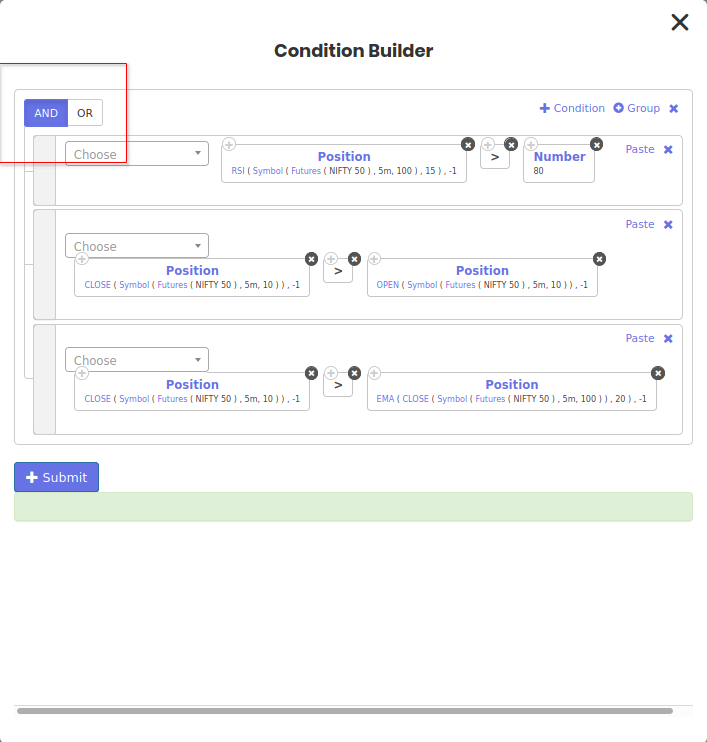 AND selected: the entry needs all three conditions
The truth table shows why AND is strict. With three conditions there are eight combinations, and only one passes:
| A | B | C | AND result |
|---|---|---|---|
| FALSE | FALSE | FALSE | Fail |
| FALSE | FALSE | TRUE | Fail |
| FALSE | TRUE | FALSE | Fail |
| FALSE | TRUE | TRUE | Fail |
| TRUE | FALSE | FALSE | Fail |
| TRUE | FALSE | TRUE | Fail |
| TRUE | TRUE | FALSE | Fail |
| TRUE | TRUE | TRUE | Pass |
Logical OR: any one condition is enough
Exits are where OR shines. Say you want to exit NIFTY futures when the price is 100 points above your entry (target) or 50 points below it (stop):
- LTP > EntryPrice + 100
- LTP < EntryPrice − 50
Put both in the Exit block and set the toggle to OR. Whichever happens first closes the trade.
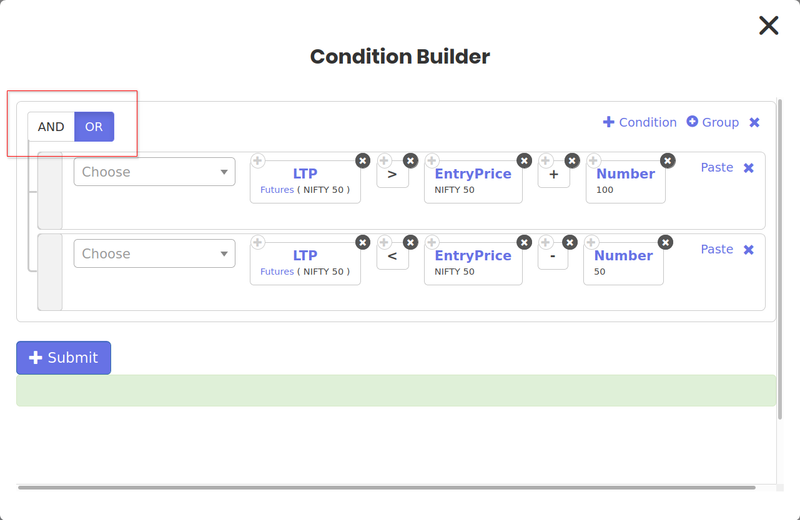 OR selected: target or stop, whichever comes first
For OR, the truth table is the mirror image. Only one combination fails:
| A | B | C | OR result |
|---|---|---|---|
| FALSE | FALSE | FALSE | Fail |
| FALSE | FALSE | TRUE | Pass |
| FALSE | TRUE | FALSE | Pass |
| FALSE | TRUE | TRUE | Pass |
| TRUE | FALSE | FALSE | Pass |
| TRUE | FALSE | TRUE | Pass |
| TRUE | TRUE | FALSE | Pass |
| TRUE | TRUE | TRUE | Pass |
Groups: mixing AND and OR
What if some conditions must hold together, but you have two different setups that should each trigger an entry? That's what groups are for. You add a group with + Group in the condition builder; each group has its own AND/OR toggle.
Example: take an entry when either setup is true.
- Group A: previous candle is green (close > open) AND previous close > EMA
- Group B: RSI > 80 AND previous close > WMA
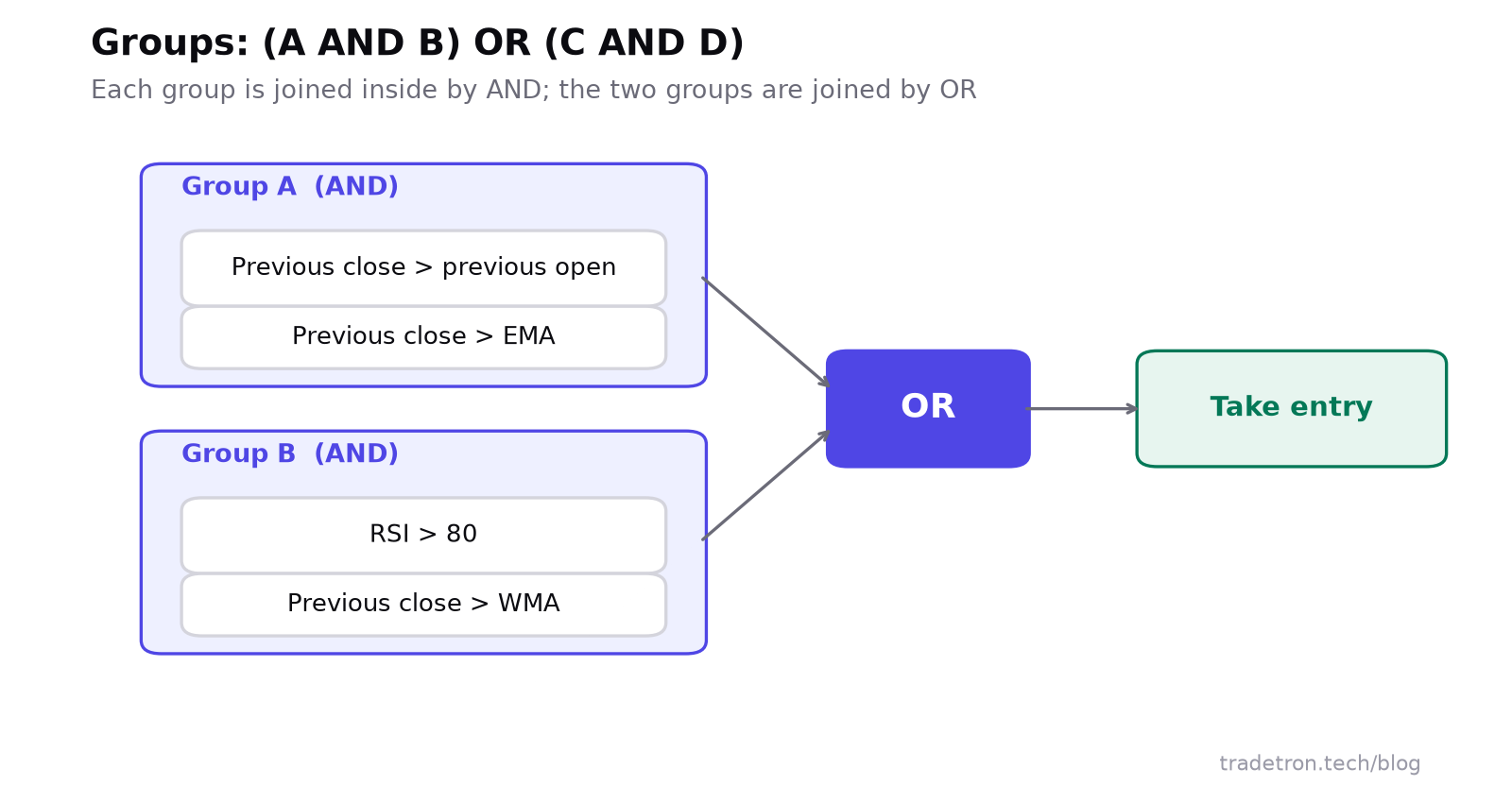 AND inside each group, OR between the groups
Set the outer toggle to OR, and the toggle inside each group to AND:
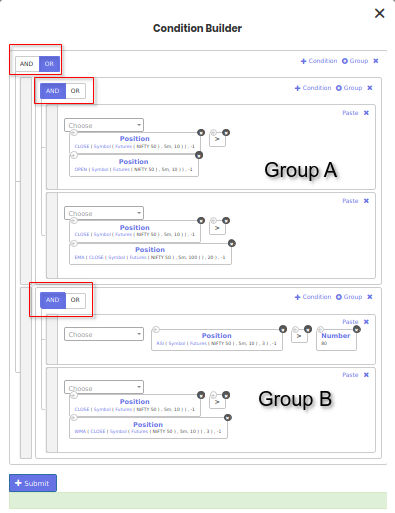 Outer OR, inner AND in Group A and Group B
A useful trick: OR for testing
Adding a condition that's always true with OR forces a block to fire. Debuggers use this: put Time ≥ 915 at the top of an Entry block and switch to OR, and the strategy should enter, so you can check that the rest of the strategy (the positions, the broker) works. Remove it afterwards. The debugging guide explains when this helps.
Common mistakes
Frequently asked questions
What is the difference between AND and OR in Tradetron?
With AND, a block is true only when every condition in it is true. With OR, it is true as soon as any one condition is true.
Where is the AND/OR option in the condition builder?
At the top left of each condition block. Each group you add has its own AND/OR toggle as well.
How do I combine AND and OR in one strategy?
Use groups. Put conditions that must hold together in a group with AND, then join the groups with OR at the outer level (or the other way round).
Should exits use AND or OR?
Usually OR, so the trade closes on whichever exit triggers first, for example a target or a stop loss. AND would wait for all exit conditions at once.
Why is my AND strategy not taking any trades?
Every AND condition must be true at the same moment. Check each condition on the chart, and backtest to see how often they line up. Removing or loosening one filter often fixes it.