Nelson
Tradetron team
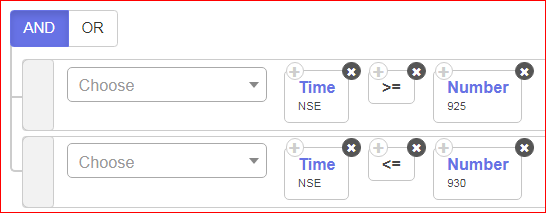
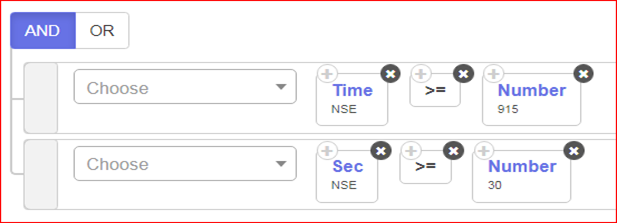
This thread will contain examples of different ways to use “Time” Keyword:

 Nelson
Tradetron team
This thread will contain examples of different ways to use “Time” Keyword:
Nelson
Tradetron team
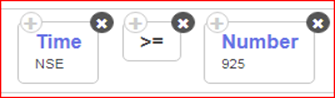
Point 1. Please note, always use “>=” for Time, not “==”, because exact time may not get recorded due to condition check frequency or server lag, and hence the strategy may not get executed as per time condition.
Below is an example of correct use of Time Keyword:
Nelson
Tradetron team
Nelson
Tradetron team
Point 3: Please note that we use 24 Hour Time Schedule format, so for eg: Time post 12 will be as
1300, 1400 till 2300 Hrs
For E.g.: To exit the strategy at 3.05 PM, we use:

Nelson
Tradetron team
Point 4: Selecting appropriate Exchange:
Please note that its very important to select the appropriate exchange as per the strategy you ar are trading.
Examples are below:



Nelson
Tradetron team
Point 5: Time Calculation Between - Universal Exit, Reactivate on Exit After, and Last Condition Check before Market Close:
This is one of the most common reasons why the strategy does not Universally Exit if the Time conditions clash between these 3 parameters. Hence please read the below image carefully and implement the Time settings accordingly:
Nelson
Tradetron team
Nelson
Tradetron team
Relationship between Universal Exit Time, Reactivate on Exit After Time, Last Condition Check before Exchange Close Time on Tradetron:
Nelson
Tradetron team
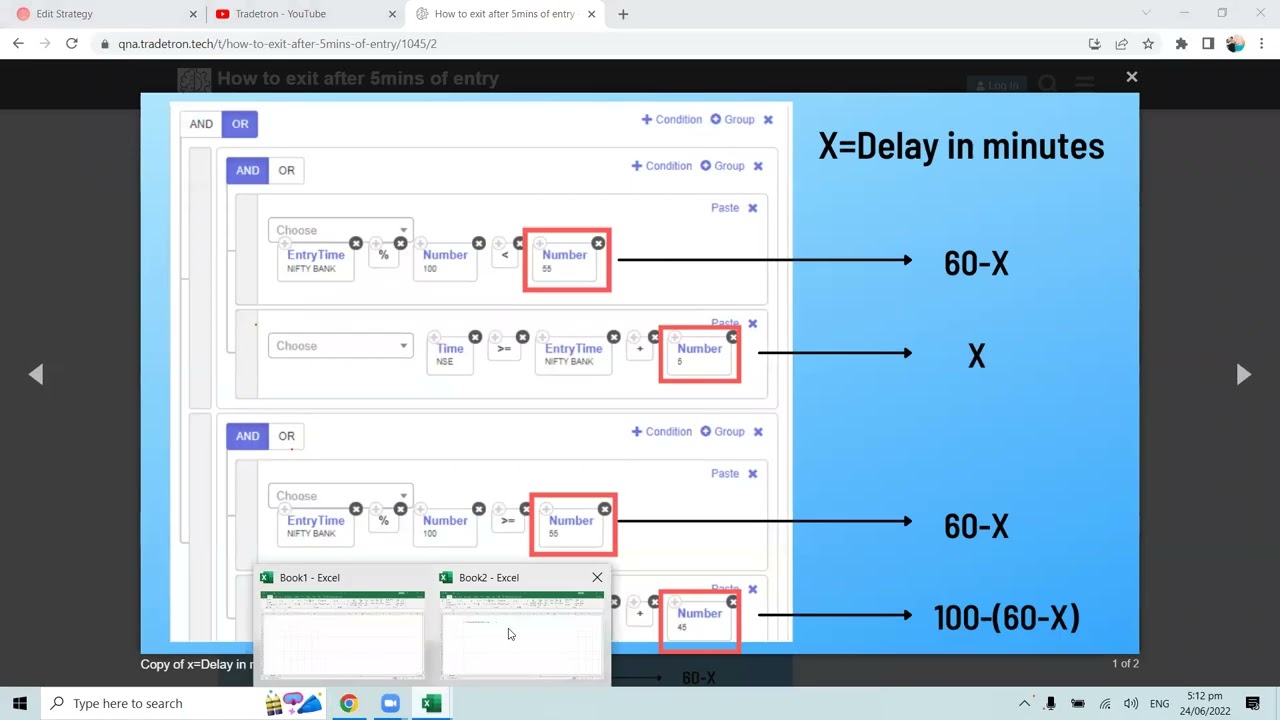
How to exit the trade after x no. of minutes on Tradetron:
 Nelson
Tradetron team
Note:
Please note, always use “>=” for Time, not “==”, because exact time may not get recorded due to condition check frequency or server lag, and hence the strategy may not get executed as per time condition.
Nelson
Tradetron team
Question: I want a time lag of 5 minute in two consecutive repair once, or from the time of previous trade in the strategy:
Solution:

 Rupal Chopade
this wont work in case the Current time of repaired one is ex . 1258 , then the time (nse) > Last ReparedTime (1258) + 5 = 1263 .
1263 is not defined in the Tradetron to become 1303
 sdas
Hi
You did not explain what ENTRY TIME % 100 does
Have I missed the full explanation?
 Tradetron Team
Tradetron team
Answering the open questions (#12, #13): adding minutes to an HHMM time breaks at the hour (1258 + 5 = 1263). Use the Time Difference (T2-T1) keyword instead. It returns the minutes between two HHMM times and handles the hour change for you.
Time Difference (T2-T1) ( EntryTime, Time ( NSE ) ) >= Number ( 5 )
The same pattern in your exit, with your N.
Notes:
!=.EntryTime % 100 in the older screenshot takes the minutes part of an HHMM number. You no longer need that trick.Reminders from this thread: always use >= with Time, never ==, and use the exchange-specific Time (NSE/MCX/CDS).
 Answer written with AI from Tradetron docs (Oct 2026). Original replies are kept above. Spot something wrong? Reply below.
Request received. Pick a time now, or close this and we'll call you to set one up.
The calendar didn't load here. Open the booking page ↗
Booked. The calendar invite is on its way to your email.
Tradetron's AI assistant — pricing, brokers, strategies, anything.
AI can make mistakes. Consider checking important information.
How good was it?
We store the question and the answer with your report so the team can audit it.