Ujjwal
Please help. Newbie here.

 Ujjwal
Please help. Newbie here.
Ujjwal
 Ashwani Gupta
Hi Ujjwal,
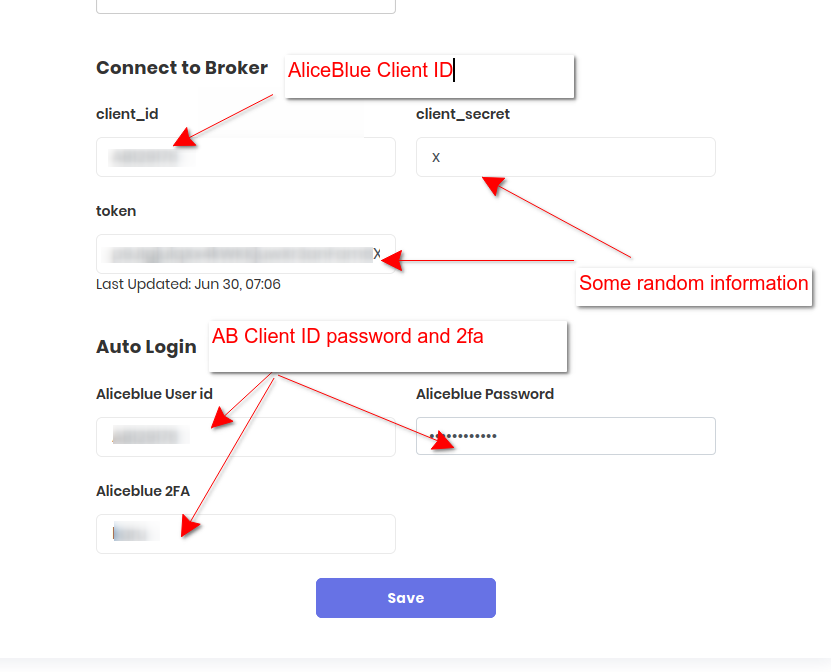
Thanks for sharing,May i know once we have entered the clientid_client_secret,one time token i took out from alice_blue api,client_id,client password and 2FA.The token which is generate by Aliceblue every 24 hour will be automatically updated or i have to again fetch token from api with python and save here?
I am also using this for the first time.Thanks
Regards
Ashwani
Ujjwal
If your auto login is enabled then you don’t need to worry much. Token will be generated automatically.
 Tradetron Team
Tradetron team
Tradetron Team
Tradetron team
Brokers are added from your Tradetron account, and the steps are different for each broker.
Adding a broker is free. Setup is self-serve: support will guide you, but will never log in with your credentials for you. If your broker is not in the list, or its steps are not clear, chat with support on tradetron.tech.
Whether the token renews by itself or you must generate it again depends on the broker. If orders start failing, first re-generate the token from the Broker & Exchanges page.
 Answer written with AI from Tradetron docs (Oct 2026). Original replies are kept above. Spot something wrong? Reply below.
Request received. Pick a time now, or close this and we'll call you to set one up.
The calendar didn't load here. Open the booking page ↗
Booked. The calendar invite is on its way to your email.
Tradetron's AI assistant — pricing, brokers, strategies, anything.
AI can make mistakes. Consider checking important information.
How good was it?
We store the question and the answer with your report so the team can audit it.