Nocodeguy
I want to trade in next weekly expiry in respect to current expiry, how to do so ?

 Nocodeguy
I want to trade in next weekly expiry in respect to current expiry, how to do so ?
 Jovin V
Solution
Jovin V
Solution
 Tradetron Team
Tradetron team
Tradetron Team
Tradetron team
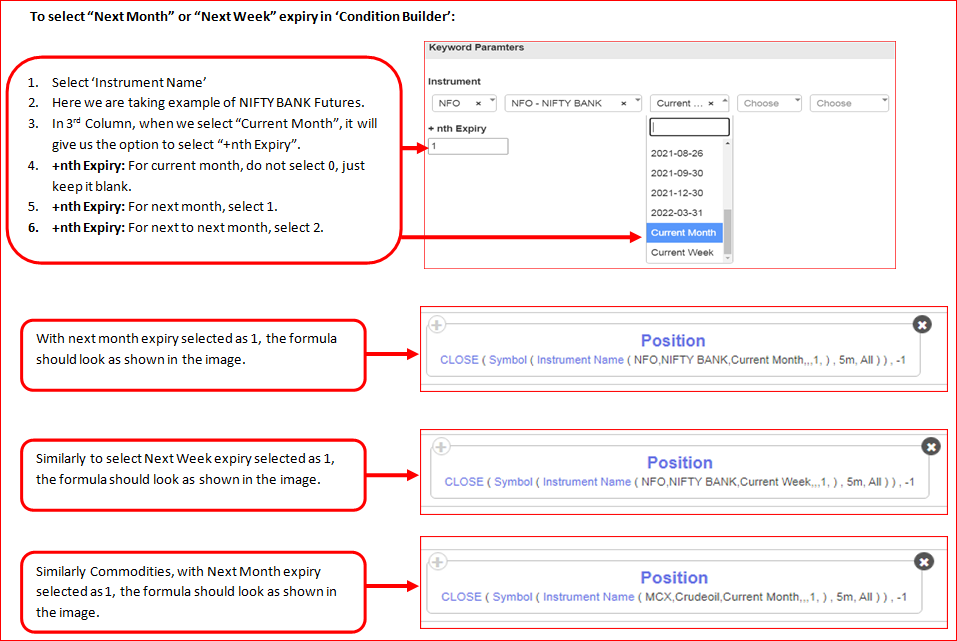
Short answer: in the leg’s Expiry Fx, use Current Week Expiry with offset 1. Offset 0 = this week, 1 = next week, 2 = the week after.
Current Week Expiry ( 'NIFTY 50', 1 )Current Month Expiry ( underlying, 1 ) = next month.Run it in Live Offline to confirm the contract before going live.
 Answer written with AI from Tradetron docs (Oct 2026). Original replies are kept above. Spot something wrong? Reply below.
Request received. Pick a time now, or close this and we'll call you to set one up.
The calendar didn't load here. Open the booking page ↗
Booked. The calendar invite is on its way to your email.
Tradetron's AI assistant — pricing, brokers, strategies, anything.
AI can make mistakes. Consider checking important information.
How good was it?
We store the question and the answer with your report so the team can audit it.