

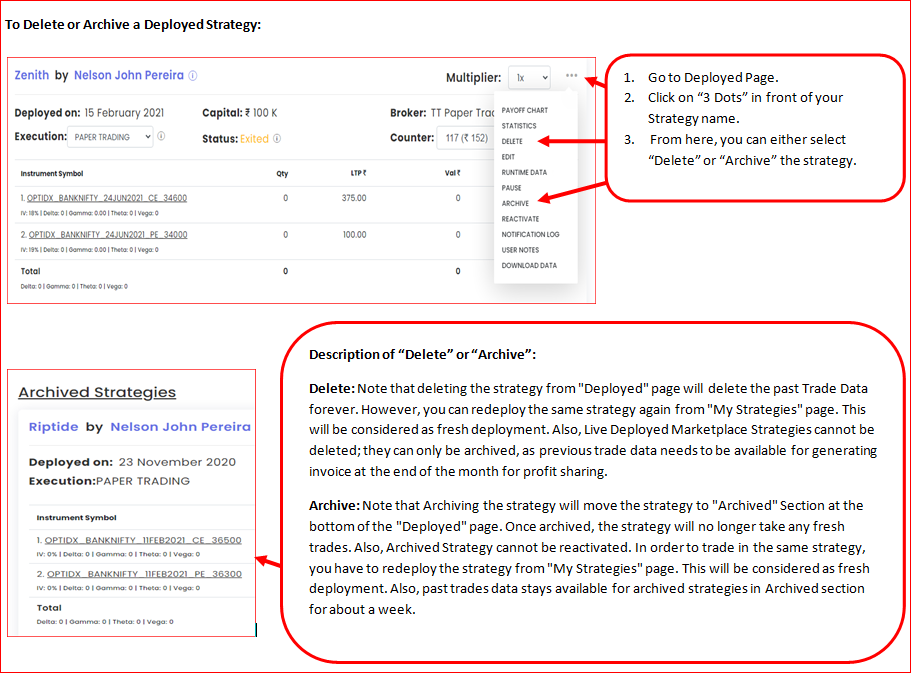
You can remove a deployment from the Deployed page in two ways:
- Archive: moves it under the Archived filter. Its trade data stays visible (Filters → Status = Archived).
- Delete: removes it. Its trade data cannot be recovered.
Which ones can be deleted
Only free deployments (from a template without a subscription fee) can be deleted. A Live Auto deployment from a paid template can only be archived, even by its creator.
If you can’t delete, exit the deployment first, then archive it.
 Edited with AI from the original Tradetron article, checked against current docs (Oct 2026). Spot something wrong? Tell us in the Community.