

Tranching splits a large or multi-leg order into smaller slices so you get a better average price with less slippage. It is in your strategy’s Advanced Settings.
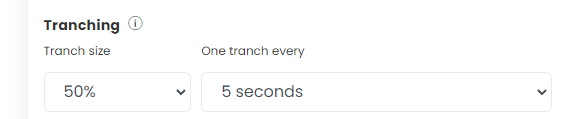
Settings
- Tranch size: defaults to 100%, meaning the whole quantity goes in one order. Set 50% for 2 tranches, 10% for 10, 1% for 100.
- One tranch every: the gap between slices.
How lots are split
- One leg: lots are split equally; any remainder goes in the last tranch. Example: 21 lots with 10 tranches = 2 lots in each of 10 tranches, then 1 lot in an 11th.
- Fewer lots than tranches: it uses as few lots per tranch as possible. Example: 3 lots with 10 tranches = 3 tranches of 1 lot.
- Several legs with different quantities: the smaller leg finishes first. Example: leg 1 = 21 lots, leg 2 = 5 lots. Tranches 1–5 send 2 lots of leg 1 and 1 lot of leg 2; tranches 6–10 send 2 lots of leg 1; tranch 11 sends the last lot of leg 1.
If a tranch is not filled, the next tranch is not sent.
Exchange freeze quantity
Orders above the exchange’s maximum freeze quantity are split automatically. For example, if the freeze limit is 36 lots and you order 40, one order of 36 lots goes first and then the remaining 4. Freeze limits are set by the exchange and change over time.
Good to know
- Exit Shorts First sits under the Tranching section. It closes short legs before long ones.
- Backtests ignore tranching. Check fills in Live Offline after changing these settings.
 Edited with AI from the original Tradetron article, checked against current docs (Oct 2026). Spot something wrong? Tell us in the Community.