

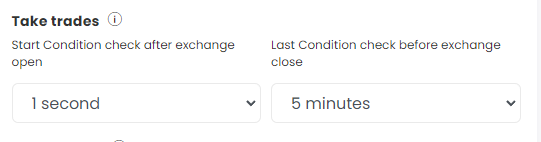
The Take Trades setting in Advanced Settings controls when your strategy starts and stops checking its Entry and Exit conditions each day. It has two inputs:
- Start condition check after exchange open
- Last condition check before exchange close
Examples
Start later in the morning. For first checks from 9:30 AM, set the start input to 15 minutes.
Make sure your Universal Exit fires. If your Universal Exit is set for 15:25, set the last check to 2 minutes, so conditions are checked until 15:28. If you set it to 5 minutes, checks stop at 15:25:00 and the Universal Exit may not get a chance to trigger.
 Edited with AI from the original Tradetron article, checked against current docs (Oct 2026). Spot something wrong? Tell us in the Community.