Nelson
Tradetron team
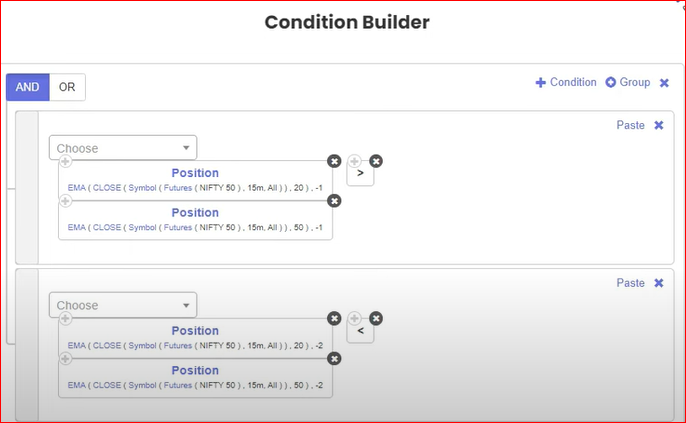
Below video explains how to store values of Entry Candle - High and Low using Runtime Variable, based on simple EMA Crossover condition.


 Nelson
Tradetron team
Below video explains how to store values of Entry Candle - High and Low using Runtime Variable, based on simple EMA Crossover condition.
Nelson
Tradetron team
Nelson
Tradetron team
Steps followed:
Nelson
Tradetron team
Setting a variable name:
Nelson
Tradetron team
Nelson
Tradetron team
A good practice to follow here is as follows:
Nelson
Tradetron team
Next Step is to ‘kill’ the runtime variable at the time of Set exit.
So, click on the ‘Runtime variable’ in front of Set Exit as shown below:
And use below formulas to essentially kill the runtime variables:
This makes sure that the same variable is not being used elsewhere in your strategy.
Hence, again at the time of re-entry, it will generate the new set of variables, since the earlier ones are already killed. So the cycle will repeat smoothly.
Nelson
Tradetron team
How to use this on a list of Stocks:
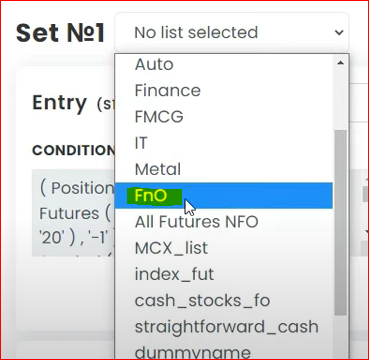
Assume you have selected “FnO” as the list as shown below:
Note that in the variable name, you need to add the name of that variable list. and use vertical pipes symbol to denote that its a list as shown below:
And similarly in the Exit condition, you have to select the list name accordingly as shown in below image:
Hope this helps.
 tradingcloud86
@Nelson How we use value from nifty_high for entry purpose?
Purpose: I would like to take an entry only when the candle high is broken.
Request received. Pick a time now, or close this and we'll call you to set one up.
The calendar didn't load here. Open the booking page ↗
Booked. The calendar invite is on its way to your email.
Tradetron's AI assistant — pricing, brokers, strategies, anything.
AI can make mistakes. Consider checking important information.
How good was it?
We store the question and the answer with your report so the team can audit it.