 AlgoBull
I want a keyword or logic by which I can exit the set after 5 mins of entry. I tried with Time>=entry time + number but it did not work as expected.

 AlgoBull
I want a keyword or logic by which I can exit the set after 5 mins of entry. I tried with Time>=entry time + number but it did not work as expected.
 Jovin V
Hello,
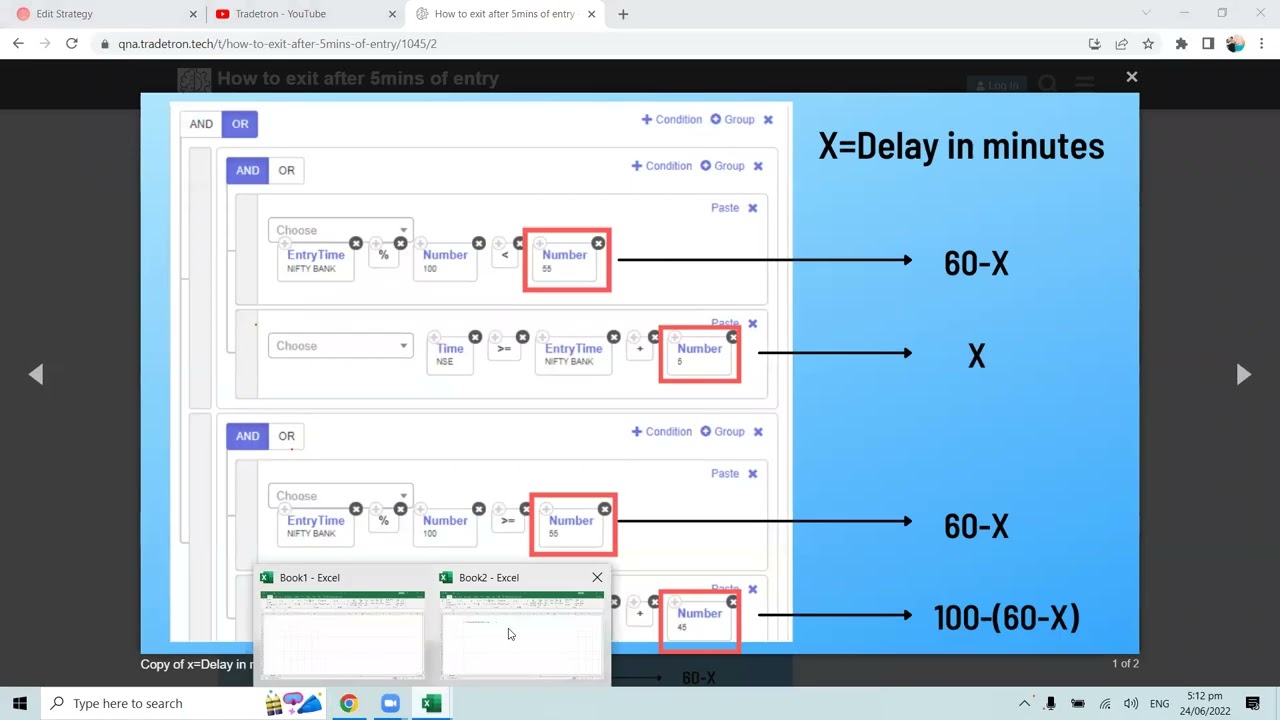
Use the entire logic block below to exit after 5 mins from entry. X in the image represents the minutes delay you require Eg- If you want 30mins delay, X=30
Both the groups should be in OR logic and all 4 conditions need to be added.
Below is an example for a delay of 5mins. Can put this entire block in exit and it will exit after 5 minutes of entry.
If you want to refer time after repair then please replace the entry time keyword with lastrepairedtime keyword
Below is another example for exit/delay after 30 mins of entry
 Nelson
Tradetron team
How to exit the trade after x no. of minutes on Tradetron
Please check the below video:
 sag
what if I have to exit after 90 mins from entry time (i.e. 6 candles of 15m each)? will this formula work? In this case, 60-x will be -30 (negative)
 Tradetron Team
Tradetron team
Use the Time Difference (T2-T1) keyword. It returns the minutes between two HHMM times and handles the hour change for you, so 09:58 to 10:03 is 5, and 90-minute delays work too. This is simpler than the older “60 − x” formula above.
Put this in the Set Exit (or OR it with your target / stop):
Time Difference (T2-T1)(EntryTime, Time('NSE')) >= Number(5)
Number(90).Entry at 14:55. At 15:00 the keyword returns 5, so the exit fires then.
Test in Live Offline first and check the Notification Log to see the values. Keyword reference: Keyword Documentation — Tradetron
 Answer written with AI from Tradetron docs (Oct 2026). Original replies are kept above. Spot something wrong? Reply below.
Request received. Pick a time now, or close this and we'll call you to set one up.
The calendar didn't load here. Open the booking page ↗
Booked. The calendar invite is on its way to your email.
Tradetron's AI assistant — pricing, brokers, strategies, anything.
AI can make mistakes. Consider checking important information.
How good was it?
We store the question and the answer with your report so the team can audit it.

