Pine Script Indicator vs Strategy: Which Can You Automate?
A Pine Script indicator plots values and raises alerts. A Pine Script strategy also simulates orders, so TradingView can backtest it in the Strategy Tester. Both can drive automated trades, because what reaches a trading platform is the alert, not the script. So you don't have to convert an indicator into a strategy to automate it. Convert it when you want backtest numbers, or position-aware logic such as flips, stops and targets.
The difference at a glance
| Indicator | Strategy | |
|---|---|---|
| First line | indicator("Name", ...) |
strategy("Name", ...) |
| What it does | Calculates and plots values, marks signals | Does the same, and places simulated orders |
| Backtest report in TradingView | No | Yes, in the Strategy Tester (net profit, drawdown, trade list) |
| Knows its own position | No | Yes: strategy.position_size, open trades, entry prices |
| How it raises alerts | alertcondition() (one alert per condition) or alert() |
Order-fill events (one alert covers every order) and alert() |
| Useful alert placeholders | {{close}}, {{ticker}}, {{plot_0}} |
Also {{strategy.order.action}}, {{strategy.order.comment}}, {{strategy.position_size}} |
One detail catches people out: alertcondition() is an indicator feature. If you leave alertcondition() lines in a strategy, the strategy's alert won't use them. A strategy signals through its orders, or through alert() calls.
Can you automate an indicator without converting it?
Yes. An indicator with clear signal conditions can drive automation as it is. You create an alert for each signal (for example "Long Signal" and "Short Signal") and give each one a message that your trading platform understands.
What an indicator can't do is know its own position. If your rule is "buy on the crossover, but only if I'm not already long", the indicator doesn't track "already long". That position-keeping then has to live on the trading platform's side, or in a strategy.
So the real question isn't "indicator or strategy?". It's where you want the position logic and the backtest to live.
When to convert an indicator into a strategy
Convert when you want any of these:
- A backtest in TradingView. Only strategies get Strategy Tester results, so this is the usual reason.
- Signals that depend on your position: flip from long to short, skip an entry while one is open, or exit after N bars.
- Exits tied to entries, such as a stop or target set relative to the entry price, with
strategy.exit. - One alert instead of many. A strategy's order-fill alert covers every order, and a comment on each order tells the receiver which signal it was.
Stay with the indicator when the signals are simple, you don't need a TradingView backtest, and your trading platform will handle positions, stops and exits.
How to convert an indicator into a strategy
Take a simple RSI indicator that marks buys and sells:
//@version=5
indicator("RSI swing", overlay=false)
r = ta.rsi(close, 14)
buy  = ta.crossover(r, 30)
sell = ta.crossunder(r, 70)
plot(r, title="RSI")
alertcondition(buy,  title="Buy",  message="buy")
alertcondition(sell, title="Sell", message="sell")
The strategy version changes the first line, turns the signals into orders, and drops the alertcondition() lines:
//@version=5
strategy("RSI swing", overlay=false, process_orders_on_close=true)
r = ta.rsi(close, 14)
buy  = ta.crossover(r, 30)
sell = ta.crossunder(r, 70)
plot(r, title="RSI")
if buy
    strategy.entry("Long", strategy.long)
if sell
    strategy.close("Long")
strategy.entry vs strategy.order, and strategy.exit vs strategy.close
| Function | What it does | Use it when |
|---|---|---|
strategy.entry |
Opens a position. An entry in the opposite direction reverses an open position, and pyramiding limits apply | Most entries |
strategy.order |
Places an order with no automatic reversal, and ignores pyramiding limits | You manage position size yourself |
strategy.close |
Closes the position opened by a named entry, at market | Exiting on a signal |
strategy.exit |
Places exit orders for an entry: stop, limit (target) or trailing stop | Exits tied to the entry price |
For automation, the useful habit is to give every order a comment. A webhook message can then pass {{strategy.order.comment}}, and the receiving platform knows exactly which order fired.
How Tradetron's Pine Script Strategy builder handles each kind
When you paste a script into Create → Pine Script Strategy (PineBridge), it detects whether you pasted a strategy or an indicator. Then it asks whether your system is always in trade (long and short only, flipping between them) or entry and exit based (separate long and short entries and exits).
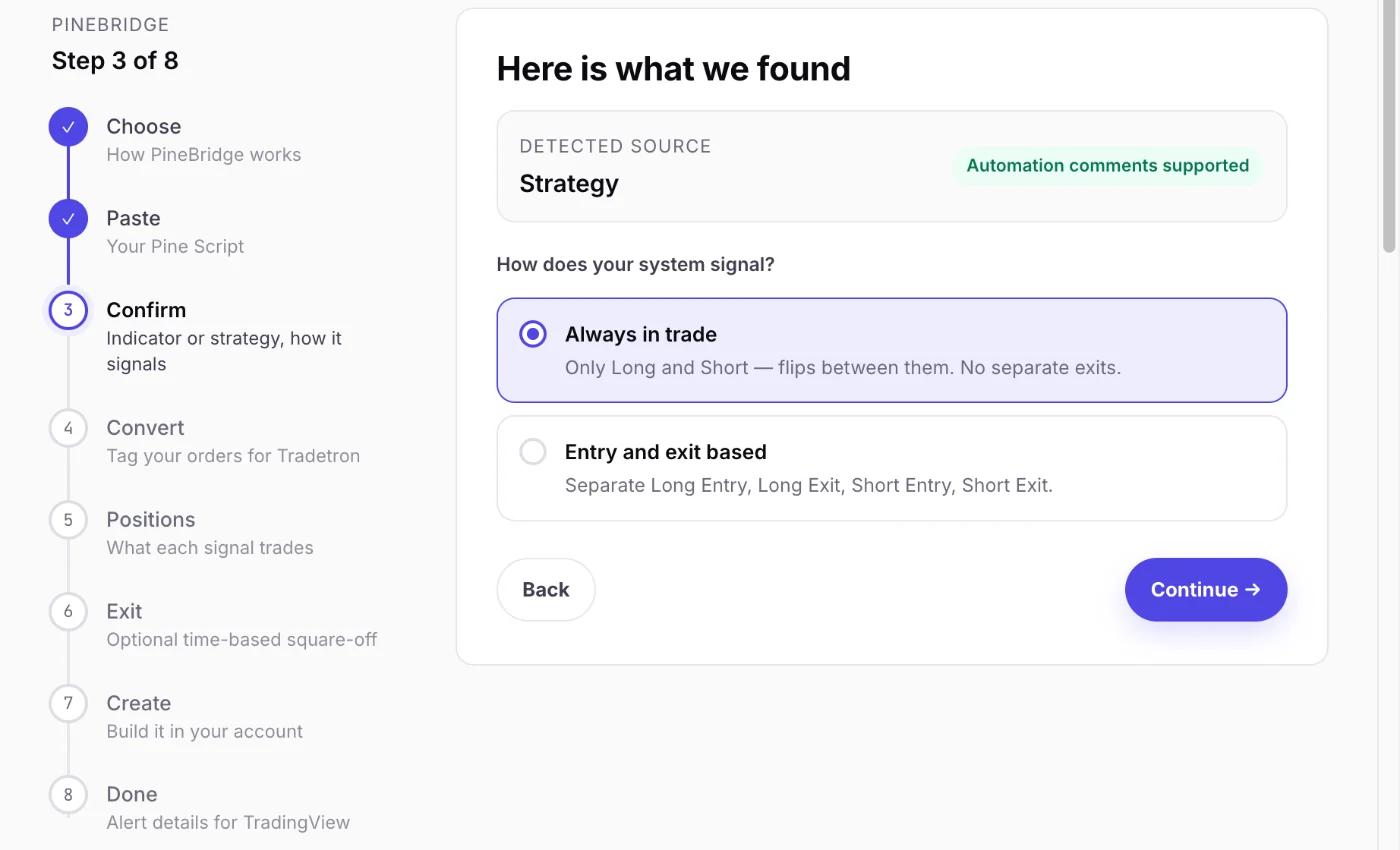 PineBridge works out what kind of script you pasted
- For a strategy, it adds a short signal comment (L or S, for example) to each order in your code. You paste the tagged version back into TradingView and create one alert on order fills. The comment selects the signal automatically.
- For an indicator, your code stays as it is. PineBridge gives you an alert message for each signal, and you add an alert for each one in TradingView.
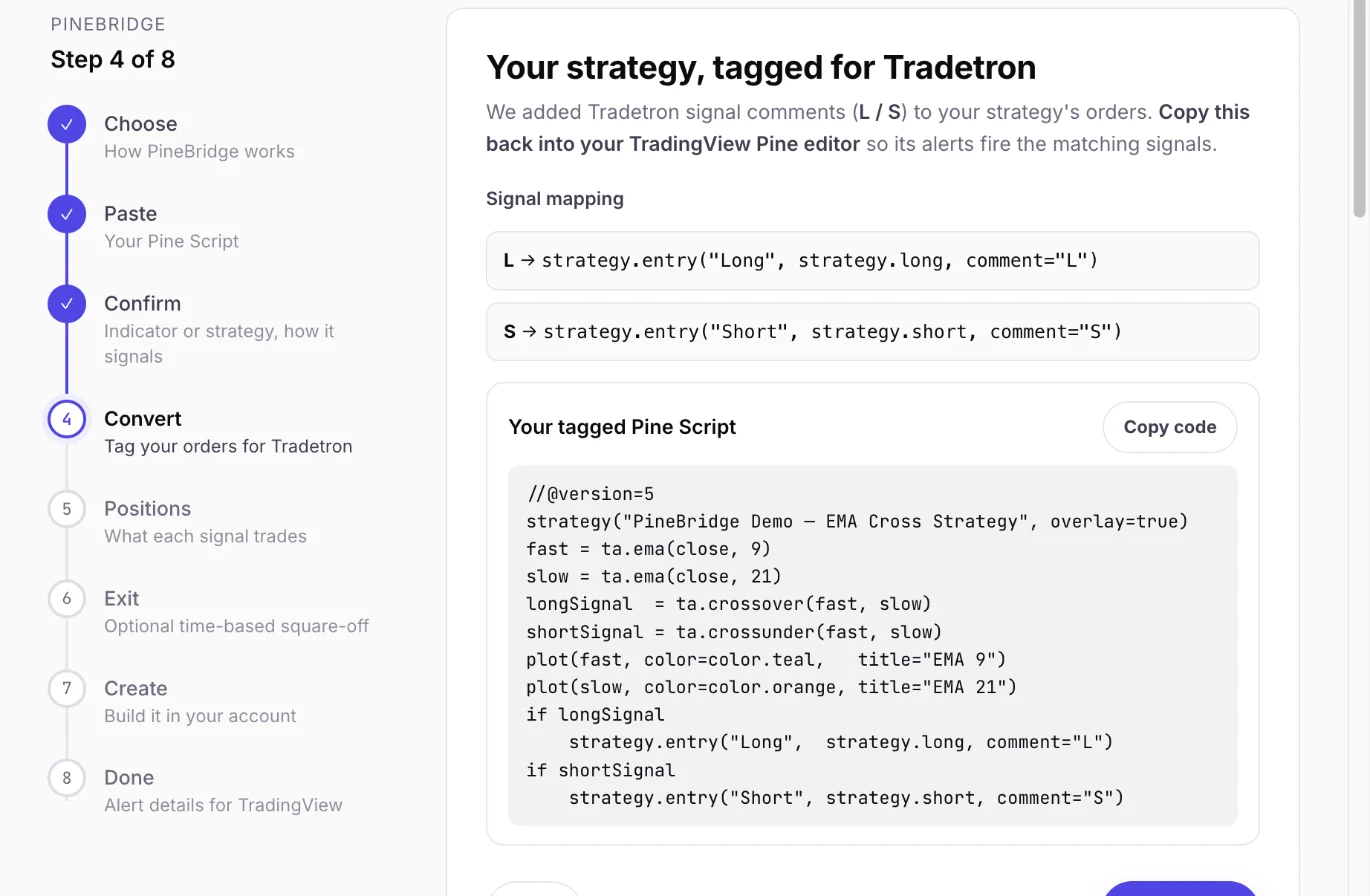 A strategy's orders, tagged for Tradetron
Either way, the position side is set on Tradetron. You pick what each signal trades (an ATM option, a future, a basket), in lots, with an optional square-off time. The full walkthrough is in automate a TradingView Pine Script on Indian brokers.
Frequently asked questions
What is the difference between an indicator and a strategy in Pine Script?
An indicator calculates, plots and raises alerts. A strategy does the same and also places simulated orders, so TradingView can backtest it and report results in the Strategy Tester. A strategy also knows its own position, and an indicator doesn't.
Can I automate a TradingView indicator without converting it to a strategy?
Yes. Create an alert for each signal, with a message your trading platform understands. Tradetron's Pine Script Strategy builder accepts indicators as they are and gives you the alert messages to use.
How do I convert an indicator into a strategy in Pine Script?
Change indicator( to strategy( on the first line. Turn each signal into an order with strategy.entry, and exit with strategy.close or strategy.exit. Remove alertcondition() lines, which strategies don't use. Then set commission, slippage and position size in the strategy's properties.
Why doesn't alertcondition work in my strategy?
alertcondition() is for indicators. In a strategy, alerts come from order fills, or from alert() calls in your code. Create one alert on the strategy, set to fire on order fills, and use placeholders such as {{strategy.order.comment}} in the message.
What is the difference between strategy.exit and strategy.close?
strategy.close closes a named entry at market when you call it. strategy.exit places exit orders for an entry in advance: a stop, a target or a trailing stop, executed when the price reaches them.
What is the difference between strategy.entry and strategy.order?
strategy.entry opens positions, reverses an open position when you enter the other way, and respects pyramiding limits. strategy.order places an order with no reversal and ignores pyramiding, so you manage the position size yourself.
Does converting to a strategy change my signals?
It shouldn't, if the conditions are the same. But the backtest's fill assumptions (next bar's open or this bar's close, commission, slippage) change the results you see. Check those settings before trusting the numbers.