

Guide
Historical option chain data: what it is and how to read it
An option chain is a table of every strike for one expiry: what each call and put costs, how many contracts are open, and how volatile the market thinks the index will be. Historical option chain data is that table as it stood at some moment in the past. It is the raw material for studying how options behaved on a day that already happened.
This guide explains what the data contains, how to read it, where NIFTY options historical data comes from, what goes wrong when people use it, and what Tradetron's replay shows. One thing up front: Tradetron does not sell or offer a data download. You can view any covered minute inside the option simulator. If you need files to load into your own tools, the section on sources says where to look.
What one option chain shows
Pick an index and an expiry. The chain lists strikes in a column down the middle, with calls (CE) on one side and puts (PE) on the other. For each strike you usually see these fields:
- LTP: the last traded price, in rupees per unit.
- Open interest (OI): how many contracts are open at that strike. OI change is how much that number moved, usually since the previous day's close.
- Volume: contracts traded so far in the session.
- Implied volatility (IV): the volatility that, put into an option pricing model, gives the option's current price. A higher IV means a dearer option, other things equal.
- Delta: roughly how much the option's price moves for a one-point move in the index. A call near the money has a Delta around 0.5.
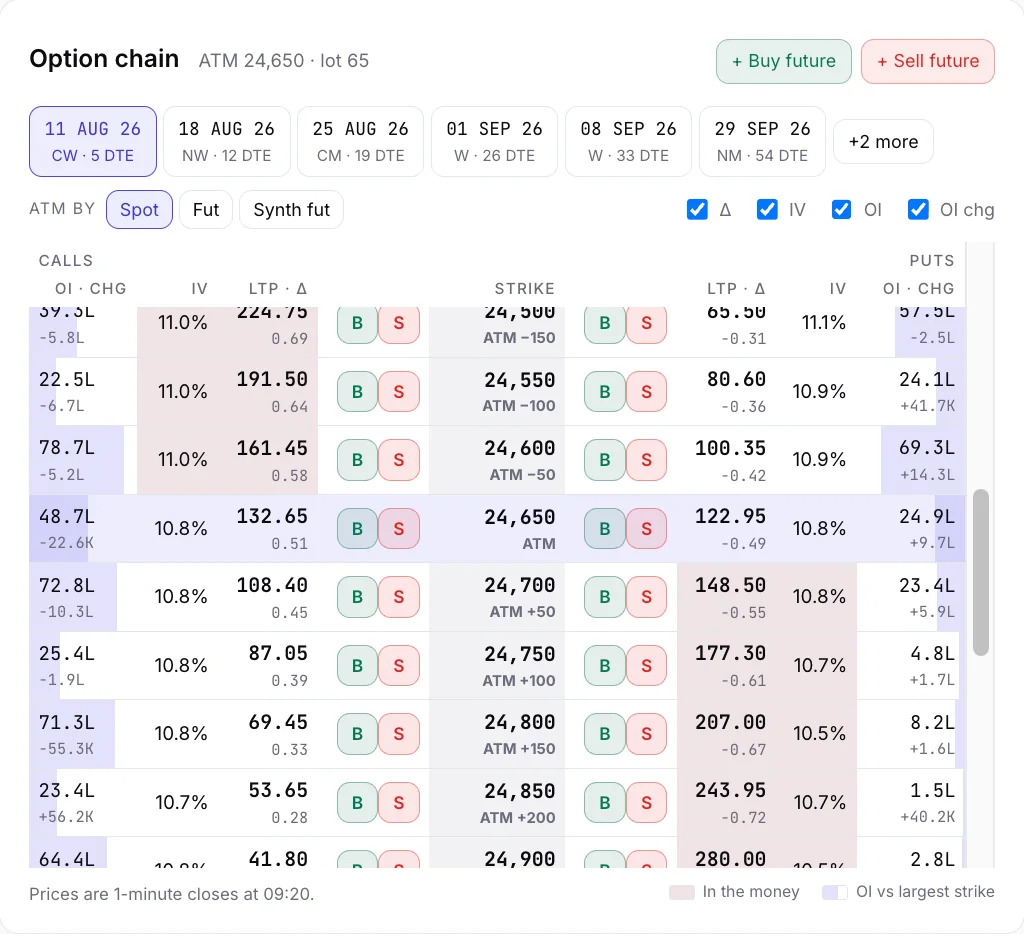
Two summary numbers sit on top. PCR, the put-call ratio, divides put OI by call OI. Max pain is the strike at which option buyers, taken together, would lose the most at expiry. Traders read both as a description of positioning. Neither is a forecast.
What "historical" adds
A live chain changes every second. A historical chain is a series of snapshots of it. The size of the gap between snapshots decides what you can learn:
- End of day. One snapshot per session, at the close. Good for seeing where OI built up over weeks. Useless for questions like "what did the straddle cost at 9:20?"
- Intraday, every few minutes. Enough to follow a trend, not enough to see a fast move or time an exit.
- Every minute. Fine enough to enter at a chosen time, watch a stop-loss get hit and see time decay build through the afternoon.
Tradetron's replay uses one-minute steps. Pick a minute, and the whole chain, the index and the position's P&L are shown as they stood then.

Where NIFTY options historical data comes from
Searches for "nifty options historical data" or "how can I get historical options data" usually mean one of three needs, and each has a different answer.
- End-of-day files for analysis. The exchanges publish end-of-day reports for derivatives. They are the usual starting point for studying open interest over weeks or years. They do not show what happened inside the day.
- Intraday data as files. Data vendors sell tick or minute-level historical option data, usually by subscription. Quality, completeness and licensing differ, so read the vendor's notes on how it handles missing prices and expired contracts.
- To see what the chain looked like at 10:35 on a given day. That is a replay. You do not need files, you need a viewer. This is what our simulator does, for NIFTY and BANKNIFTY back to 1 Jan 2020, FINNIFTY from 3 Feb 2021, SENSEX from 7 Aug 2023 and MIDCPNIFTY from 14 Sep 2023.
If you want a download, a replay is the wrong tool, and we will not pretend it does that job. If you want to learn how options moved, it is usually quicker than building a database.
A worked example (illustration, not a real day)
The numbers below are invented to show the reading skill. They are not from any day in our data.
Suppose the index is at 24,000 at 9:20 and you look at the weekly chain. At the 24,000 strike, the call is 120 and the put is 110. The straddle, one call plus one put at that strike, costs 230 per unit. That is the market's price for movement until expiry. If the index later sits at 24,230 or 23,770, a buyer of that straddle is at breakeven (ignoring costs); anything beyond is a gain for the buyer and a loss for the seller.
Now look one strike higher. At 24,100, suppose call OI is 8 lakh and has risen by 2 lakh since the last close. Many traders read a big OI build at a call strike as a crowd of sellers there. Some read it as a ceiling. Others read it as hedging. The same number supports different stories, which is why OI is a description, not a signal.
The skill is to move from the table to a question: "What would I have done at this minute, and what happened next?" That second half is why a snapshot is not enough, and why the replay lets you move the clock.
Where historical option data goes wrong
Most mistakes come from the data, not the reader. Watch for these.
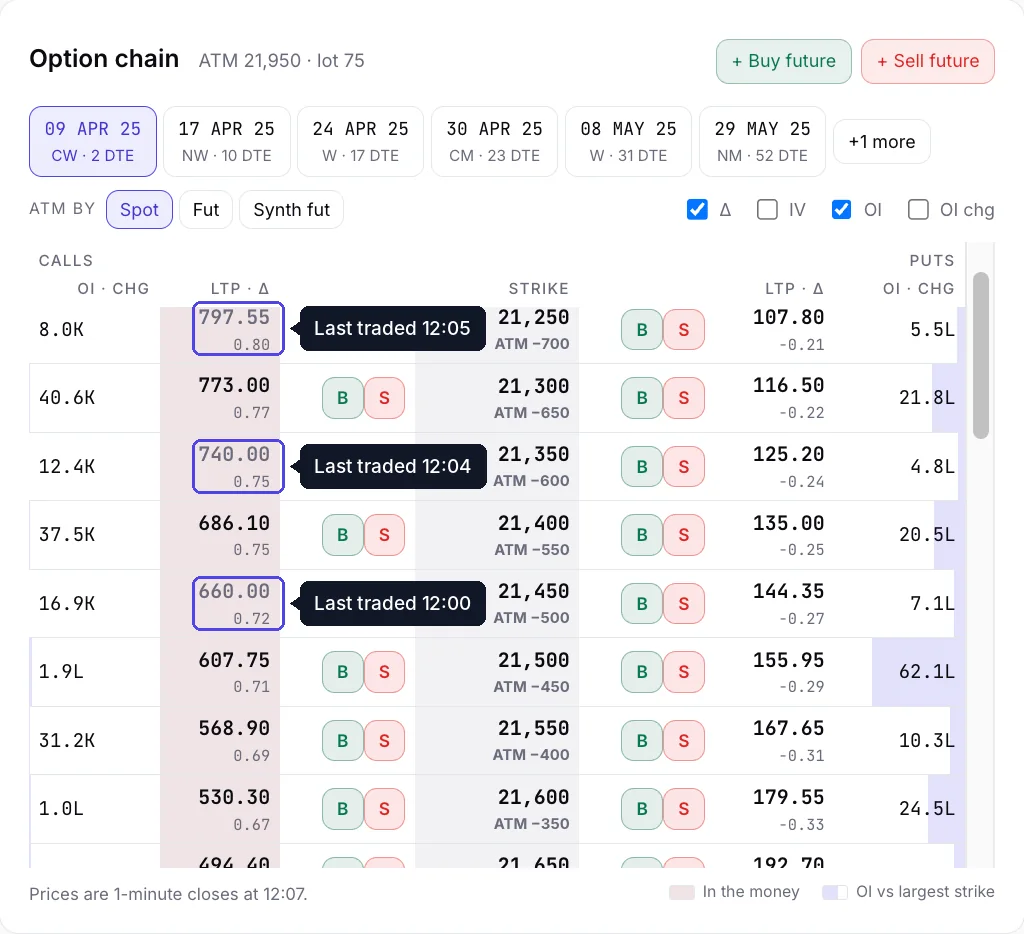
- Prices that never existed. A far strike can go minutes without a trade. Some tools fill the gap with a price from a pricing model, which looks real and is not. We never fill a missing price with a model. A strike that did not trade shows its last traded price in grey, with the minute it traded. The same applies to the index.
- Mixing time steps. End-of-day IV and minute-level IV are not interchangeable. Do not compare them as if they were.
- Expiry changes. Exchanges have changed expiry days and contract cycles over time. A rule that says "the weekly expiry" means different dates in different years. Check the expiry list for the day you study.
- IV computed differently. Providers compute IV with their own inputs for interest rate and dividends. Two sources can differ for the same strike.
- Thin chains. SENSEX options run on a thinner chain than NIFTY's. Our SENSEX data also uses approximations, because there is no BSE settlement price or margin file in our data. Treat SENSEX replays as practice, not precision.
- Recency. Our replay data runs with a 35-day lag; SEBI requires 30. If you want yesterday's chain, it is not there.
Common mistakes when you use it
- Studying one day and calling it a pattern. A single session can show you a mechanism, such as how premiums collapse after an event. It cannot show you how often that happens. Rules tested across years are a backtest, which is a separate step.
- Reading OI as a signal. It shows positions, not intent.
- Ignoring costs. A replay shows traded prices. Real orders can fill differently, and brokerage and taxes apply.
- Using the closing chain to explain the morning. The 3:25 pm chain says little about what you could have known at 9:20.
- Trusting a smooth number. If a thin strike has a perfectly smooth price, ask where it came from.
What you see in Tradetron's replay
Open a day in the NIFTY option simulator and you see the option chain with Delta, IV, OI and OI change beside each strike, plus PCR and max pain. Step the clock by a minute, an hour or to the close. Place a position from the chain and read its P&L, payoff and Greeks as they were at that minute. The Bank Nifty and SENSEX pages cover those indices in the same way.
A good first day is 7 Apr 2025. NIFTY opened 4.82% lower and India VIX rose 66.1% on the day, the largest one-day rise in our data since 2020. Watch how IV and the cost of the 9:15 straddle compare with a quiet day such as 6 Aug 2026, when the high-low range was 0.30%. For a longer view of how to practise with these days, see practising options trading with replay, and for how the payoff line on the screen is drawn, the option payoff graph, explained.
7 Apr 2025, 09:15
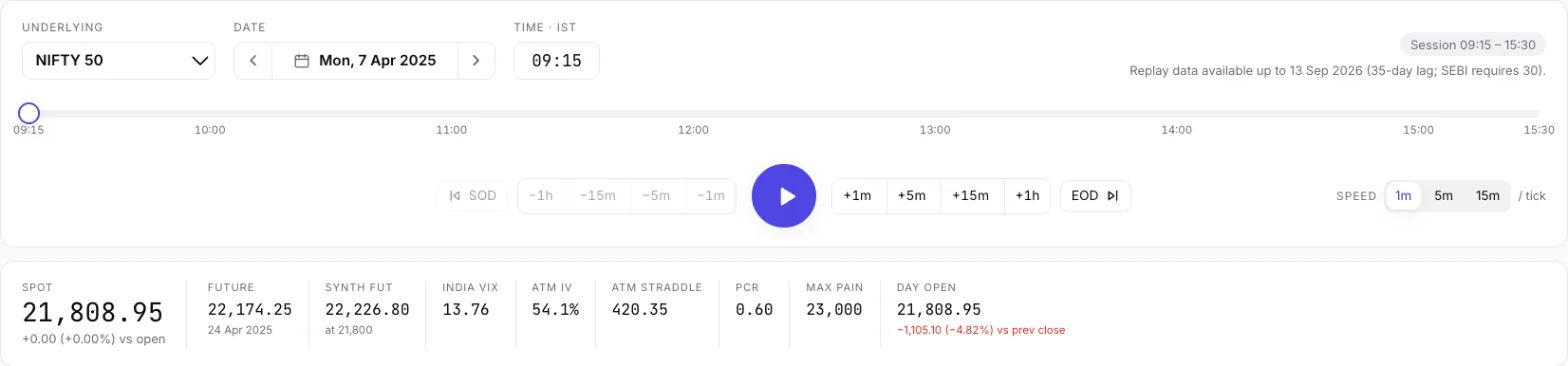
7 Apr 2025 at 09:15: ATM IV 54.1%, ATM straddle 420.35.
6 Aug 2026, 09:15
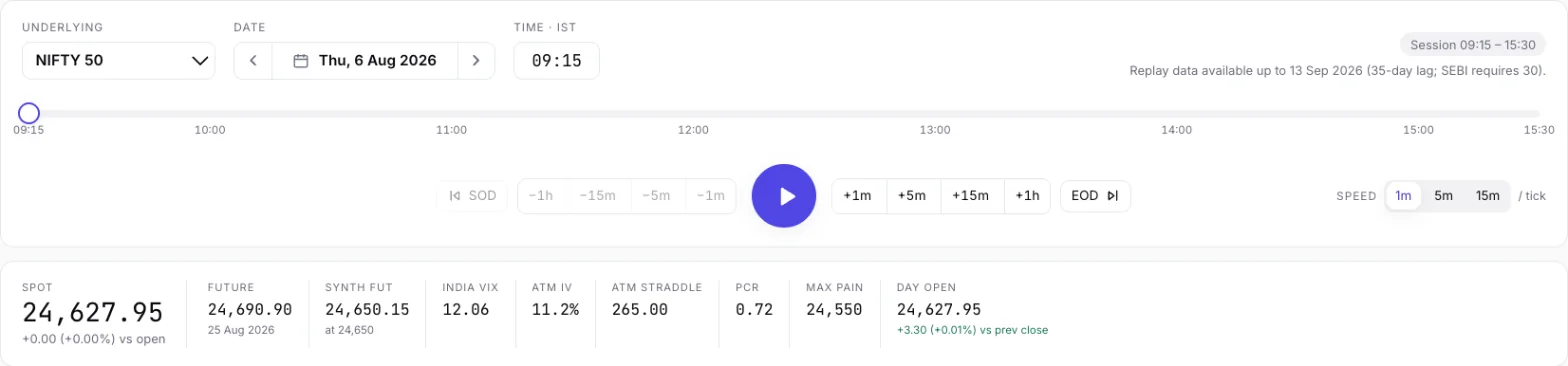
6 Aug 2026 at 09:15: ATM IV 11.2%, ATM straddle 265.00.
Questions traders ask
What is a historical option chain?
It is an option chain as it stood at a past moment: every strike for an expiry with its call and put prices, open interest, volatility and Greeks. A series of them, taken a minute apart, lets you replay how a day unfolded.
How to get Nifty option historical data?
It depends on what you need. The exchanges publish end-of-day derivatives reports, and data vendors sell intraday files. To view any minute of a past session without files, use a replay. Tradetron's NIFTY option simulator covers 1 Jan 2020 onwards, but offers no download.
How can I get historical options data?
The same three routes apply: exchange end-of-day reports for open interest and settlement, vendor subscriptions for intraday files, or a replay tool for viewing a day minute by minute. Check how each handles missing prices and expired contracts.
How far back does Tradetron's option data go?
NIFTY and BANKNIFTY from 1 Jan 2020, FINNIFTY from 3 Feb 2021, SENSEX from 7 Aug 2023 and MIDCPNIFTY from 14 Sep 2023, in 1-minute steps.
Why can't I see last week's option chain?
Replay data runs with a 35-day lag; SEBI requires 30. The most recent day you can replay is therefore about five weeks old.
What does a greyed price mean?
That strike, or the index, did not trade in that minute. We show its last traded price from earlier in the day, greyed, with the minute it traded. We never fill a missing price with a model.
Can I download historical option chain data from Tradetron?
No. The replay is for viewing and practising, not for exporting data. For files, use the exchanges' end-of-day reports or a data vendor.
Keep reading
- Free NIFTY & Bank Nifty option simulator: replay a real day
- NIFTY option simulator
- SENSEX option simulator
- Practice options trading with replay
- The option payoff graph, explained
- Option simulators in India, by use case
Historical replay for education and analysis. Past prices; not investment advice. Nothing here places orders. Algo trading carries risk.