

Rollover on expiry moves your open futures and options positions to the next expiry on expiry day, at a time you choose.
Where to find it
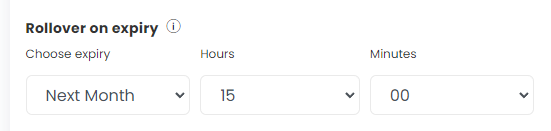
Advanced settings → Rollover on expiry. It has three inputs:
- Choose expiry: Dont Rollover (default), Next Week or Next Month
- Hour and Minutes (default 15:00)
How it works
On expiry day, at the set time, all open futures and options positions in the deployment are rolled to the next week or month, each at its current strike. This includes every underlying in the strategy, not only the contract that is expiring.
Important
- The strategy must still be checking conditions at that time. If your last condition check time ends earlier, the rollover will not happen. Keep the rollover time inside market hours.
- It can fire more than once in a day if the strategy exits and re-enters after the rollover time. Stop re-entries or square off after the rollover time.
- MCX: positions are squared off but not re-entered, so on MCX it works as an exit only. Build an MCX roll with a Repair Once instead.
- Backtests do not apply rollover.
- There is only one rollover setting per strategy. To roll one type of position and square off another, handle the square-off yourself in the condition builder (for example a Repair Once with a time check).
 Edited with AI from the original Tradetron article, checked against current docs (Oct 2026). Spot something wrong? Tell us in the Community.