How to Automate a 0DTE SPX Strategy Without Coding
To automate a 0DTE SPX strategy without coding, write the strategy as plain rules (entry window, structure, stop, target, time exit, daily limit), then build each rule in a no-code platform such as Tradetron: conditions for entry and exit, legs for the options, and per-leg stop and target triggers. Backtest it, run it in a test mode during live sessions, and only then connect your broker.
Before you build: what you need
- A Tradetron account to build, test and run the strategy in the cloud.
- A US broker that connects to Tradetron, such as Tastytrade, with approval to trade SPX options spreads.
- A written plan. "Make money on 0DTE" is not a plan. "Sell a 10-point SPX put spread in a fixed morning window, exit at 50% profit, stop at 3× the credit, flat 30 minutes before the close" is.
Step 1: Write the rules in plain English
Here is an example rule set. It is an illustration of how to write rules, not a recommendation. Every number is a placeholder to test.
If a rule contains the words "feel," "looks" or "maybe," rewrite it until it doesn't.
Step 2: See what the exits do to your risk
Exits are the part of a 0DTE strategy that matter most, and the part worth deciding with numbers. Take the example spread sold for a $2.00 credit:
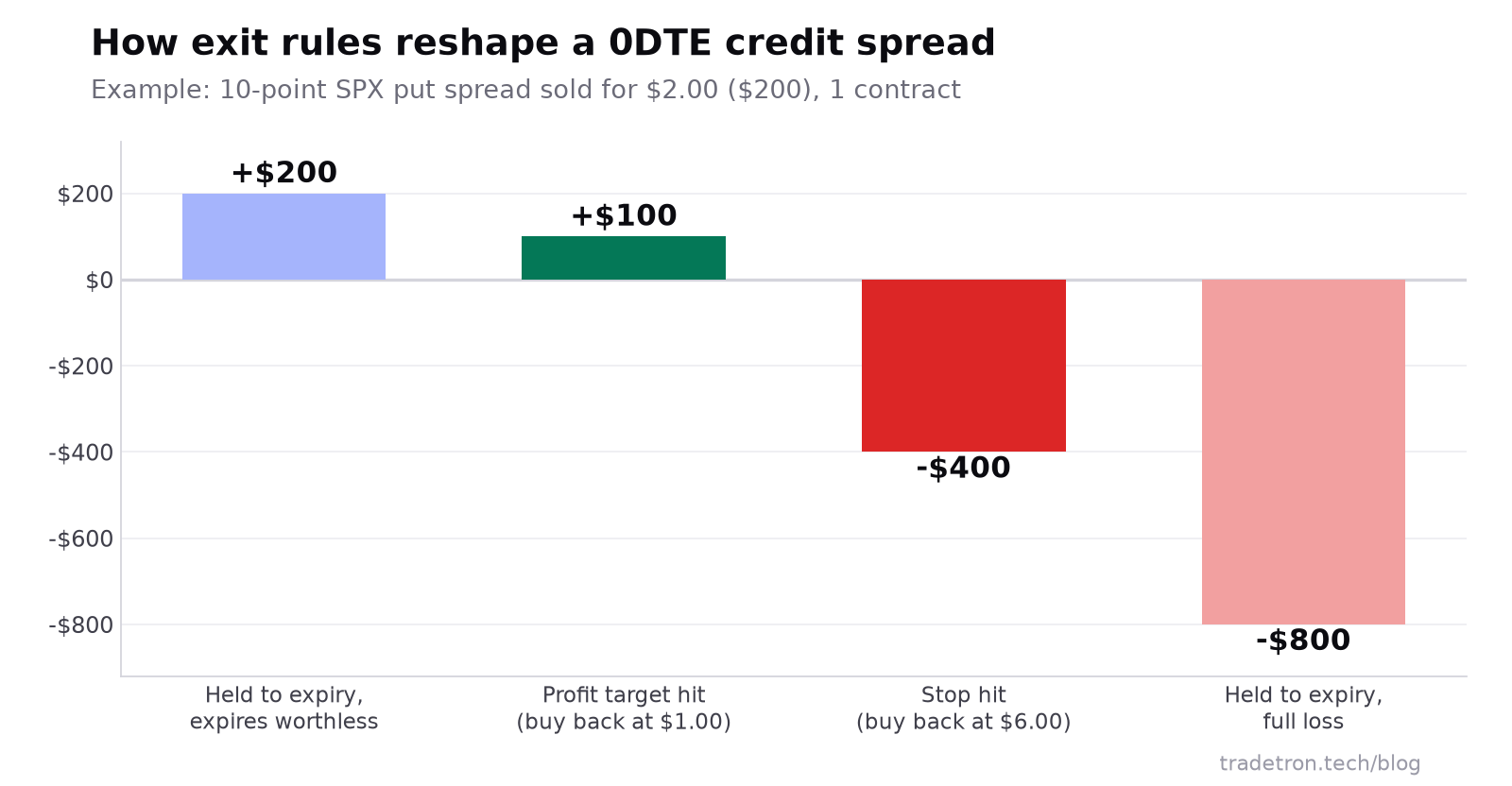 Exit rules cap the loss at the stop instead of the spread's full width
- +$100 when the 50% profit target hits
- −$400 when the 3× credit stop hits
- −$800 the full loss the stop is there to prevent
With these numbers, a stopped trade costs as much as four target hits make. So the strategy needs to reach its target roughly four times for every stop just to break even, before costs. That ratio is what your backtest has to check.
Step 3: Build it in Tradetron
Every plain-English rule maps to a part of Tradetron's builder:
| Your rule | Where it goes in Tradetron |
|---|---|
| Entry window | Entry condition using the Time keyword, on the NYSE clock |
| "SPX not far below the open" | Same Entry condition, comparing the index price with the day's open |
| "No open position" | Same Entry condition, using the open-positions check |
| Sell one put, buy a further one | Two positions (legs) in the Entry set, strikes chosen relative to at-the-money |
| Stop and target per leg | Each leg's SL trigger and Target trigger |
| Stop on the whole spread | Exit condition using the PNL keyword |
| Close before the bell | Exit condition using Time |
| Hard backstop | Universal Exit, or a strategy-level trailing stop |
- Create a new strategy and give it a clear name, such as "0DTE SPX put spread."
- Add the Entry set: your time window, the price filter and the no-open-position check, joined with AND.
- Add the two legs to the Entry set: the short put and the long put, with today's expiry and quantity in contracts.
- Set the exits: an Exit condition for the time cutoff, another for the position's loss on PNL, and the profit target.
- Guard against re-entry. Make sure your Entry conditions (and Advanced Settings) stop the strategy from opening a second spread after a stop, if your plan is one trade a day.
- Save and backtest.
Step 4: Test it in stages
- Backtest on historical data, including volatile months. Look at the number of stops versus targets, the worst day and the longest losing streak.
- Run it Live Offline for a few weeks: the strategy runs and records every trade, but nothing is sent to the exchange. Check that entries fire in the window you expect and exits trigger at the levels you set.
- Compare the Live Offline trades with the backtest. Different fills or missed entries tell you which assumptions to fix.
- Go Live Auto with one contract once the behaviour matches. Orders now go to your broker.
- Review weekly at first, then monthly. Change rules only on evidence across many trades.
Still choosing a structure? Read the best 0DTE options strategy. Need the broker link first? Follow the Tastytrade connection tutorial. For more on how deployment works, see how to deploy a strategy in Tradetron.
Frequently asked questions
Can I automate a 0DTE SPX strategy without coding?
Yes. On a no-code platform like Tradetron, you build entries, legs, stops, targets and time exits from menus and conditions. The platform watches the market and sends orders to your broker when the conditions are met.
What broker do I need to automate SPX options?
One that connects to your automation platform and has approved you for SPX options spreads. Tradetron users trading US markets connect brokers such as Tastytrade.
How do I set a stop-loss on a 0DTE spread?
Set it on the whole position rather than one leg alone: for example, close both legs when the position's loss reaches a set dollar amount or when the spread's value reaches a multiple of the credit. On Tradetron, use an Exit condition on PNL, plus per-leg SL triggers if you want them.
What time should a 0DTE strategy exit?
Most systematic 0DTE strategies close before the final half hour, when gamma and spreads make prices most volatile. The exact time is something to test; leave enough room for the exit orders to fill.
How do I test a 0DTE strategy without risking money?
Backtest it on historical data, then run it Live Offline on Tradetron during real sessions. The strategy runs and records every trade, but nothing is sent to the exchange, so you can compare its behaviour with the backtest.
Does automating a 0DTE strategy make it profitable?
No. Automation makes the strategy consistent and testable; whether it makes money depends on the rules and the market. It does stop the most common manual mistakes, like moving stops or skipping the time exit.